Tuesday, December 28, 2010

Significant Software Development Developments of 2010

With the end of 2010 rapidly approaching, it is time to summarize what I believe are the ten most significant developments in 2010 in the software development community. As I have disclaimed before, this is entirely biased toward my interests. It is difficult to gauge the importance of events in spaces one is not familiar with, so I tend to favor areas that I do know and am able to make some educated (albeit anecdotal) conclusions about their significance. I started writing this blog in late 2007 and have written posts similar to this one on significant software development developments for the years 2007, 2008, and 2009.

Although I enjoy many different programming languages, I would most closely associate myself with Java programming. Therefore, it's not surprising that this year's developments are dominated by Oracle's ownership and stewardship of Java. It is a challenge to decide whether to represent all of these things under one item, to have an item for each issue, or to go somewhere between. I chose the last option and bundle multiple items related to Oracle's stewardship of Java into a smaller number of groups, but do not limit all of these events to one of the items.

The interesting thing is that even with only 3 days left in the year 2010, there is still the possibility that a major development could occur that should make this list.


10. Java EE 6

Java EE 6 was technically finalized in late 2009, but 2010 has been its year of implementation and adoption. There has been significant enthusiasm and evangelism for Java EE 6 this year. Cameron McKenzie's Moving from Spring to Java EE 6: The Age of Frameworks is Over generated significant community discussion. There is much to like about Java EE 6. Even Java EE 5 (and more specifically EJB3) had made enterprise Java development less difficult so that developers were more likely to actually return to use of Java EE. The question is whether Java EE 6 can lure even more developers away from the Spring Framework and other common alternatives.


9. .NET Framework 4 and Visual Studio 2010

Roughly 2 1/2 years after the release of .NET 3.5 and Visual Studio 2008, .NET 4 and Visual Studio 2010 were released in April of 2010. .NET Framework 4 offers numerous new features including support for covariance and contravariance for generics, simpler property syntax in VB.NET, optional method parameters in C#, late/dynamic binding in C#, security improvements, improved ability to measure performance diagnostics, background garbage collection as a replacement for concurrent garbage collection, code contracts, and built-in Tuple support.

Visual Studio 2010 includes support for F# (functional programming) and many other improvements.


8. OpenJDK: More Community-Based Than Ever

For years, Java developers worldwide and organizations associated with Java (IBM) clamored for Sun Microsystems to open source Java. Even when Sun did open source Java, not everyone was pleased. Different organizations lined up behind the two favorites for an open source Java implementation: Sun's OpenJDK and Apache Harmony. The Oracle acquisition of Sun has now appeared to turn the tide definitively in OpenJDK's favor with Apple now supporting OpenJDK and IBM now supporting OpenJDK. IBM had been the big corporate sponsor associated with Apache Harmony, so the shift of IBM to be aligned with OpenJDK is a huge boon for OpenJDK at a large cost to Apache Harmony. With major vendors IBM, Apple, and Oracle all behind OpenJDK, that open source Java implementation seems to definitely have a stranglehold on one of the most important pieces of many successful open source projects: strong financial backing from project sponsors. Because these vendors have much influence with developers, it also plays well into another important aspect of successful open source projects: large communities are advantageous.


7. Oracle/Google Dispute over Android

For those of us who identify ourselves as members of the Java community, this Oracle lawsuit over Android and Java is a big deal because one of the attractive aspects of Android development is the ability to use language syntax we are familiar with to develop applications for a rapidly growing number of mobile devices that run on the Android platform. This lawsuit also has the attention of open source enthusiasts and Google has attempted to frame the lawsuit as a "lawsuit against open source." Even for those who are not interested in Java or open source, this is a big development because it affects the mobile development community and because it may establish or reinforce precedents in areas of patent law and other intellectual property legal affairs. I'm no attorney and cannot comment on any of that with any type of knowledge, but it seems that the ramifications of this are potentially huge. For Java developers, there is also a question of fragmentation, though the association of IBM and Apple with OpenJDK seems to mitigate that concern to some extent. That being stated, Google's boycott of JavaOne 2010 due to the lawsuit is an example of how the lawsuit and the response to the lawsuit have already negatively impacted the Java community. I think it's worth noting that Sun also did not like Google's handling of Android, but chose to just "grin and bear it" (my summary).


6. The Rise of HTML5

I have been frustrated with HTML/CSS/DOM/JavaScript idiosyncrasies across major web browers (particularly the most popular web browser) for years. I'll admit to some skepticism regarding adoption of HTML5 at a level that would make it truly viable. Although it's certainly "not there yet," HTML5 finally seems to be gaining the traction it needs among the major browsers and among web developers and authors to be worth paying attention to. In particular, market-leading browsers Google Chrome, Firefox 4 (beta), and Microsoft Internet Explorer 9 (beta) have or are advertised to have significant greater HTML5 support.

As important as it is that the desktop web browsers provide consistent HTML5 support to make it more attractive to use, it seems that the mobile device arena is already pushing HTML5 features heavily. Many of the HTML5 features, such as the web forms features, are more useful and more interesting on mobile device browsers where the savings to the user provide by the new, more granular HTML forms controls are truly appreciable.


5. Mobile Device Development

Although desktop and enterprise applications have lost some of their luster in the blogosphere in recent years as web development has seemed to dominate the blogosphere, the desktop web browser development appears to be now losing some of those gains to mobile device development. Mobile devices are becoming increasingly prevalent. Although many software developers have never needed to learn web development skills to do their enterprise or desktop jobs and although many web developers have never needed to learn desktop skills or enterprise skills to do their jobs, I believe that developers who gain at least some basic mobile device development skills will be better positioned for future work.

See Biggest Mobile Stories of 2010 for more specifics on the biggest mobile developments of 2010. Jason Hiner has called 2010 "the year of the smartphone."


4. New Direction for Java: Java 7 and Java 8

Sun allowed the Java programming language to languish for years. Shortly before JavaOne 2010, however, it was announced that there were two competing plans for the future of Java. By JavaOne 2010, it was known and announced that Plan B would be implemented. This plan focuses on an earlier delivery of Java 7 with fewer features than would be possible for a more complete delivery. The missing features would come relatively quickly afterward in Java 8. Since that time, there's been significant blogosphere and other online coverage of the features expected to be delivered with Java 7. I also thought that some of the ideas put out there at JavaOne 2010 for post-Java 8 are promising. I personally would love to see reified generics. Mark Reinhold announced Plans A and B and the decision to move forward with Plan B, so it was not surprising when he blogged on the release of the four Java Specification Requests related to the forthcoming new versions of Java: JSR 334, JSR 335, JSR 336, and JSR 337.


3. Oracle Closes Deal for Sun

Given that several of the items above are somewhat related to Oracle's acquisition of Sun and given that the (at the time) pending acquisition was a big deal (my #1) in 2009, it is not surprising that the actual close of the deal is considered a major software development event in 2010. I covered this event in greater detail in the blog post Oracle/Sun: The Deal Has Closed. Had I included all of the effects of this acquisition described above into a single item, that single item would have been #1 again this year.


2. Increasing Popularity of Groovy and Scala and Alternative JVM Languages

One of my observations from JavaOne 2010 is that Groovy is close to being considered "assumed knowledge" in the Java community. Numerous presenters discussed and/or used Groovy to facilitate their examples, even when the presentation was not explicitly focused on Groovy. Although presenters still usually asked who was familiar with Groovy, most audience participants raised their hands in the affirmative and most presenters did not spend much time on Groovy basics unless in a Groovy-focused presentation. I have always considered it a sign that something is an "assumed knowledge" when the presenters stop asking who knows it before using it. For example, I remember when, years ago, presenters asked if audience members knew XML or Ant. They don't ask about those two anymore and I don't think it will be long before they don't ask regarding Groovy either.

Scala seems to have arrived where Groovy was not so long ago: many Java developers have heard of it, but relatively few have actually tried it out. One person at JavaOne 2010 who seemed to know what he was talking about when it comes to Scala described Scala as a language that might not be the best at any one thing, but is second best at nearly everything. I have not felt a driving need to learn more about Scala, but I do pay attention to its acceptance and adoption rate in case I decide I need to invest more time in it.

Clojure also seems to be separating itself from other JVM alternative languages, but seems a little behind Groovy and Scala at this point in terms of developer interest and evangelism.

Alternative languages on the JVM continues to be a strong trend and I think Oracle's JavaFX plans (discussed above) make a lot of sense given that developers will more readily be able to apply their favorite JVM language to working with JavaFX in the future.


1. Cloud Computing

I'll admit that I still have some lingering doubts about cloud computing as a long-term widely applicable concept. I still question whether it's something a majority of developers will ever really need to deal with as-is, but at this point it's obvious that at least some significant portion of developers will and already are dealing with development for the cloud. When all the major vendors want a piece of the action, there's at least short-term gains associated with that action. IBM, Oracle, and Microsoft have all expressed commitment to cloud computing. Although it's normal for vendors to chase anything new because it's easier to sell products and services for new rather than for familiar, getting all the vendors behind something means that we're going to get it advertised to us relentlessly whether we want it or not. That type of sales pressure often leads to acceptance.

Despite my personal misgivings about cloud computing, I realize that it is widely discussed and covered in development circles. At the very least, cloud computing is the "flavor of the month" (or few years), but it has the potential to be more than that. Like many things, cloud computing has its place and situations it fits nicely. But, as is also the case with just about anything, cloud computing is not going to be the appropriate solution for all customers in all situations.

See Top 10 Cloud Stories of 2010 for more a significantly more detailed explanation of some of the year's biggest stories in cloud computing.


Honorable Mention

The "Honorable Mention" section of this post covers items that did not make my Top Ten, but are nonetheless significant developments in software development.

JavaFX May Have Life After All, But JavaFX Script is Dead

One of the largest announcements out of JavaOne 2010 was the new direction for JavaFX. I never could understand Sun's seemingly arrogant insistence on coercing developers to learn a new language and use a technology that was largely slideware for a couple of JavaOne conferences before being truly viable. Most developers I know who wanted a "Java solution" instead of Flex or something else wanted it so they could use the Java they already knew. Although JavaFX did make use of the JVM, it was not particularly friendly to incorporation with Java or the other JVM-based languages such as Groovy (though it has been possible as evidenced by Steve Chin's presentation JavaFX 2.0 with Alternative Languages and Visage). Oracle showed insight into what developers really want and need and a desire to meet that need with their announcement of plans for JavaFX to support Java API calls that will make JavaFX more attractive for use with languages such as Java, Groovy, Scala, Clojure, and on and on. I had pretty much written off JavaFX before JavaOne 2010, but Oracle may be able to save it if they can deliver on their intentions and advertised plan. Although I don't miss JavaFX Script, those who do will likely find Visage (open source project based on JavaFX Script compiler) interesting.


Flash on Mobile Devices

For some, the advent of Flash on many mobile devices is unwelcome news. However, I know several iPhone users who are tired of being shut-out from Flash-based applications. It seems that lack of Flash and the lack of carrier options (AT&T is the exclusive carrier) are two of the most common complaints I hear from iPhone users.


NoSQL

The concept of the NoSQL database became even more popular in 2010. Not everyone is caught up in the NoSQL hype. I am trying to decide whether NoSQL will make long-lasting real inroads against the relational database or if it's going to be another in a long line of "also rans" such as the object-oriented databases and XML databases of past years. At the very least, NoSQL approaches probably will at least maintain some support (just as there are still OO and native XML databases available). The question is whether they can garner significant market share from the relational databases. In NoSQL is Software Darwinism, Jeremy Zawodny summarizes where I think NoSQL is headed: NoSQL implementations will be part of the landscape, but relational databases will still be prevalent.


Objective-C

Obviously riding on the back of the iPhone, Objective-C enjoyed a tremendous adoption rate in 2010 as evidenced by the Tiobe chart for Objective-C. Although the Tiobe index is not (and does not claim to be) a perfect gauge of a language's popularity, it does indicate what developers are searching for on the web with popular search engines. According to the December index, Objective-C is the leading candidate for the Programming Language Hall of Fame, which is "given to the programming language that has the highest rise in ratings in a year." Only Python (the 2007 winner) appears to have a chance to win that award over Objective-C in 2010.


Software Development Blogging

Software development blogging itself had an interesting year in 2010. One of the leading software development bloggers, Joel Spolsky, announced that he'd no longer blog like he used to in the column Let's Take This Offline. His blog, Joel on Software, is still online, but the content is dramatically different now. Bruce Eckel has not given up writing software development blogs entirely, but announced his intention to focus "from software development to business." This is pretty big news from the author of Thinking in Java, Thinking in C++, and the well-read Hybridizing Java article.

Since May 2009, it has sounded like another well-known software development blogger, Steve Yegge, was getting ready to stop writing blogs ("We're getting close to the end of my blog. After today's entry, I only have three left to write. After that, I'll only blog anonymously or (more likely) not at all."). He has written three since, but certainly doesn't write them as frequently as he used to and mentions a "nice relaxing blog-free year" in one of them. Although the number/frequency is down, the last two (of three written in 2010) are funny.

The blogosphere is littered with blogs that were started with ambitious plans, had one or two posts written, and then were indefinitely abandoned. What makes the recent announcements from Joel Spolsky, Bruce Eckel, and Steve Yegge more significant is that these were regularly, prolific bloggers with large readerships who have either stopped writing technical software blogs altogether or have significantly scaled back their investment of time and energy in doing so.

Writing and maintaining a blog can be difficult work that requires a significant time investment. If I had not attended JavaOne 2010 this year on a Blogger Pass, it is likely that my own blog would have had fewer posts for the 12 months of 2010 than over any other twelve month period. It can be difficult to come up with enough ideas that seem useful to blog on and then can be time-consuming to write about those ideas. That being stated, I still believe that we'd all benefit from more software developers writing blogs.

Although software development-related blogging may have reached its zenith, I don't think it is going away altogether anytime soon. Java.net editor Kevin Farnham's observation that conference blogging has returned (after an apparently temporary replacement by Tweets or so-called microblogging) is evidence that software development blogging is still active and useful.


Java Community Process in Danger

There is an unsurprising dispute between the Apache Software Foundation and Oracle over Java licensing and control. I think most of us in the Java community would like to see these issues worked out, but only the revisionist historians among us think this is all Oracle: Apache had disagreements about this with Sun as well. Now, the Apache Software Foundation has resigned from the Executive Committee of the Java Community Process. Others to have resigned recently from the JCP include Doug Lea and Tim Peierls. The JCP was under stress even before Oracle's acquisition of Sun. Now, many prominent folks in the Java development community are asking, Is the JCP Dead?


Lucene

Apache Lucene has been around for more than a decade, but 2010 was certainly a big year for Lucene. Many Java developers that I know started to get serious about Lucene in 2010 and its adoption rate certainly seems to have taken off. Grant Ingersoll provides a much more descriptive overview of Lucene in 2010 in the post The Apache Lucene Ecosystem: My View of 2010. Ingersoll highlights the merger of Lucene and Solr as well as additions and enhancements to Lucene and Solr to support trendy topics in software development such as cloud computing and location-aware applications. He also points out that Twitter used Lucene in its search engine in 2010.


iBATIS Forks/Moves from ASF to Google Code and Becomes MyBatis

In 2010, iBATIS creator Clinton Begin and the rest of the iBATIS for Java and iBATIS.net committers made the decision to move their efforts from iBATIS under the Apache Software Foundation umbrella to Google Code. They did this by forking iBATIS and calling it MyBatis (somewhat reminiscent of MySQL naming?) on Google Code. As Begin points out in the 21 May 2010 entry on the main page of ASF iBATIS project, very little that matters to developers changes immediately. An important consistency is that MyBatis retains the Apache License, Version 2.0 that its source iBATIS was licensed under.

I have not used iBATIS (or MyBatis), but I have heard and read many good things about it. I found this development particularly interesting from the perspective of wondering why the project committers are moving the project from the deservedly venerated ASF to Google Code. The explanations for this transition can be found in at least two primary sources.

In the About MyBatis page, there is a section called "The Apache Software Foundation" that contains an informative paragraph:
In six years [since Begin's donation of iBATIS name and code to ASF in 2004] a lot had changed in the world of open source software. Everything from development practices, infrastructure, licensing and even database technology changed drastically. In 2010 the core development team decided that these developments were worth exploring and that iBATIS would benefit from some significant changes. This was a serious consideration and the move meant leaving the iBATIS name behind.

Some implications of the motivations for the change can be derived from the above paragraph, but it even more details and clarity are found on the iBATIS home page that now focuses on the move to MyBatis on Google Code. I think the section under the heading "GOALS" is particularly informative in terms of understanding the reason for the transition:

We believe can improve a number of things by making this move, including (but not limited to):

* Lighter process
* More frequent releases
* Unified infrastructure
* Modernized tools (source control etc.)
* Build and deployment automation
* Easier to use mailing lists
* Single sign-on for users
* Greater community involvement
* More productive development team

The Wiki page DocIbatis2MyBatis discusses how to migrate from iBATIS 3 to MyBatis and includes an interesting twist on copyright versus license as a response to the question "Did the license change?": "The copyright for future code will change. But the license is still the Apache License 2.0."

With the "direct fork" of iBATIS to MyBatis, ASF iBATIS has now been moved into the Apache Attic with other Apache Software Foundation products that have similarly met their end of life such as Beehive, Crimson (replaced by Xerces), and Shale.


Conclusion

As is the case every year, I found it difficult to limit my list to ten items. There is no doubt that others would place other developments in the top ten, but I believe that this list of developments is a good starting point for reviewing what's happened in the world of software development (especially in Java development) in 2010.


Additional Reading

This is the time of year for this type of blog posts. Others that may be of interest include The Top 7 Java Stories of 2010, Top 10 Software Stories of 2010, The Top Tech Tech Stories of 2010, 2010: Yet Another Great Year for PHP, Top 12 Tech Embarrassments of 2010, and The Major Incidents on the Internet in 2010.

Monday, December 27, 2010

The Best Decisions are Those We Must Live With

We have all been the victims of others' poor decisions. This is especially painful when we, and not those making the decisions, are the victims. I have seen many times in my career when a particularly bad idea was implemented because the person making the decision had no relevant experience to understand the consequences of his or her decision. These same people often don't have to implement the poor decision and therefore don't learn from their mistakes. In this post, I look at ways to reduce or avoid this effect.

Most decision-makers (managers, leads, customers) want to succeed and are trying to make good decisions. The problem is that they may lack a full understanding of the total costs, the risks. and the unintended consequences of a particular decision. It it sometimes sufficient to point out the total costs, the risks and the potential unintended consequences of the decision to head the poor decision off. Unfortunately, expressed risks, costs, and unintended consequences are often dismissed as overstated or not likely to be incurred.

In the remainder of this post, I look at steps that can be taken to attempt to stop or reduce poor decisions from having long-term adverse negative impacts on success.


Help or Allow the Decision Maker to Taste the Idea

A group of fellow developers and I stopped a particularly bad idea from being implemented when we helped the management team making the decision to visualize the true costs (time and schedule) of the decision. As they envisioned themselves implementing this onerous approach, they realized what we had been trying to tell them: their idea sounded good at first, but was very inefficient when considering the realities of the tools we had at the time. Only when they pictured themselves waiting on this tool to run did they understand how inefficient their idea really was.

It's most effective when the decision maker has personally experienced the negative consequences of a particular idea, but helping them imagine it is the next best thing.  If imagining the consequences of the decision  is not enough, it may be possible to implement a solution on a trial basis without a backout plan. This allows only minimal loss to be incurred until the decision maker realizes the downside. The actual experience or realistic imagining can help make the costs, risks, and unintended consequences more "real" or more concrete to the decision maker.


Associate Idea to Similar Ideas Whose Problems are Well Known

It's often the case that decision makers know about poor previous decisions and their negative results, but they may not realize the relevance of that previous decision to the current decision. Developers can connect the two decisions and draw parallels between them. This can make it easier for the decision maker to identify the true costs, risks, and unintended consequences of the pending decision because the similar negative consequences of a similar decision made previously may now be known.


Enlist Recognized Experts

If the significance of a decision warrants it, it may be advisable to bring in a colleague who is a recognized guru or expert in the particular area to provide credibility to your argument. Such outside influence will be most effective if the person brought in has real life experience with something similar to the decision being made.


Avoid Hyperbole

Too much drama or exaggeration can doom chances of stopping a poor decision. The decision maker is more likely to dismiss the objections when they are obviously exaggerated. If a decision maker believes one has exaggerated in the past, he or she cannot be blamed for thinking that the same person is exaggerating again.


Not All Bad Decisions are Equal

Some bad decisions have more significant negative consequences than others. Because of this, not every decision deserves an equal challenge. The person who challenges every potential decision is more likely to be ignored when objecting to a really bad idea and dismissed as just a complainer. This is the "pick your battles" principle.


Assess Negatives and Positives of Major Decisions

Even when we are unable to avoid being subject to another's poor decision, we can potentially improve our own future by gently pointing out the negatives of the current decision. Although it's tempting to turn this into an "I told you so" session, what we really want is for the person who made the poor decision to realize their own error and to realize the value of our experience. It seems to be human nature to want to say "I told you so," but it's even more welcome when that doesn't need to be explicitly stated because everyone knows you did without you saying it.  Making sure an objection to a really bad decision was made and acknowledged before everyone else realized its negative impact helps build this credibility and people will be more likely to listen carefully to your opinion the next time.


Recognize Own Deficiencies

It is also important to realize that everyone makes mistakes and everyone is limited based on lack of experience or knowledge in certain areas. Especially in the case where peers do not seem to agree with our position, we should ask ourselves, "Am I the one with the bad idea here?"


Not All Decisions Are All Technical

Perhaps one of the most difficult principles for we developers to accept is that not all decisions are made on a purely technical basis. We can argue as much as we want about the technical merits of something, but many other factors play into decisions. There are times when those seeing the bigger picture might make a technical decision we don't like for a real or perceived greater good.

One of the things that makes this difficult is that there seems to be a relatively small percentage of people who can adeptly weave technical aspects of a particular decision with the many non-technical aspects of the same decision. The technical person has a difficult time seeing how anyone could decide anything but the best technical solution and the non-technical person wonders how the technical person cannot see the overwhelming need for their decision to be applied.

It is an impasse like this that makes a good technical manager a significant boon. A good technical manager with technical background combined with good business and other skills can help mediate difficult decisions and provide some expert-based credibility to the decision.

Another thing that can help with this is when the technically minded folks attempt to understand the consequences of making a major decision purely on technical grounds. Just as decision makers who make bad technical decisions should need to live with their decisions, so should technically minded people who make poor non-technical decisions. Better than suffering the negative consequences is to think them through before making the decision.


Unpleasant Does Not Mean Poor or Bad

Sometimes, we have to do tasks that may not be our favorite task or may not be the most pleasant of tasks. This doesn't mean they are a result of a poor decision. There are times when we have to do certain tasks to get the job done or accomplish a certain goal that simply are not fun. However, if tasks are overly wasteful or demotivating with no real value or insufficient value to justify their cost, then we are talking about a bad or poor decision. Often the worst decisions are those for which there are some elements of "good," but these elements are outweighed by the bad if the decision maker will look closely enough at the likely obvious and unintentional consequences.


Leave the Situation

In the most severe cases of a pending poor decision, when all else fails, it may be advisable to remove oneself from the situation entirely. If the results of the decision are highly likely to lead to significant negative consequences that the decision maker does not have to deal with, it may be best for the potentially affected developer to make sure that he or she will not be the victim of the decision either. Removing oneself from the situation may be as easy as working on a different part of the project.


It's Easier to Choose Poorly When It Impacts Someone Else

The decisions that I have been most disappointed with and most frustrated with in my career have generally been made by people who don't have to live with the consequences of the decision. It's all too easy to avoid the effort involved in researching an issue and thinking about the wide range of choices and associated consequences (obvious and unintended) when one knows that he or she is not the one who suffers from being not putting in the requisite labor.

A colleague recently told me a story that reminds me that this is human nature. His in-laws planned to live with him for a short period of time while they looked for and purchased a new home in the area. He had suggested that they should rent PODS or equivalent to store the majority of their stuff in while living with him. His reasoning was that then they could load the PODS from their former house, have them delivered to the new house when it was purchased, and unload from the PODS to the new house. His mother-in-law, however, thought it was a better idea to move all the stuff from their old house to my colleague's house and then from my colleague's house to their new house. For her, this was a cheaper solution and it did not cost her anything because her son-in-laws would do all the moving in all cases. In other words, she had a choice of no cost (monetary or effort) versus a choice with monetary cost and so it was an obvious better deal for her to have her son-in-laws put extra effort into moving her stuff around. My guess is that if she had to do the moving, the rental price wouldn't look so bad after all (especially given the fact that they weren't paying rent anyway while living with the daughter and son-in-law). Meanwhile, her son-in-law colleague of mine, who was affected by her plan, was seriously considering simply paying for the PODS costs for his in-laws stuff because that decision benefited him.

When we don't have to live with the consequences of our decisions, it changes what we think is the best decision. I contend that we will generally make the best decisions when we have a stake in the outcome. When we envision how we would implement a decision ourselves, we start to realize more fully how good or bad the decision is.


Conclusion

There are few things more frustrating to a developer than being the victim of particularly poor decisions whose negative consequences are obvious to everyone but the decision maker. Assuming that the decision maker really has the organization's or client's best interests at heart, one important step to helping that person make a better decision is to help that person better understand how the organization or client is severely and negatively impacted by that decision. In cases where the decision maker only cares about himself or herself, it probably won't matter how bad the consequences are if he or she will not be affected by those consequences.

I think most people would agree that decisions and plans are best implemented when the people who must implement them take ownership of the decision. Therefore, it's fairly obvious that decision makers should get buy-in from the would-be owners of the decision's implementation. When decision makers don't get buy-in from those implementing the decision, the implementation may be found lacking. Getting buy-in from the implementers of a decision is also important because the very process of doing so may help the decision maker make a better, more informed decision.

$15 Off Today Only at Manning

Manning is offering $15 off any "pbook" (printed book), "ebook" (electronic book), or MEAP (Manning Early Access Program) for today only (27 December 2010). Use the code dotd1227 at the Manning site to get this discount. According to the Deal of the Day e-mail message I received, the "$15 discount on any purchase expires at midnight ET (GMT - 5:00) tonight!"

Thursday, December 23, 2010

Using Generic 'log' Methods in Java Logging

When developing Java applications, it is easy to get used to invoking logging on the provided logger via its log level-specific methods. For example, Log4j's Logger provides methods such as Logger.info(Object), Logger.warn(Object), Logger.error(Object), and Logger.fatal(Object) and java.util.logging's Logger provides methods such as Logger.info(String), Logger.warning(String), and Logger.severe(String). These methods have names that explicitly convey the level at which the message is logged and often work well. However, there are situations when the code can be cleaner and the logging more efficient when a more generic logging method is used. In this blog post, I look at Log4j's overloaded Logger.log methods and java.util.logging's overloaded Logger.log methods.

The next example is a little contrived, but should suffice. It demonstrates logging at a specific level (INFO in this case) using java.util.logging.

Code Listing One
/**
    * Divide the provided dividend by the provided divisor and return the quotient.
    *
    * @param dividend Number to be divided.
    * @param divisor Number by which dividend is to be divided.
    * @return Quotient of dividend divided by divisor.
    */
   private double divide(final double dividend, final double divisor)
   {
      final double quotient = dividend / divisor;
      LOGGER.info("Quotient of " + dividend + " divided by " + divisor + " is " + quotient + ".");
      return quotient;
   }

The logging statement in the above code will always log at INFO level if it logs at all (only logs if INFO-level logging is turned on). This might be satisfactory in most cases, but one might want it to be a higher level if the divisor is zero. Before getting to that, though, I want to take a side detour and look at NetBeans 6.9's hint that highlights the line of code above with the log statement. The next screen snapshot shows the above code again, but this time as it is rendered in the NetBeans editor window with the logging line highlighted with a hint.


This particular hint (Inefficient use of string concatenation in logger) is not one of the hints that I highlighted in my earlier post Seven Indispensable NetBeans Java Hints, but I'll follow its recommendation here. When I select the option to have NetBeans automatically address this hint ("Convert string concatenation to a message template"), it changes the code as shown in the next two screen captures and code listing.


The code has been changed by NetBeans 6.9 to that shown in the next code listing.

Code Listing Two
/**
    * Divide the provided dividend by the provided divisor and return the quotient.
    *
    * @param dividend Number to be divided.
    * @param divisor Number by which dividend is to be divided.
    * @return Quotient of dividend divided by divisor.
    */
   private double divide(final double dividend, final double divisor)
   {
      final double quotient = dividend / divisor;
      LOGGER.log(Level.INFO, "Quotient of {0} divided by {1} is {2}.", new Object[]{dividend, divisor, quotient});
      return quotient;
   }

Accepting the NetBeans hint's automatic fix changed the explicit call to Logger.info to instead call the more generic Logger.log method. In this case, a driving reason for the change seems to be the availability in the Logger.log method to support a message String with object parameters to the String. Although it is not surprising that NetBeans would change from the explicit and specific info method to the more generic log method to take advantage of the message String with object parameters, that is not the only reason one might prefer the more generic log method.

To illustrate another reason for using the more generic log method in some cases, I go back to the code as originally listed in Code Listing One with a twist. In Code Listing Three, I have modified that code to change its log level depending on runtime information.

Code Listing Three
/**
    * Divide the provided dividend by the provided divisor and return the quotient.
    *
    * @param dividend Number to be divided.
    * @param divisor Number by which dividend is to be divided.
    * @return Quotient of dividend divided by divisor.
    */
   private double divide(final double dividend, final double divisor)
   {
      final double quotient = dividend / divisor;
      if (Double.doubleToLongBits(divisor) == 0)
      {
         LOGGER.warning("Quotient of " + dividend + " divided by " + divisor + " is " + quotient + ".");
      }
      else
      {
         LOGGER.info("Quotient of " + dividend + " divided by " + divisor + " is " + quotient + ".");
      }
      return quotient;
   }

In the above code, the same statement is potentially logged at different levels depending on a runtime condition. Suppose that the application was run with logging only enabled for warning and more significant log levels. In such a hypothetical situation, only the case with a divisor of zero would be logged and the "normal" cases would not. This might be intentional because only the zero divisor situation might require typical logging. The code could be slightly improved by avoiding duplicate String literals. This is shown in Code Listing Four.

Code Listing Four
/**
    * Divide the provided dividend by the provided divisor and return the quotient.
    *
    * @param dividend Number to be divided.
    * @param divisor Number by which dividend is to be divided.
    * @return Quotient of dividend divided by divisor.
    */
   private double divide(final double dividend, final double divisor)
   {
      final double quotient = dividend / divisor;
      final String message = "Quotient of " + dividend + " divided by " + divisor + " is " + quotient + ".";
      if (Double.doubleToLongBits(divisor) == 0)
      {
         LOGGER.warning(message);
      }
      else
      {
         LOGGER.info(message);
      }
      return quotient;
   }

Code Listing Four makes it more obvious that the String is the same in both logging cases. Incidentally, it also is rendered without NetBeans hint because the string concatenation is not within the logging statement.

Changing the log call to use the generic Logger.log allows the developer to only need to specify the log statement once. This is demonstrated in Code Listing Five.

Code Listing Five
/**
    * Divide the provided dividend by the provided divisor and return the quotient.
    *
    * @param dividend Number to be divided.
    * @param divisor Number by which dividend is to be divided.
    * @return Quotient of dividend divided by divisor.
    */
   private double divide(final double dividend, final double divisor)
   {
      final double quotient = dividend / divisor;
      final String message = "Quotient of " + dividend + " divided by " + divisor + " is " + quotient + ".";
      final Level logLevel = 
           Double.doubleToLongBits(divisor) == 0
         ? Level.WARNING
         : Level.INFO;
      LOGGER.log(logLevel, message);
      return quotient;
   }

Code Listing Five demonstrates the ability to set the log level at runtime with a single conditional ternary operator and then only have one log statement that will log at the appropriate level given runtime differentiation.

So far, the discussion has centered around java.util.logging. However, Log4j provides similar support both for methods with name specific to a logging level and for more general logging methods based on a provided log level. Code Listing Six is shown next and provides the Log4j equivalent of Code Listing Five.

Code Listing Six
/**
    * Divide the provided dividend by the provided divisor and return the quotient.
    *
    * @param dividend Number to be divided.
    * @param divisor Number by which dividend is to be divided.
    * @return Quotient of dividend divided by divisor.
    */
   private double divide(final double dividend, final double divisor)
   {
      final double quotient = dividend / divisor;
      final String message = "Quotient of " + dividend + " divided by " + divisor + " is " + quotient + ".";
      final Level logLevel = 
           Double.doubleToLongBits(divisor) == 0
         ? Level.WARN
         : Level.INFO;
      LOGGER.log(logLevel, message);
      return quotient;
   }

The code for the Log4j example is almost identical to the java.util.logging example. One of the only differences is that java.util.logging's warning-level constant is Level.WARNING while Log4j's similar constant is Level.WARN. I obviously also had to import different Logger and Level classes in both cases.

Having a dynamic log level can also be useful when writing logging guards. There are numerous cases where it is most efficient to check if a given log level is applicable before trying to log to that level. This is especially the case when long-running logic is necessary to build up the String to be logged and can include explicitly or implicitly called toString() implementations.

I will be using the nonsensical SlowToString class (shown in Code Listing Seven) to illustrate the value of logging guards and how to use dynamic resolution of logging level in conjunction with such guards. Although the SlowToString class is nonsense, it simulates the potential inefficiencies of logging String representations of objects with complex toString() methods.

Code Listing Seven: SlowToString.java
/**
 * Class with intentionally slow toString() implementation.
 *
 * @author Dustin
 */
public class SlowToString
{
   @Override
   public String toString()
   {
      try
      {
         Thread.sleep(Integer.MAX_VALUE);
      }
      catch (InterruptedException threadEx)
      {
         // this is really bad; don't do this!!!
      }
      return "";
   }
}

In this extreme case, logging of any messages that invoke SlowToString's toString() method will be held up a painfully long time. Code Listing Eight shows a piece of code that would suffer from this with java.util.logging.

Code Listing Eight
/**
    * Demonstrate logging of object with slow toString() implementation.
    */
   private void demonstrateLoggingGuard()
   {
      final SlowToString slow = new SlowToString();
      LOGGER.finer(slow.toString());  // toString must be explicitly called
   }

Developers new to Java might think that the delay of SlowToString's toString() method will only be incurred if logging at FINER level is enabled. Unfortunately, that is not the case. The toString() above will always be invoked regardless of level. In fact, even code as shown in Code Listing Nine will have the same unsatisfactory delay.

Code Listing Nine
/**
    * Demonstrate logging of object with slow toString() implementation.
    */
   private void demonstrateLoggingGuard()
   {
      final SlowToString slow = new SlowToString();
      LOGGER.setLevel(Level.SEVERE);
      LOGGER.finer(slow.toString());   // toString must be explicitly called
   }

Even explicitly setting the logging level to be SEVERE is not sufficient to prevent the SlowToString.toString() method from being invoked. A logging guard is needed. This is demonstrated in Code Listing Ten for this java.util.logging-based example.

Code Listing Ten
/**
    * Demonstrate logging of object with slow toString() implementation.
    */
   private void demonstrateLoggingGuard()
   {
      final SlowToString slow = new SlowToString();
      if (LOGGER.isLoggable(Level.FINER))
      {
         LOGGER.finer(slow.toString());   // toString must be explicitly called
      }
   }

When Code Listing Ten is executed, it will only bother trying to build up the long-running toString() implementation if the logging level is set to at least FINER. There's a maintenance issue with this code, however. One could, especially if the code base was much larger, change one level (either the logging statement or the guard) without changing the other. If the guard was changed to a less severe log level (finest), the log statement would never get run despite it still using the "finer" method. That is likely to be less of a problem than the other possibility: if the guard is more restrictive (say INFO), then the performance cost would be incurred anyway despite the guard and even though nothing would actually get logged. The solution for this to be more maintainable is to set the log level once and then use that same set log level for the guard and for the logging statement itself. This is demonstrated in Code Listing Eleven.

Code Listing Eleven
/**
    * Demonstrate logging of object with slow toString() implementation.
    */
   private void demonstrateLoggingGuard()
   {
      final SlowToString slow = new SlowToString();
      final Level logLevel = Level.FINER;
      if (LOGGER.isLoggable(logLevel))
      {
         LOGGER.log(logLevel, slow.toString());   // toString must be explicitly called
      }
   }

Use of the more generic log method as demonstrated in Code Listing Eleven allows the guard and the logging statement itself to remain synchronized in terms of level. When the developer wishes to change the level of this particular logging, he or she can do so by changing only one line (where the logLevel variable is set). This is even potentially more powerful when one considers combining this with the ability to set this level dynamically as shown earlier in this post. The guards and the individual logging statements can potentially be controlled in a synchronized fashion based on dynamic runtime considerations. That's pretty powerful stuff!

All of the above discussions apply to Log4j as much as they apply to java.util.logging. Log4j has guard methods with specific levels in their names just as it does for the logging methods. For example, it has methods like Logger.isTraceEnabled(), Logger.isInfoEnabled(), and Logger.isDebugEnabled(). Fortunately, Log4j also provides a generic form of the guard method similar to that provided by java.util.logging. Log4j's Logger.isEnabledFor(Priority) method can be used as a generic logging guard.

Code Listing Twelve provides a rough Log4j equivalent to the java.util.logging example.

Code Listing Twelve
/**
    * Demonstrate logging of object with slow toString() implementation.
    */
   private void demonstrateLoggingGuard()
   {
      final SlowToString slow = new SlowToString();
      final Level logLevel = Level.DEBUG;
      if (LOGGER.isEnabledFor(logLevel))
      {
         LOGGER.log(logLevel, slow);  // Look Ma!  No toString() required!
      }
   }

Because Log4j's logging methods accept an Object rather than a String, the toString() method does not need to be explicitly called for Log4j. This means that the toString() might even be called without the developer realizing it. Using Log4j's Logger.isEnabledFor(Priority) method allows the developer to again synchronize the level of the guard with the level of the message or messages being logged.

Beyond Log4j and java.util.logging

I have focused on Log4j and java.util.logging in this post. Although these are dominant Java logging frameworks, many Java developers like to use higher level logging APIs such as Apache Commons Logging or Simple Logging Facade for Java (SLF4J). I typically use one of the frameworks (Log4j or java.util.logging) directly, so I'm not familiar with these other frameworks. That being stated, it appears that Apache Commons Logging's Log interface does not provide for generic logging methods or generic guard methods. As far as I can tell, SLF4J's Logger interface similarly does not support generic logging and guard methods either. If anyone knows differently than this, please let me know via feedback comment. Because SLF4J and Apache Commons Logging are largely "wrappers"/"facades" for Log4j and java.util.logging, it seems that the generic support for logging and guard checking provided by those underlying libraries could be "passed through."

Conclusion

In many situations, the developer knows what at which level logging needs to occur and, if the logged string is literal or quick to generate, use of the level-specific logging methods may be easiest, cleanest, and most readable. However, when the level of logging is more dependent on runtime conditions than development time conditions or when guards need to be synchronized with the log method(s) invoked within the guard, the ability to log generically to a runtime-provided level allows the code to be more efficient, more maintainable, and more consistent.

Additional Reading

I thought of writing this post based on recent publication of blogs related to effective logging practices. These included The Dark Art of Logging (discusses importance of logging at appropriate level and using logging guards) and Logging Do's and Dont's (tightly associated with use of SLF4J).

Monday, December 13, 2010

Lightweight Persistence with Java Serialization

The Java SE 6 documentation on Object Serialization states the following about the uses of Java serialization:
Serialization is used for lightweight persistence and for communication via sockets or Java Remote Method Invocation (Java RMI).
The latter uses of Java serialization, for transmission of object data via sockets of RMI, are common everyday uses of Java serialization. However, I sometimes feel that the use of Java serialization for "lightweight persistence" may not be used as often as it might be.

When I first started using Java in the late mid-1990s, I used serialization quite a bit. The advent of web services and other mechanisms that are platform-independent, operating system independent, and programming language independent, coupled with the rise of XML and various sorts of databases, seemed to make it less common to apply Java serialization for persistence. However, although it might not be the first thing to come to mind any longer, Java serialization can be a compelling lightweight persistence solution in the right circumstances.

In this blog post, I look at some simple examples of lightweight persistence with Java serialization.

The first code listing is a simple example of persisting data to a serialized file using Java's standard serialization. The generated file is called dustin.out.

LightweightPersister.java
package dustin.examples;

import java.io.FileOutputStream;
import java.io.ObjectOutputStream;
import java.util.Arrays;
import java.util.List;

import static java.lang.System.out;

public class LightweightPersister
{
   public static void main(final String[] arguments)
   {
      if (arguments.length < 1)
      {
         out.println("Enter Strings separated by spaces to be serialized.");
      }

      final List<String> strings = Arrays.asList(arguments);

      // Serialize the List
      try
      {
         final FileOutputStream fo = new FileOutputStream("dustin.out");
         final ObjectOutputStream oos = new ObjectOutputStream(fo);
         oos.writeObject(strings);
         oos.flush();
         oos.close();
      }
      catch (Exception ex)
      {
         // write stack trace to standard error
         ex.printStackTrace();
      }
   }
}

The following screen image shows the use of the above code and the resultant generated serialization file.


It is not difficult to build a reader that reads this serialized file into the appropriate Java data structures. Code for doing that is shown next.

LightweightReader.java
package dustin.examples;

import java.io.FileInputStream;
import java.io.ObjectInputStream;
import java.util.Arrays;
import java.util.List;

import static java.lang.System.out;

public class LightweightReader
{
   public static void main(final String[] arguments)
   {
      List<String> strings = null;

      // Deserialize what was assumed to be written by LightweightPersister
      try
      {
         final FileInputStream fis = new FileInputStream("dustin.out");
         final ObjectInputStream ois = new ObjectInputStream(fis);  
         final Object deserializedObject = ois.readObject();
         out.println("Object Type to deserialize " + deserializedObject.getClass().getName());
         if (deserializedObject instanceof List)
         {
            strings = (List<String>) deserializedObject;
         }
         else
         {
            out.println("Not expected to deserialize " + deserializedObject.getClass().getName());
         }
         ois.close();

         if (strings != null)
         {
            out.println("The persisted Strings are: " + strings);
         }
      }
      catch (Exception ex)
      {
         // Print stack trace to standard error for simple demonstration
         ex.printStackTrace();
      }
   }
}

The simple code above will read the serialized file and this is demonstrated in the next screen snapshot.


This image and the preceding code listings demonstrate that Java serialization can be an effective method for lightweight persistence.

Serialization is not limited to standard Java SDK classes. It can also be used with custom classes. This is demonstrated in the Java SE 6 documentation Serialization Examples.  Using Serialization with a Custom Data Format is an especially useful example to consider.

Before ending this post, I cannot help but point out how Groovy makes an already easy task in Java even easier. Here are the lines of Groovy needed to read the contents of the serialized file.

def file = new File("dustin.out")
def serializedStrings = []
file.eachObject {serializedStrings << it}
println "The persisted Strings are: ${serializedStrings}"

That's it; four lines! Does it work? That is demonstrated in the next screen snapshot.


It works! Groovy makes reading the serialized file even easier than the corresponding Java code.

The serialization mechanism demonstrated in this post was easy to implement on the writer and reader sides because I used standard Java classes that are inherently Serializable and their serialization is know to be done correctly and consistently. Things can get a little trickier with custom serialization as evidenced by the fact that Josh Bloch devotes an entire chapter of Effective Java to covering serialization in five items.

Besides Effective Java's treatment on serialization, other tremendous resources on Java serialization (that are all also available online) are Java SE 6 Object Serialization (referenced multiple times in this post), 5 Things You Didn't Know About ... Java Object Serialization (first article in the excellent series and covers signing and sealing serialized data), Java Serialization Algorithm Revealed, and, of course, the Java (SE 6) Object Serialization Specification (1.4 PDF).

Java object serialization can be an effective tool for straightforward lightweight persistence when both the application/service saving the data and the applications/services reading the data are all written in Java. This mechanism can be easier than dealing with XML writing/parsing, database manipulation, or object-relational mapping for simpler and lighter persistence needs.

Java toString() Considerations

Even beginning Java developers are aware of the utility of the Object.toString() method that is available to all instances of Java classes and can be overridden to provide useful details regarding any particular instance of a Java class. Unfortunately, even seasoned Java developers occasionally don't take full advantage of this powerful Java feature for a variety of reasons. In this blog post, I look at the humble Java toString() and describe easy steps one can take to improve the utilitarianism of toString().


Explicitly Implement (Override) toString()

Perhaps the most important consideration related to achieving maximum value from toString() is to provide implementations of them. Although the root of all Java class hierarchies, Object, does provide a toString() implementation that is available to all Java classes, this method's default behavior is almost never useful. The Javadoc for Object.toString() explains what is provided by default for toString() when a custom version is not provided for a class:
The toString method for class Object returns a string consisting of the name of the class of which the object is an instance, the at-sign character `@', and the unsigned hexadecimal representation of the hash code of the object. In other words, this method returns a string equal to the value of:
getClass().getName() + '@' + Integer.toHexString(hashCode())
It is difficult to come up with a situation in which the name of the class and the hexadecimal representation of the object's hash code separated by the @ sign is useful. In almost all cases, it is significantly more useful to provide a custom, explicit toString() implementation in a class to override this default version.

The Javadoc for Object.toString() also tells us what a toString() implementation generally should entail and also makes the same recommendation I'm making here: override toString():
In general, the toString method returns a string that "textually represents" this object. The result should be a concise but informative representation that is easy for a person to read. It is recommended that all subclasses override this method.
Whenever I write a new class, there are several methods I consider adding as part of the act of new class creation. These include hashCode() and equals(Object) if appropriate. However, in my experience and in my opinion, implementing explicit toString() is always appropriate.

If the Javadoc "recommendation" that "all subclasses override this method" is not enough (then I don't presume that my recommendation is either) to justify to a Java developer the importance and value of an explicit toString() method, then I recommend reviewing Josh Bloch's Effective Java Item "Always Override toString" for additional background on the importance of implementing toString(). It is my opinion that all Java developers should own a copy of Effective Java, but fortunately the chapter with this item on toString() is available for those who don't own a copy: Methods Common to All Objects.


Maintain/Update toString()

It is frustrating to explicitly or implicitly call an object's toString() in a log statement or other diagnostic tool and have the default class name and object's hexidecimal hash code returned rather than something more useful and readable. It is almost as frustrating to have an incomplete toString() implementation that does not include significant pieces of the object's current characteristics and state. I try to be disciplined enough and generate and follow the habit of always reviewing the toString() implementation along with reviewing the equals(Object) and hashCode() implementations of any class I work on that is new to me or whenever I am adding to or changing the attributes of a class.


Just the Facts (But All/Most of Them!)

In the chapter of Effective Java previously mentioned, Bloch writes, "When practical, the toString method should return all of the interesting information contained in the object." It can be painful and tedious to add all attributes of an attribute-heavy class to its toString implementation, but the value to those trying to debug and diagnose issues related to that class will be worth the effort. I typically strive to have all significant non-null attributes of my instance in the generated String representation (and sometimes include the fact that some attributes are null). I also typically add minimal identifying text for the attributes. It's in many ways more of an art than a science, but I try to include enough text to differentiate attributes without bludgeoning future developers with too much detail. The most important thing to me is to get the attributes' values and some type of identifying key in place.


Know Thy Audience

One of the most common mistakes I've seen non-beginner Java developers make with regards to toString() is forgetting what and who the toString() is typically intended for. In general, toString() is a diagnostic and debugging tool that makes it easy to log details on a particular instance at a particular time for later debugging and diagnostics. It is typically a mistake to have user interfaces display String representations generated by toString() or to make logic decisions based on a toString() representation (in fact, making logic decisions on any String is fragile!). I have seen well-meaning developers have toString() return XML format for use in some other XML-friendly aspect of code. Another significant mistake is to force clients to parse the String returned from toString() in order to programatically access data members. It is probably better to provide a public getter/accessor method than to rely on the toString() never changing. All of these are mistakes because these approaches forget the intention of a toString() implementation. This is especially insidious if the developer removes important characteristics from the toString() method (see last item) to make it look better on a user interface.

I like toString() implementations to have all the pertinent details and to provide minimal formatting to make these details more palatable. This formatting might include judiciously selected new line characters [System.getProperty("line.seperator");] and tabs, colons, semicolons, etc. I don't invest the same amount of time as I would in a result presented to an end-user of the software, but I do try to make the formatting nice of enough to be more readable. I try to implement toString() methods that are not overly complicated or expensive to maintain, but that provide some very simple formatting. I try to treat future maintainers of my code as I would like to be treated by developers whose code I will one day maintain.

In his item on toString() implementation, Bloch states that a developer should choose whether or not to have the toString() return a specific format. If a specific format is intended, that should be documented in the Javadoc comments and Bloch further recommends that a static initializer be provided that can return the object to its instance characteristics based on a String generated by the toString(). I agree with all of this, but I believe this is more trouble than most developers are willing to go. Bloch also points out that any changes to this format in future releases will cause pain and angst for people depending on it (which is why I don't think it's a good idea to have logic depend on a toString() output). With significant discipline to write and maintain appropriate documentation, having a predefined format for a toString() might be plausible. However, it seems like trouble to me and better to simply create a new and separate method for such uses and leave the toString() unencumbered.


No Side Effects Tolerated

As important as the toString() implementation is, it is generally unacceptable (and certainly considered bad form) to have the explicit or implicit calling of toString() impact logic or lead to exceptions or logic problems. The author of a toString() method should be careful to ensure that references are checked for null before accessing them to avoid a NullPointerException. Many of the tactics I described in the post Effective Java NullPointerException Handling can be used in toString() implementation. For example, String.valueOf(Object) provides an easy mechanism for null safety on attributes of questionable origin.

It is similarly important for the toString() developer to check array sizes and other collection sizes before trying to access elements outside of that collection. In particular, it is all too easy to run into a StringIndexOutOfBoundsException when trying to manipulate String values with String.substring.

Because an object's toString() implementation can easily be invoked without the developer conscientiously realizing it, this advice to make sure it doesn't throw exceptions or perform logic (especially state-changing logic) is especially important. The last thing anyone wants is to have the act of logging an instance's current state lead to an exception or change in state and behavior. A toString() implementation should effectively be a read-only operation in which object state is read to generate a String for return. If any attributes are changed in the process, bad things are likely to happen at unpredictable times.

It is my position that a toString() implementation should only include state in the generated String that is accessible in the same process space at the time of its generation. To me, it's not defensible to have a toString() implementation access remote services to build up an instance's String. Perhaps a little less obvious is that an instance should not populate data attributes because toString() was called. The toString() implementation should only report on how things are in the current instance and not on how they might be or will be in the future if certain different scenarios occur or if things are loaded. To be effective in debugging and diagnostics, the toString() needs to show how conditions are and not how they could be.


Simple Formatting Is Sincerely Appreciated

As described above, judicious use of line separators and tabs can be useful in making lengthy and complex instances more palatable when generated in String format. There are other "tricks" that can make things nicer. Not only does String.valueOf(Object) provide some null protection, but it also presents null as the String "null" (which is often the preferred representation of null in a toString()-generated String. Arrays.toString(Object) is useful for easily representing arrays as Strings (see my post Stringifying Java Arrays for additional details).


Include Class Name in toString Representation

As described above, the default implementation of toString() provides the class name as part of the instance's representation. When we explicitly override this, we potentially lose this class name. This is not a big deal typically if logging an instance's string because the logging framework will include class name. However, I prefer to be on the safe side and always have the class name available. I don't care about keeping the hexadecimal hash code representation from the default toString(), but class name can be useful. A good example of this is Throwable.toString(). I prefer to use that method rather than getMessage or getLocalizedMessage because the former (toString()) does include the Throwable's class name while the latter two methods don't.


toString() Alternatives

We don't currently have this (at least not a standard approach), but there has been talk of an Objects class in Java that would go a long toward safely and usefully preparing String representations of various objects, data structures, and collections. I have not heard of any recent progress in JDK7 on this class. A standard class in the JDK that provided String representation of objects even when the objects' class definitions did not provide an explicit toString() would be helpful.

The Apache Commons ToStringBuilder may be the most popular solution for building safe toString() implementations with some basic formatting controls. I have blogged on ToStringBuilder previously and there are numerous other online resources regarding use of ToStringBuilder.

Glen McCluskey's Java Technology Tech Tip "Writing toString Methods" provides additional details about how to write a good toString() method. In one of the reader comments, Giovanni Pelosi states a preference for delegating production of a string representation of an instance within inheritance hierarchies from the toString() to a delegate class built for that purpose.


Conclusion

I think most Java developers acknowledge the value of good toString() implementations. Unfortunately, these implementations are not always as good or useful as they could be. In this post I have attempted to outline some considerations for improving toString() implementations. Although a toString() method won't (or at least shouldn't) impact logic like an equals(Object) or hashCode() method can, it can improve debugging and diagnostic efficiency. Less time spent figuring out what the object's state is means more time fixing the problem, moving onto more interesting challenges, and satisfying more client needs.

Wednesday, December 1, 2010

HTML5 Form Placeholder Text

When developing web applications, my preference is to use HTML tags rather than JavaScript solutions whenever possible. HTML tags tend to be cleaner and simpler and will often work whether JavaScript is enabled or not in the user's browser. Because of this preference for HTML over JavaScript, I really like HTML5's new form support that provides standard HTML tag support for many behaviors that formerly required JavaScript. In this blog post, I look at HTML5's support for placeholder text support in form input elements.

Before HTML5, JavaScript was the typical approach for placing placeholder text in input fields on an HTML form. With HTML5, this scripting is only needed to support pre-HTML5 browsers. The following simple HTML snippet shows how easy it is to apply placeholder text to input fields in HTML5.

Placeholder.html
<html lang="en">
<head>
  <meta charset="utf-8" />
  <title>HTML5 Placeholder Demonstrated</title>
</head>
<body>
<header>
  <h1>HTML 5 Placeholder Demonstrated</h1>
</header>
<form>
  <input name="firstName" placeholder="First Name">
  <input name="lastName" placeholder="Last Name">
  <input type="submit" value="Submit">
</form>
</body>
</html>

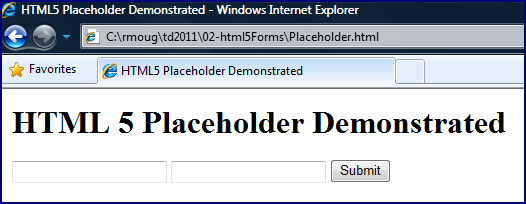
When the simple page whose code is shown above is first loaded in the web browser, it appears respectively as shown in the following screen snapshots for Google Chrome 7.0, Firefox 3.6, Microsoft Internet Explorer 8.0, and Apple Safari 5.0.3 (the same versions used for all screen snapshots in this post).

Chrome 7.0

Firefox 3.6

Internet Explorer 8.0

Safari 5.0

As depicted in the screen snapshots above, the placeholder text appears to work properly for Chrome 7.0 and Safari 5.0, but is not yet supported in Firefox 3.6 or MSIE 8.  For the two in which placeholder support obviously works on initial page load, I now show screen snapshots of how they behave when focus is placed on the "First Name" field.

Chrome 7.0

Safari 5.0

As the two screen snapshots just displayed indicate, the browsers supporting HTML5 placeholder text for input fields, remove the placeholder text when focus is placed on the particular field, but leave the placeholder text for other fields of interest that have not already been populated.

The screen snapshots remind us that scripting support is still needed for placeholder text functionality in certain browsers. However, the ease of use for HTML5 placeholder text provides hope for reduced scripting needs in the future.