Monday, December 13, 2010

Lightweight Persistence with Java Serialization

The Java SE 6 documentation on Object Serialization states the following about the uses of Java serialization:
Serialization is used for lightweight persistence and for communication via sockets or Java Remote Method Invocation (Java RMI).
The latter uses of Java serialization, for transmission of object data via sockets of RMI, are common everyday uses of Java serialization. However, I sometimes feel that the use of Java serialization for "lightweight persistence" may not be used as often as it might be.

When I first started using Java in the late mid-1990s, I used serialization quite a bit. The advent of web services and other mechanisms that are platform-independent, operating system independent, and programming language independent, coupled with the rise of XML and various sorts of databases, seemed to make it less common to apply Java serialization for persistence. However, although it might not be the first thing to come to mind any longer, Java serialization can be a compelling lightweight persistence solution in the right circumstances.

In this blog post, I look at some simple examples of lightweight persistence with Java serialization.

The first code listing is a simple example of persisting data to a serialized file using Java's standard serialization. The generated file is called dustin.out.

LightweightPersister.java
package dustin.examples;

import java.io.FileOutputStream;
import java.io.ObjectOutputStream;
import java.util.Arrays;
import java.util.List;

import static java.lang.System.out;

public class LightweightPersister
{
   public static void main(final String[] arguments)
   {
      if (arguments.length < 1)
      {
         out.println("Enter Strings separated by spaces to be serialized.");
      }

      final List<String> strings = Arrays.asList(arguments);

      // Serialize the List
      try
      {
         final FileOutputStream fo = new FileOutputStream("dustin.out");
         final ObjectOutputStream oos = new ObjectOutputStream(fo);
         oos.writeObject(strings);
         oos.flush();
         oos.close();
      }
      catch (Exception ex)
      {
         // write stack trace to standard error
         ex.printStackTrace();
      }
   }
}

The following screen image shows the use of the above code and the resultant generated serialization file.


It is not difficult to build a reader that reads this serialized file into the appropriate Java data structures. Code for doing that is shown next.

LightweightReader.java
package dustin.examples;

import java.io.FileInputStream;
import java.io.ObjectInputStream;
import java.util.Arrays;
import java.util.List;

import static java.lang.System.out;

public class LightweightReader
{
   public static void main(final String[] arguments)
   {
      List<String> strings = null;

      // Deserialize what was assumed to be written by LightweightPersister
      try
      {
         final FileInputStream fis = new FileInputStream("dustin.out");
         final ObjectInputStream ois = new ObjectInputStream(fis);  
         final Object deserializedObject = ois.readObject();
         out.println("Object Type to deserialize " + deserializedObject.getClass().getName());
         if (deserializedObject instanceof List)
         {
            strings = (List<String>) deserializedObject;
         }
         else
         {
            out.println("Not expected to deserialize " + deserializedObject.getClass().getName());
         }
         ois.close();

         if (strings != null)
         {
            out.println("The persisted Strings are: " + strings);
         }
      }
      catch (Exception ex)
      {
         // Print stack trace to standard error for simple demonstration
         ex.printStackTrace();
      }
   }
}

The simple code above will read the serialized file and this is demonstrated in the next screen snapshot.


This image and the preceding code listings demonstrate that Java serialization can be an effective method for lightweight persistence.

Serialization is not limited to standard Java SDK classes. It can also be used with custom classes. This is demonstrated in the Java SE 6 documentation Serialization Examples.  Using Serialization with a Custom Data Format is an especially useful example to consider.

Before ending this post, I cannot help but point out how Groovy makes an already easy task in Java even easier. Here are the lines of Groovy needed to read the contents of the serialized file.

def file = new File("dustin.out")
def serializedStrings = []
file.eachObject {serializedStrings << it}
println "The persisted Strings are: ${serializedStrings}"

That's it; four lines! Does it work? That is demonstrated in the next screen snapshot.


It works! Groovy makes reading the serialized file even easier than the corresponding Java code.

The serialization mechanism demonstrated in this post was easy to implement on the writer and reader sides because I used standard Java classes that are inherently Serializable and their serialization is know to be done correctly and consistently. Things can get a little trickier with custom serialization as evidenced by the fact that Josh Bloch devotes an entire chapter of Effective Java to covering serialization in five items.

Besides Effective Java's treatment on serialization, other tremendous resources on Java serialization (that are all also available online) are Java SE 6 Object Serialization (referenced multiple times in this post), 5 Things You Didn't Know About ... Java Object Serialization (first article in the excellent series and covers signing and sealing serialized data), Java Serialization Algorithm Revealed, and, of course, the Java (SE 6) Object Serialization Specification (1.4 PDF).

Java object serialization can be an effective tool for straightforward lightweight persistence when both the application/service saving the data and the applications/services reading the data are all written in Java. This mechanism can be easier than dealing with XML writing/parsing, database manipulation, or object-relational mapping for simpler and lighter persistence needs.

Java toString() Considerations

Even beginning Java developers are aware of the utility of the Object.toString() method that is available to all instances of Java classes and can be overridden to provide useful details regarding any particular instance of a Java class. Unfortunately, even seasoned Java developers occasionally don't take full advantage of this powerful Java feature for a variety of reasons. In this blog post, I look at the humble Java toString() and describe easy steps one can take to improve the utilitarianism of toString().


Explicitly Implement (Override) toString()

Perhaps the most important consideration related to achieving maximum value from toString() is to provide implementations of them. Although the root of all Java class hierarchies, Object, does provide a toString() implementation that is available to all Java classes, this method's default behavior is almost never useful. The Javadoc for Object.toString() explains what is provided by default for toString() when a custom version is not provided for a class:
The toString method for class Object returns a string consisting of the name of the class of which the object is an instance, the at-sign character `@', and the unsigned hexadecimal representation of the hash code of the object. In other words, this method returns a string equal to the value of:
getClass().getName() + '@' + Integer.toHexString(hashCode())
It is difficult to come up with a situation in which the name of the class and the hexadecimal representation of the object's hash code separated by the @ sign is useful. In almost all cases, it is significantly more useful to provide a custom, explicit toString() implementation in a class to override this default version.

The Javadoc for Object.toString() also tells us what a toString() implementation generally should entail and also makes the same recommendation I'm making here: override toString():
In general, the toString method returns a string that "textually represents" this object. The result should be a concise but informative representation that is easy for a person to read. It is recommended that all subclasses override this method.
Whenever I write a new class, there are several methods I consider adding as part of the act of new class creation. These include hashCode() and equals(Object) if appropriate. However, in my experience and in my opinion, implementing explicit toString() is always appropriate.

If the Javadoc "recommendation" that "all subclasses override this method" is not enough (then I don't presume that my recommendation is either) to justify to a Java developer the importance and value of an explicit toString() method, then I recommend reviewing Josh Bloch's Effective Java Item "Always Override toString" for additional background on the importance of implementing toString(). It is my opinion that all Java developers should own a copy of Effective Java, but fortunately the chapter with this item on toString() is available for those who don't own a copy: Methods Common to All Objects.


Maintain/Update toString()

It is frustrating to explicitly or implicitly call an object's toString() in a log statement or other diagnostic tool and have the default class name and object's hexidecimal hash code returned rather than something more useful and readable. It is almost as frustrating to have an incomplete toString() implementation that does not include significant pieces of the object's current characteristics and state. I try to be disciplined enough and generate and follow the habit of always reviewing the toString() implementation along with reviewing the equals(Object) and hashCode() implementations of any class I work on that is new to me or whenever I am adding to or changing the attributes of a class.


Just the Facts (But All/Most of Them!)

In the chapter of Effective Java previously mentioned, Bloch writes, "When practical, the toString method should return all of the interesting information contained in the object." It can be painful and tedious to add all attributes of an attribute-heavy class to its toString implementation, but the value to those trying to debug and diagnose issues related to that class will be worth the effort. I typically strive to have all significant non-null attributes of my instance in the generated String representation (and sometimes include the fact that some attributes are null). I also typically add minimal identifying text for the attributes. It's in many ways more of an art than a science, but I try to include enough text to differentiate attributes without bludgeoning future developers with too much detail. The most important thing to me is to get the attributes' values and some type of identifying key in place.


Know Thy Audience

One of the most common mistakes I've seen non-beginner Java developers make with regards to toString() is forgetting what and who the toString() is typically intended for. In general, toString() is a diagnostic and debugging tool that makes it easy to log details on a particular instance at a particular time for later debugging and diagnostics. It is typically a mistake to have user interfaces display String representations generated by toString() or to make logic decisions based on a toString() representation (in fact, making logic decisions on any String is fragile!). I have seen well-meaning developers have toString() return XML format for use in some other XML-friendly aspect of code. Another significant mistake is to force clients to parse the String returned from toString() in order to programatically access data members. It is probably better to provide a public getter/accessor method than to rely on the toString() never changing. All of these are mistakes because these approaches forget the intention of a toString() implementation. This is especially insidious if the developer removes important characteristics from the toString() method (see last item) to make it look better on a user interface.

I like toString() implementations to have all the pertinent details and to provide minimal formatting to make these details more palatable. This formatting might include judiciously selected new line characters [System.getProperty("line.seperator");] and tabs, colons, semicolons, etc. I don't invest the same amount of time as I would in a result presented to an end-user of the software, but I do try to make the formatting nice of enough to be more readable. I try to implement toString() methods that are not overly complicated or expensive to maintain, but that provide some very simple formatting. I try to treat future maintainers of my code as I would like to be treated by developers whose code I will one day maintain.

In his item on toString() implementation, Bloch states that a developer should choose whether or not to have the toString() return a specific format. If a specific format is intended, that should be documented in the Javadoc comments and Bloch further recommends that a static initializer be provided that can return the object to its instance characteristics based on a String generated by the toString(). I agree with all of this, but I believe this is more trouble than most developers are willing to go. Bloch also points out that any changes to this format in future releases will cause pain and angst for people depending on it (which is why I don't think it's a good idea to have logic depend on a toString() output). With significant discipline to write and maintain appropriate documentation, having a predefined format for a toString() might be plausible. However, it seems like trouble to me and better to simply create a new and separate method for such uses and leave the toString() unencumbered.


No Side Effects Tolerated

As important as the toString() implementation is, it is generally unacceptable (and certainly considered bad form) to have the explicit or implicit calling of toString() impact logic or lead to exceptions or logic problems. The author of a toString() method should be careful to ensure that references are checked for null before accessing them to avoid a NullPointerException. Many of the tactics I described in the post Effective Java NullPointerException Handling can be used in toString() implementation. For example, String.valueOf(Object) provides an easy mechanism for null safety on attributes of questionable origin.

It is similarly important for the toString() developer to check array sizes and other collection sizes before trying to access elements outside of that collection. In particular, it is all too easy to run into a StringIndexOutOfBoundsException when trying to manipulate String values with String.substring.

Because an object's toString() implementation can easily be invoked without the developer conscientiously realizing it, this advice to make sure it doesn't throw exceptions or perform logic (especially state-changing logic) is especially important. The last thing anyone wants is to have the act of logging an instance's current state lead to an exception or change in state and behavior. A toString() implementation should effectively be a read-only operation in which object state is read to generate a String for return. If any attributes are changed in the process, bad things are likely to happen at unpredictable times.

It is my position that a toString() implementation should only include state in the generated String that is accessible in the same process space at the time of its generation. To me, it's not defensible to have a toString() implementation access remote services to build up an instance's String. Perhaps a little less obvious is that an instance should not populate data attributes because toString() was called. The toString() implementation should only report on how things are in the current instance and not on how they might be or will be in the future if certain different scenarios occur or if things are loaded. To be effective in debugging and diagnostics, the toString() needs to show how conditions are and not how they could be.


Simple Formatting Is Sincerely Appreciated

As described above, judicious use of line separators and tabs can be useful in making lengthy and complex instances more palatable when generated in String format. There are other "tricks" that can make things nicer. Not only does String.valueOf(Object) provide some null protection, but it also presents null as the String "null" (which is often the preferred representation of null in a toString()-generated String. Arrays.toString(Object) is useful for easily representing arrays as Strings (see my post Stringifying Java Arrays for additional details).


Include Class Name in toString Representation

As described above, the default implementation of toString() provides the class name as part of the instance's representation. When we explicitly override this, we potentially lose this class name. This is not a big deal typically if logging an instance's string because the logging framework will include class name. However, I prefer to be on the safe side and always have the class name available. I don't care about keeping the hexadecimal hash code representation from the default toString(), but class name can be useful. A good example of this is Throwable.toString(). I prefer to use that method rather than getMessage or getLocalizedMessage because the former (toString()) does include the Throwable's class name while the latter two methods don't.


toString() Alternatives

We don't currently have this (at least not a standard approach), but there has been talk of an Objects class in Java that would go a long toward safely and usefully preparing String representations of various objects, data structures, and collections. I have not heard of any recent progress in JDK7 on this class. A standard class in the JDK that provided String representation of objects even when the objects' class definitions did not provide an explicit toString() would be helpful.

The Apache Commons ToStringBuilder may be the most popular solution for building safe toString() implementations with some basic formatting controls. I have blogged on ToStringBuilder previously and there are numerous other online resources regarding use of ToStringBuilder.

Glen McCluskey's Java Technology Tech Tip "Writing toString Methods" provides additional details about how to write a good toString() method. In one of the reader comments, Giovanni Pelosi states a preference for delegating production of a string representation of an instance within inheritance hierarchies from the toString() to a delegate class built for that purpose.


Conclusion

I think most Java developers acknowledge the value of good toString() implementations. Unfortunately, these implementations are not always as good or useful as they could be. In this post I have attempted to outline some considerations for improving toString() implementations. Although a toString() method won't (or at least shouldn't) impact logic like an equals(Object) or hashCode() method can, it can improve debugging and diagnostic efficiency. Less time spent figuring out what the object's state is means more time fixing the problem, moving onto more interesting challenges, and satisfying more client needs.

Wednesday, December 1, 2010

HTML5 Form Placeholder Text

When developing web applications, my preference is to use HTML tags rather than JavaScript solutions whenever possible. HTML tags tend to be cleaner and simpler and will often work whether JavaScript is enabled or not in the user's browser. Because of this preference for HTML over JavaScript, I really like HTML5's new form support that provides standard HTML tag support for many behaviors that formerly required JavaScript. In this blog post, I look at HTML5's support for placeholder text support in form input elements.

Before HTML5, JavaScript was the typical approach for placing placeholder text in input fields on an HTML form. With HTML5, this scripting is only needed to support pre-HTML5 browsers. The following simple HTML snippet shows how easy it is to apply placeholder text to input fields in HTML5.

Placeholder.html
<html lang="en">
<head>
  <meta charset="utf-8" />
  <title>HTML5 Placeholder Demonstrated</title>
</head>
<body>
<header>
  <h1>HTML 5 Placeholder Demonstrated</h1>
</header>
<form>
  <input name="firstName" placeholder="First Name">
  <input name="lastName" placeholder="Last Name">
  <input type="submit" value="Submit">
</form>
</body>
</html>

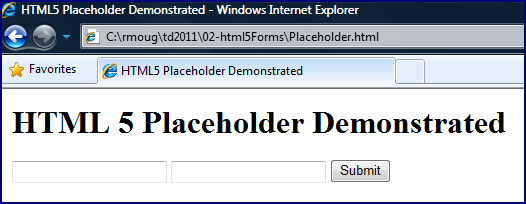
When the simple page whose code is shown above is first loaded in the web browser, it appears respectively as shown in the following screen snapshots for Google Chrome 7.0, Firefox 3.6, Microsoft Internet Explorer 8.0, and Apple Safari 5.0.3 (the same versions used for all screen snapshots in this post).

Chrome 7.0

Firefox 3.6

Internet Explorer 8.0

Safari 5.0

As depicted in the screen snapshots above, the placeholder text appears to work properly for Chrome 7.0 and Safari 5.0, but is not yet supported in Firefox 3.6 or MSIE 8.  For the two in which placeholder support obviously works on initial page load, I now show screen snapshots of how they behave when focus is placed on the "First Name" field.

Chrome 7.0

Safari 5.0

As the two screen snapshots just displayed indicate, the browsers supporting HTML5 placeholder text for input fields, remove the placeholder text when focus is placed on the particular field, but leave the placeholder text for other fields of interest that have not already been populated.

The screen snapshots remind us that scripting support is still needed for placeholder text functionality in certain browsers. However, the ease of use for HTML5 placeholder text provides hope for reduced scripting needs in the future.

Tuesday, November 30, 2010

Stringifying Java Arrays

J2SE 5 provided significant new language features that made Java significantly easier to use and more expressive than it had ever been. Although "big" new J2SE 5 features such as enums, generics, and annotations, there was a plethora of new APIs and methods that have made our lives easier ever since. In this post, I briefly look at two of my favorites when dealing with Java arrays: the Arrays.toString(Object[]) method and the Arrays.deepToString(Object[]) method.

The Arrays class has been around since JDK 1.2, but the methods for conveniently and simply converting arrays to a readable String including relevant array content without using Arrays.asList() were added with J2SE 5. Both Arrays.toString(Object[]) and Arrays.deepToString(Object[]) are static methods that act upon the arrays provided to them. The former, Arrays.toString(Object[]), is intended for single-dimension arrays while the latter, Arrays.deepToString(Object[]), is intended for multi-dimensional arrays. As my example later in this post will demonstrate, the multi-dimension deepToString will produce expected results even for single-dimension arrays. The two methods also provide easy and safe null handling, something that I appreciate.

The next code listing is for a simple demonstration class that demonstrates trying to put the contents of various types of Java arrays into a String format. The types of arrays demonstrated are a single dimension array, a double dimensional array representing multi-dimensional arrays of various sizes, and an array that is really just null. The three methods demonstrated for getting a String out of these three types of arrays are (1) simple Object.toString() on each array (implicitly in case of null array to avoid the dreaded NullPointerException), (2) Arrays.toString(Object[]), and (3) Arrays.deepToString(Object[]).

ArrayStrings.java
package dustin.examples;

import java.util.Arrays;
import static java.lang.System.out;

/**
 * Simple demonstration of Arrays.toString(Object[]) method and the
 * Arrays.deepToString(Object[]) method.
 */
public class ArrayStrings
{
   /**
    * Demonstrate usage and behavior of Arrays.toString(Object[]).
    */
   private static void demonstrateArraysToString()
   {
      printHeader("Arrays.toString(Object[])");
      out.println(
           "Single Dimension Arrays.toString: "
         + Arrays.toString(prepareSingleDimensionArray()));
      out.println(
           "Double Dimension Arrays.toString: "
         + Arrays.toString(prepareDoubleDimensionArray()));
      out.println(
           "Null Array Arrays.toString: "
         + Arrays.toString(prepareNullArray()));
   }

   /**
    * Demonstrate usage and behavior of Arrays.deepToString(Object[]).
    */
   private static void demonstrateArraysDeepToString()
   {
      printHeader("Arrays.deepToString(Object[])");
      out.println(
           "Single Dimension Arrays.deepToString: "
         + Arrays.deepToString(prepareSingleDimensionArray()));
      out.println(
           "Double Dimension Arrays.deepToString: "
         + Arrays.deepToString(prepareDoubleDimensionArray()));
      out.println(
           "Null Array Arrays.deepToString: "
         + Arrays.deepToString(prepareNullArray()));
   }

   /**
    * Demonstrate attempting to get String version of array with simple toString()
    * call (not using Arrays class).
    */
   private static void demonstrateDirectArrayString()
   {
      printHeader("Object[].toString() [implicit or explicit]");
      out.println("Single Dimension toString(): " + prepareSingleDimensionArray().toString());
      out.println("Double Dimension toString(): " + prepareDoubleDimensionArray());
      out.println("Null Array toString(): " + prepareNullArray());
   }

   /**
    * Prepare a single-dimensional array to be used in demonstrations.
    *
    * @return Single-dimensional array.
    */
   private static Object[] prepareSingleDimensionArray()
   {
      final String[] names = {"Aaron", "Bianca", "Charles", "Denise", "Elmer"};
      return names;
   }

   /**
    * Prepare a double-dimension array to be used in demonstrations.
    *
    * @return Double-dimensional array.
    */
   private static Object[] prepareDoubleDimensionArray()
   {
      final Object[][] namesAndAges = {
         {"Aaron", 10}, {"Bianca", 25}, {"Charles", 32}, {"Denise", 29}, {"Elmer", 67}};
      return namesAndAges;
   }

   /**
    * Prepare a null array.
    *
    * @return Array that is really null.
    */
   private static Object[] prepareNullArray()
   {
      return null;
   }

   /**
    * Print simple header to standard output with provided header string.
    *
    * @param headerString Text to be included in simple header.
    */
   public static void printHeader(final String headerString)
   {
      out.println(
         "\n===================================================================");
      out.println("== " + headerString);
      out.println(
         "===================================================================");
   }

   /**
    * Main executable function for demonstrating Arrays.toString(Object[]) and
    * Arrays.deepToString(Object[]) methods.
    */
   public static void main(final String[] arguments)
   {
      demonstrateDirectArrayString();
      demonstrateArraysToString();
      demonstrateArraysDeepToString();
   }
}

The above code exercises the three mentioned approaches for getting a String out of an array on the three different types of arrays: single dimension, multi dimension, and null array. The output from running this code demonstrates the utility of the different approaches. That output is shown next.

===================================================================
== Object[].toString() [implicit or explicit]
===================================================================
Single Dimension toString(): [Ljava.lang.String;@3e25a5
Double Dimension toString(): [[Ljava.lang.Object;@19821f
Null Array toString(): null

===================================================================
== Arrays.toString(Object[])
===================================================================
Single Dimension Arrays.toString: [Aaron, Bianca, Charles, Denise, Elmer]
Double Dimension Arrays.toString: [[Ljava.lang.Object;@addbf1, [Ljava.lang.Object;@42e816, [Ljava.lang.Object;@9304b1, [Ljava.lang.Object;@190d11, [Ljava.lang.Object;@a90653]
Null Array Arrays.toString: null

===================================================================
== Arrays.deepToString(Object[])
===================================================================
Single Dimension Arrays.deepToString: [Aaron, Bianca, Charles, Denise, Elmer]
Double Dimension Arrays.deepToString: [[Aaron, 10], [Bianca, 25], [Charles, 32], [Denise, 29], [Elmer, 67]]
Null Array Arrays.deepToString: null

The code above and its corresponding output lead to several observations:
  1. Simple Object.toString() on arrays is seldom what we want as it only prints the String representation of the array itself and not of its contents.
  2. Arrays.toString(Object[]) will print a String representation for multi-dimensional arrays, but this representation suffers the same drawbacks as Object.toString() after the first dimension. The first dimension (and only dimension for a single dimension array) gets put into an expected String, but deeper dimensions have the same Object.toString() treatment.
  3. Arrays.deepToString(Object[]), while intended for multi-dimensional arrays, produces the expected results for both single and multi-dimensional arrays.
  4. Both Arrays.toString(Object[]) and Arrays.deepToString(Object[]) handle null array gracefully, simply returning a String "null".
I tend to use Java Collections far more than I use Java arrays. However, when I do need to work with arrays, it is nice to have the many useful features of the java.util.Arrays class. As this post has demonstrated, Arrays.toString(Object[]) and Arrays.deepToString(Object[]) are particularly valuable in obtaining a useful String representation of an array's contents. The java.util.Arrays class provides similar "deep" methods for performing equals and hashCode functionality on multi-dimensional arrays: Arrays.deepEquals and Arrays.deepHashCode.

Java's System.identityHashCode

The java.lang.System class provides many useful general utilities including handles to the standard output stream, the standard input stream, the standard error stream, and the console as well as methods for obtaining the current time in milliseconds, defined properties, and environmental variables. In this blog post, I briefly look at the System.identityHashCode(Object) method.

The Javadoc documentation for System.identityHashCode(Object) states:
Returns the same hash code for the given object as would be returned by the default method hashCode(), whether or not the given object's class overrides hashCode().
The System.identityHashCode(Object) method provides the hash code of the provided Object as would be returned from its ultimate Object parent regardless of whether the passed-in object overrode the hashCode method.  This is demonstrated by the following simple class, the source code of which is followed by sample output.

Main.java
package dustin.examples;

import static java.lang.System.out;

public class Main
{
   private static final String NEW_LINE = System.getProperty("line.separator");

   /**
    * Print the overridden and identity hash codes of the provided object.
    *
    * @param object Object whose overridden and identity hash codes are to be
    *    printed to standard output.
    */
   public static void printHashCodes(final Object object)
   {
      out.println(
           NEW_LINE + "====== "
         + String.valueOf(object) + "/"
         + (object != null ? object.getClass().getName() : "null")
         + " ======");
      out.println(
           "Overridden hashCode: "
         + (object != null ? object.hashCode() : "N/A"));
      out.println("Identity   hashCode: " + System.identityHashCode(object));
   }

   /**
    * Main executable function.
    *
    * @param arguments Command-line arguments; none expected.
    */
   public static void main(final String[] arguments)
   {
      final Integer int1 = 1;
      final int int2 = 1;
      final Long long1 = 1L;
      final long long2 = 1L;
      final String str = "SomeString";
      final String nullStr = null;
      final SimpleData simpleData = new SimpleData("AnotherString");

      printHashCodes(int1);
      printHashCodes(int2);
      printHashCodes(long1);
      printHashCodes(long2);
      printHashCodes(str);
      printHashCodes(nullStr);
      printHashCodes(simpleData);
   }
}


Output from Main.java
====== 1/java.lang.Integer ======
Overridden hashCode: 1
Identity   hashCode: 4072869

====== 1/java.lang.Integer ======
Overridden hashCode: 1
Identity   hashCode: 4072869

====== 1/java.lang.Long ======
Overridden hashCode: 1
Identity   hashCode: 1671711

====== 1/java.lang.Long ======
Overridden hashCode: 1
Identity   hashCode: 1671711

====== SomeString/java.lang.String ======
Overridden hashCode: 728471109
Identity   hashCode: 11394033

====== null/null ======
Overridden hashCode: N/A
Identity   hashCode: 0

====== AnotherString/dustin.examples.SimpleData ======
Overridden hashCode: 1641745
Identity   hashCode: 1641745


The example code and its corresponding output indicate that the identity hash code returned by System.identityHashCode(Object) can be different than the object's hash code defined by an overridden version of the hashCode() method. It's also worth noting that if a class does not override hashCode(), then its own hash code will obviously match that provided by Object. In the example above, the SimpleData class (not shown here) does not have a hashCode implementation, so its own hashCode IS the Object-provided hashCode (identity hash code). Another observation that can be made based on the above example is that System.identityHashCode(Object) returns zero when null is passed to it.

Bug 6321873 explains that the hash code returned by System.identityHashCode(Object) is not guaranteed to be unique (it's a hash code after all). That being stated, there are situations in which the hash code returned by System.identityHashCode(Object) is "unique enough" for the problem at hand. For example, Brian Goetz et al. demonstrate use of this to prevent deadlocks in Java Concurrency in Practice.

There are numerous online resources providing greater detail regarding this method. Erik Engbrecht describes how the identity hash code is calculated in his post System.identityHashCode (a topic further discussed in the StackOverflow thread "How does the JVM ensure that System.identityHashCode() will never change?"). Rosarin Roy provides a brief overview of the method in the post System.identityHashCode() - What Is It?

In this blog post, I have looked at a common method that I only use rarely, but which is worth noting for its occasional use. The System.identityHashCode(Object) method is an easy way to obtain the hash code that would have been provided for a particular object if that object's class did not override the hashCode() implementation. The Javadoc documentation for Object.hashCode() tells us that this identity hash code is often, but is not required to be, the memory address of the object converted to an integer.

Tuesday, November 16, 2010

Java 7 and Java 8 JSRs Released!

There has been a lot of big news in the Java world as of late. The recent announcements that IBM is backing OpenJDK and Apple is backing OpenJDK were huge in and of themselves. Today there was more big news with the announcement that Java Specification Requests (JSRs) have been released for Java SE 7, Java SE 8, and related new Java features. The release of these JSRs is the realization of the now famous Plan B announced prior to JavaOne 2010 and then further detailed at JavaOne.

The newly released JSRs (referred to as a JSR Quartet in Mark Reinhold's blog) are JSR 334 ("Small Enhancements to the Java Programming Language") [Project Coin], JSR 335 ("Lambda Expressions for the Java Programming Language") ["informally, closures"], JSR 336 ("Java SE 7 Release Contents"), and JSR 337 ("Java SE 8 Release Contents").

Joseph D. Darcy has provided additional details on the release of JSR 334 (Project Coin) in his blog post Project Coin: JSR Filed! and pelegri likens this quartet of JSRs to the famous quartet known as The Beatles (available on iTunes today). Alex Miller, who has maintained perhaps the most exhaustive collection of what is in and out, back in, and then back out, and then back in, for Java 7, has posted his analysis of the Java 7/Java 8 JSRs.

The release of these four new JSRs indicate that the plans announced for Java prior to and at JavaOne 2010 are moving forward. Coupled with the announced IBM and Apple support of OpenJDK, the future of Java seems very promising.

Saturday, November 13, 2010

Apple and Oracle Are Behind OpenJDK!

I received the November 2010 edition of Oracle's Java Developer Newsletter in my e-mail inbox last night. The lead story is titled IBM Joins OpenJDK (a subject of my previous post IBM and Oracle Are Behind OpenJDK!). On the same day, it was also announced that Apple is joining the OpenJDK effort as well! Henrik Ståhl supplies additional details and answers to likely questions in his post Oracle and Apple Announce OpenJDK Project for OSX. The numerous comments on Henrik's post demonstrate how well this is being received in the Java development community.

Besides the obvious advantage of having power players like Oracle, IBM, and Apple behind OpenJDK, there are other interesting observations to be had here. For one, there had been lots of wailing, gnashing of teeth and complaining about Oracle's heavy-handedness. Similarly, there had been complaints about Apple and its policies and a desire for Apple to provide its OSX implementation as open source. In the end, this happily turns out to be unnecessary angst. Henrik discusses this in his post:
This announcement is the result of a discussion between Oracle and Apple that has been going on for some time. I understand that the uncertainty since Apple's widely circulated "deprecation" of Java has been frustrating, but due to the nature of these things we have neither wanted to or been able to communicate before. That is as it is, I'm afraid.
 I think it's obvious why many of us had concerns about this, but I'm glad that in the end Oracle and Apple were doing what's best for Java.

Another interesting observation or question is what will Google do because or about this? Will Google join the OpenJDK to use in conjunction with Android?

The announcement about Apple joining OpenJDK is huge and positive news for Java developers. I also wonder if some of the many people who talk about Sun as if they could do no wrong and Oracle as if they can do no right will acknowledge that Oracle appears to be doing something with OpenJDK that Sun failed to do: bringing the biggest players in Java together behind a common open source implementation of Java.