Thursday, October 15, 2015

Better Performing Non-Logging Logger Calls in Log4j2

Using logging guards is a common practice when using Log4j 1.x and wanting to avoid the additional performance impact that can occur on some occasions even if the message is not actually logged. One of the most attractive features that Simple Logging Facade for Java (SLF4J) brought to Java logging was the ability to reduce the number of circumstances in which these log level checks are necessary. In this post, I look at how one can use Log4j 2.x's logging API changes to achieve a similar benefit.

The next code listing demonstrates logging long-running operations. The first example implicitly calls to toString() method on an instance whose name is "slow". The second logging example invokes a method that is long-running.

Traditional, Unguarded Logging

// Will implicitly invoke slow's toString() method
logger.debug("NORMAL: " + slow);
// Will explicitly invoke the long-running method expensiveOperation()
logger.debug(expensiveOperation());

In the previous example, both logging operations will take a long time even when no logging is actually performed. The logging statements in the previous code listing will only actually log when the logging level is DEBUG or a less specific log level such as TRACE, but their expensive operations will be run even when nothing is logged.

There are two ways to deal with this in Log4j 1.x. One approach, and often the best approach, is to try to re-write the log statement so that no long-running operations are involved. When that is impractical (such as when one needs the context associated with the long-running operation for the log message to be useful), logging guards can be used. This approach that works in Log4j 1.x is demonstrated next.

Traditional, Guarded Logging

if (logger.isDebugEnabled())
{
   logger.debug("GUARDED: " + slow);
   logger.debug(expensiveOperation());
}

Logging guards, as shown in the previous code listing, are effective in preventing long-running operations from being called even when no message would have been logged anyway. However, using logging guards does introduce some disadvantages. Perhaps the most significant disadvantage is the extra (some would say bloated) code that is introduced. Another potential disadvantage is much less common, but much more serious: with the extra scope introduced by the conditional and associated block, it's more susceptible to errant code being introduced in the conditional that could potentially even introduce side effects in a logging-level-dependent block of code.

One of the most common situations in which log calls that do not actually log anything but significantly impact performance is when an object's toString() method is explicitly or implicitly called when an object is passed to the logger call or concatenated with a string passed to the logger call. This situation was demonstrated in the two above code listings with the string passed to the logger call by concatenating the string literal "GUARDED: " to the implicitly invoked toString() method of the variable named "slow".

SLF4J has popularized the concept of parameterized logging calls and Log4j 2 provides similar support in its logging API. The code that follows demonstrates how this is used.

Parameterized Logging

logger.debug("PARAMETERIZED: {}", slow);
logger.debug("{}", expensiveOperation());

When the parameterized logging example above is executed with a log level more specific than DEBUG, the implicit toString() on the "slow" variable will not be attempted thanks to the parameterized logging. However, parameterized logging cannot help the other logging situation as the method expensiveOperation() will be invoked despite the parameterized logging. Note also that while parameterized logging helps in the case of implicit toString() calls, it does not help with explicit toString() calls. Even if the logging level is more specific than DEBUG, a call to slow.toString() in a logger statement would still incur a performance hit.

Log4j 2.4 introduces a Lambda-based mechanism that can be used to defer invocation of methods passed to a logger call such that they don't need to be executed at all if the statement is being logged at a level less specific than the current log level. This is demonstrated in the next code listing where the toString() method is explicitly called on the "slow" variable's object via lambda expression and the expensiveOperation method is invoked via method reference.

Lambda Expression Logging

logger.debug("LAMBDA: ", () -> slow.toString());
logger.debug("{}", this::expensiveOperation);

When the above code is executed with a log level set to a level more specific than DEBUG, neither the "slow" object's toString() method nor the expensiveOperation method will be invoked thanks to the lambda expression based lazy loading. In other words, similar to how the example worked with guards, the use of lambda expressions prevents unnecessary execution of potentially long-running methods unless their results are really going to be logged. This lambda expression support was added to Log4j with version 2.4 and, of course, requires Java 8.

Summary

Log4j 2 (2.4) provides multiple approaches for avoiding the performance impact of log statements when the messages aren't actually logged.

  1. Log statements can be re-written such that expensive methods (including expensive toString() calls) are not logged at all.
  2. Logging guards can be used to ensure that a log statement's long-running methods invocations are only executed if the message is to actually be logged.
  3. Log4j 2's parameterized (formatted) logger API can be used to eliminate the invocation of implicit toString() methods unless the message is really being logged.
  4. Log4j 2.4's lambda expression logger API can be used to to eliminate the invocation of any operations (implicit or explicit) needed for the logged message unless the message is really being logged.

Thursday, October 8, 2015

Easy and Consistent Log4j2 Logger Naming

In the post Portable Logger Names with Java 7 Method Handles, I wrote about using Java 7's method handles to name classes' loggers. I stated in that post that advantages of that approach included consistency in logger naming and avoiding accidental copying and pasting of code that might lead to a different class's name being used for the logger name. In this post, I look at how Log4j 2 provides an approach for achieving these same benefits.

Log4j 2 recognizes the prevalent approach to naming loggers based off of classes' names. The "Logger Names" section of the "Log4j 2 API" page in the Log4j 2 Manual states, "In most cases, applications name their loggers by passing the current class's name to LogManager.getLogger. Because this usage is so common, Log4j 2 provides that as the default when the logger name parameter is either omitted or is null."

The following very simple Calculator class demonstrates this, creating a Logger with a parameter-less LogManager.getLogger() call. Because no parameter is passed to the getLogger() method, the logger will be named after the class in which the Logger is created. The Javadoc comment for method LogManager.getLogger() confirms this behavior: "Returns a Logger with the name of the calling class."

Calculator.java

package dustin.examples.log4j;

import org.apache.logging.log4j.LogManager;
import org.apache.logging.log4j.Logger;

import java.util.Arrays;


/**
 * Simple calculator class that is intended more for demonstration
 * of Log4j2 than for calculating anything.
 */
public class Calculator
{
   private static final Logger logger = LogManager.getLogger();

   public String getLoggerName()
   {
      return logger.getName();
   }

   /**
    * Add the provided operands together and provide their sum.
    *
    * @param operands Operands to be added together.
    * @return Sum of the provided operands.
    */
   public long add(final long ... operands)
   {
      long sum = 0;
      for (final long operand : operands)
      {
         sum += operand;
      }
      logger.debug("The sum of " + Arrays.toString(operands) + " is " + sum);
      return sum;
   }
}

With the Calculator class implemented as shown above, the class's logger's name, available by call to Logger.getName() as demonstrated in the Calculator method getLoggerName(), is "dustin.examples.log4j.Calculator". Although not shown here, a Logger retrieved with parameter-less LogManager.getFormatterLogger() will also use "the fully qualified name of the calling Class as the Logger name."

Conclusion

The Log4j 2 approach discussed and demonstrated in this post for naming loggers is easy to use and makes it easy to have consistent and correct logger names, assuming that the chosen logger naming scheme is to use the fully qualified package and class name. This approach is briefer and arguably even more readable than the method handles approach to naming loggers, but this approach is specific to Log4j 2 while the method handles approach can be used with multiple logging frameworks and libraries.

Tuesday, October 6, 2015

Single Quotes in Oracle Database Index Column Specification

In my previous post, I mentioned that a downside of using double quotes to explicitly specify case in Oracle identifiers is the potential for being confused with the use of single quotes for string literals. Although I don't personally think this is sufficient reason to avoid use of double quotes for identifiers in Oracle, it is worth being aware of this potential confusion. When to use single quotes versus when to use double quotes has been a source of confusion for users new to databases that distinguish between the two for some time. In this post, I look at an example of how accidental misuse of single quote where no quote is more appropriate can lead to the creation of an unnecessary index.

The SQL in the simple script createPersonTable.sql generates a table called PEOPLE and an index will be implicitly created for this table's primary key ID column. However, the script also contains an explicit index creation statement that, at first sight, might appear to also create an index on this primary key column.

createPersonTable.sql
CREATE TABLE people
(
   id number PRIMARY KEY,
   last_name varchar2(100),
   first_name varchar2(100)
);

CREATE INDEX people_pk_index ON people('id');

We might expect the statement that appears to explicitly create the primary key column index to fail because that column is already indexed. As the output below shows, it does not fail.

When a query is run against the indexes, it becomes apparent why the explicit index creation did not fail. It did not fail because it was not creating another index on the same column. The single quotes around what appears to be the "id" column name actually make that 'id' a string literal rather than a column name and the index that is created is a function-based index rather than a column index. This is shown in the query contained in the next screen snapshot.

The index with name PEOPLE_PK_INDEX was the one explicitly created in the script and is a function-based index. The implicitly created primary key column index has a system-generated name. In this example, the function-based index is a useless index that provides no value.

It's interesting to see what happens when I attempt to explicitly create the index on the column by using double quotes with "id" and "ID". The first, "id", fails ("invalid identifier") because Oracle case folds the name 'id' in the table creation to uppercase 'ID' implicitly. The second, "ID", fails ("such column list already indexed") because, in this attempt, I finally am trying to create an index on the same column for which an index was already implicitly created.

In my original example, the passing of a literal string as the "column" to the index creation statement resulted in it being created as a useless function-based index. It could have been worse if my intended primary key column index hadn't already been implicitly created because then I might not have the index I thought I had. This, of course, could happen when creating an index for a column or list of columns that won't have indexes created for them implicitly. There is no error message to warn us that the single-quoted string is being treated as a string literal rather than as a column name.

Conclusion

The general rule of thumb to remember when working with quotation marks in Oracle database is that double quotes are for identifiers (such as column names and table names) and single quotes are for string literals. As this post has demonstrated, there are times when one may be misused in place of the other and lead to unexpected results without necessarily displaying an error message.

Monday, October 5, 2015

Downsides of Mixed Identifiers When Porting Between Oracle and PostgreSQL Databases

Both the Oracle database and the PostgreSQL database use the presence or absence of double quotes to indicate case sensitive or case insensitive identifiers. Each of these databases allows identifiers to be named without quotes (generally case insensitive) or with double quotes (case sensitive). This blog post discusses some of the potential negative consequences of mixing quoted (or delimited) identifiers and case-insenstive identifiers in an Oracle or PostgreSQL database and then trying to port SQL to the other database.

Advantages of Case-Sensitive Quoted/Delimiter Identifiers

There are multiple advantages of case sensitive identifiers. Some of the advertised (real and perceived) benefits of case sensitive database identifiers include:

  • Ability to use reserved words, key words, and special symbols not available to identifiers without quotes.
    • PostgreSQL's keywords:
      • reserved ("only real key words" that "are never allowed as identifiers")
      • unreserved ("special meaning in particular contexts," but "can be used as identifiers in other contexts").
      • "Quoted identifiers can contain any character, except the character with code zero. (To include a double quote, write two double quotes.) This allows constructing table or column names that would otherwise not be possible, such as ones containing spaces or ampersands."
    • Oracle reserved words and keywords:
      • Oracle SQL Reserved Words that can only be used as "quoted identifiers, although this is not recommended."
      • Oracle SQL Keywords "are not reserved," but using these keywords as names can lead to "SQL statements [that] may be more difficult to read and may lead to unpredictable results."
      • "Nonquoted identifiers must begin with an alphabetic character from your database character set. Quoted identifiers can begin with any character."
      • "Quoted identifiers can contain any characters and punctuations marks as well as spaces."
  • Ability to use the same characters for two different identifiers with case being the differentiation feature.
  • Avoid dependency on a database's implementation's case assumptions and provide "one universal version."
  • Explicit case specification avoids issues with case assumptions that might be changeable in some databases such as SQL Server.
  • Consistency with most programming languages and operating systems' file systems.
  • Specified in SQL specification and explicitly spells out case of identifiers rather than relying on specific implementation details (case folding) of particular database.
  • Additional protection in cases where external users are allowed to specify SQL that is to be interpreted as identifiers.

Advantages of Case-Insensitive Identifiers

There are also advantages associated with use of case-insensitive identifiers. It can be argued that case-insensitive identifiers are the "default" in Oracle database and PostgreSQL database because one must use quotes to specify when this default case-insensitivity is not the case.

  • Case-insensitivity is the "default" in Oracle and PostgreSQL databases.
  • The best case for readability can be used in any particular context. For example, allows DML and DDL statements to be written to a particular coding convention and then be automatically mapped to the appropriate case folding for various databases.
  • Avoids errors introduced by developers who are unaware of or unwilling to follow case conventions.
  • Double quotes (" ") are very different from single quotes (' ') in at least some contexts in both the Oracle and PostgreSQL databases and not using case-sensitive identifier double quotes eliminates need to remember the difference or worry about the next developer not remembering the difference.
  • Many of the above listed "advantages" may not really be good practices:
    • Using reserved words and keywords as identifiers is probably not good for readability anyway.
    • Using symbols allowed in quoted identifiers that are not allowed in unquoted identifiers may not be necessary or even desirable.
    • Having two different variables of the same name with just different characters cases is probably not a good idea.

Default Case-Insensitive or Quoted Case-Sensitive Identifiers?

In Don’t use double quotes in PostgreSQL, Reuven Lerner makes a case for using PostgreSQL's "default" (no double quotes) case-insensitive identifiers. Lerner also points out that pgAdmin implicitly creates double-quoted case-sensitive identifiers. From an Oracle DBA perspective, @MBigglesworth79 calls quoted identifiers in Oracle an Oracle Gotcha and concludes, "My personal recommendation would be against the use of quoted identifiers as they appear to cause more problems and confusion than they are worth."

A key trade-off to be considered when debating quoted case-sensitive identifiers versus default case-insensitive identifiers is one of being able to (but also required to) explicitly specify identifiers' case versus not being able to (but not having to) specify case of characters used in the identifiers.

Choose One or the Other: Don't Mix Them!

It has been my experience that the worst choice one can make when designing database constructs is to mix case-sensitive and case-insensitive identifiers. Mixing of these make it difficult for developers to know when case matters and when it doesn't, but developers must be aware of the differences in order to use them appropriately. Mixing identifiers with implicit case and explicit case definitely violates the Principle of Least Surprise and will almost certainly result in a frustrating runtime bug.

Another factor to consider in this discussion is case folding choices implemented in Oracle database and PostgreSQL database. This case folding can cause unintentional consequences, especially when porting between two databases with different case folding assumptions. The PostgreSQL database folds to lowercase characters (non-standard) while the Oracle database folds to uppercase characters. This significance of this difference is exemplified in one of the first PostgreSQL Wiki "Oracle Compatibility Tasks": "Quoted identifiers, upper vs. lower case folding." Indeed, while I have found PostgreSQL to be heavily focused on being standards-compliant, this case folding behavior is one place that is very non-standard and cannot be easily changed.

About the only "safe" strategy to mix case-sensitive and case-insensitive identifiers in the same database is to know that particular database's default case folding strategy and to name even explicitly named (double quoted) identifiers with exactly the same case as the database will case fold non-quoted identifiers. For example, in PostgreSQL, one could name all identifiers in quotes with completely lowercase characters because PostgreSQL will default unquoted identifiers to all lowercase characters. However, when using Oracle, the opposite approach would be needed: all quoted identifiers should be all uppercase to allow case-sensitive and case-insensitive identifiers to be intermixed. Problems will arise, of course, when one attempts to port from one of these databases to the other because the assumption of lowercase or uppercase changes. The better approach, then, for database portability between Oracle and PostgreSQL databases is to commit either to using quoted case-sensitive identifiers everywhere (they are then explicitly named the same for both databases) or to use default case-insensitive identifiers everywhere (and each database will appropriately case fold appropriately in its own approach).

Conclusion

There are advantages to both identifiers with implicit case (case insensitive) and to identifiers with explicit (quoted and case sensitive) case in both Oracle database and PostgreSQL database with room for personal preferences and tastes to influence any decision on which approach to use. Although I prefer (at least at the time of this writing) to use the implicit (default) case-insensitive approach, I would rather use the explicitly spelled-out (with double quotes) identifier cases in all cases than mix the approach and use explicit case specification for identifiers in some cases and implicit specification of case of identifiers in other cases. Mixing the approaches makes it difficult to know which is being used in each table and column in the database and makes it more difficult to port the SQL code between databases such as PostgreSQL and Oracle that make different assumptions regarding case folding.

Additional Reading

Tuesday, September 15, 2015

JDK 9: Highlights from The State of the Module System

Mark Reinhold's The State of the Module System (SOMS) was published earlier this month and provides an information-packed readable "informal overview of enhancements to the Java SE Platform prototyped in Project Jigsaw and proposed as the starting point for JSR 376." In this post, I summarize and highlight some of concepts and terms I found interesting while reading the document.

  • The State of the Module System states that a subset of the features discussed in the document will be used regularly by Java developers. These features and concepts are "module declarations, modular JAR files, module graphs, module paths, and unnamed modules."
  • A module is a "fundamental new kind of Java program component" that is "a named, self-describing collection of code and data."
  • "A module declares which other modules it requires in order to be compiled and run."
  • "A module declares which ... packages it exports" to other modules.
  • A module declaration is "a new construct of the Java programming language" that provides "a module’s self-description."
    • Convention is to place "source code for a module declaration" in a "file named module-info.java at the root of the module’s source-file hierarchy."
    • This module-info.java file specification of requires and exports is analogous to how OSGi uses the JAR MANIFEST.MF file to specify Import-Package and Export-Package.
  • "Module names, like package names, must not conflict."
  • "A module’s declaration does not include a version string, nor constraints upon the version strings of the modules upon which it depends."
  • "A modular JAR file is like an ordinary JAR file in all possible ways, except that it also includes a module-info.class file in its root directory."
  • "Modular JAR files allow the maintainer of a library to ship a single artifact that will work both as a module, on Java 9 and later, and as a regular JAR file on the class path, on all releases."
  • "The base module defines and exports all of the platform’s core packages," "is named java.base," is "the only module known specifically to the module system," "is always present," is depended upon by all other modules, and depends on no other modules.
  • All "platform modules" begin with the "java." prefix and "are likely to include "java.sql for database connectivity, java.xml for XML processing, and java.logging for logging."
  • The prefix "jdk." is applied to the names of "modules that are not defined in the Java SE 9 Platform Specification," but are "specific to the JDK."
  • Implied Readability: The keyword public can be added after the requires keyword to state that a given module's readable module can be read by dependent modules that read it. In other words, if module B references a package provided by module C as requires public, then that package is readable by module A that can read module B.
  • "The loose coupling of program components via service interfaces and service providers" is facilitated in the Java module system by use of the keywords provides ... with ... to indicate when a module provides an implementation of a service and by the use of the keyword uses to indicate when a module uses a provided service.
  • Because a given class is associated with a single module, Class::getModule() will allow access to a class's associated module.
  • "Every class loader has a unique unnamed module" from which types are loaded that are not associated with packages exposed by a module. A given class loader's unnamed module can be retrieved with new method ClassLoader::getUnnamedModule.
    • An unnamed module can read all other modules and can be read by all other modules.
    • Allows existing classpath-based applications to run in Java SE 9 (backwards compatibility).
  • "JMOD" is the "provisional" name for a "new artifact format" that "goes beyond JAR files" for holding "native code, configuration files, and other kinds of data that do not fit naturally ... into JAR files." This is currently implemented as part of the JDK and potentially could be standardized in Java SE at a later point.

The items summarized above don't include the "Advanced Topics" covered in "The State of the Module System" such as qualified exports, increasing readability, and layers. The original document is also worth reading for its more in-depth explanations, brief code listings, and illustrative graphics.

Project Jigsaw and OSGi

Project Jigsaw, like OSGi, aims for greater modularity in Java-based applications. I look forward to seeing if the built-in modularity support can provide some of the same advantages that OSGi provides while at the same time eliminating or reducing some of the disadvantages associated with OSGi. In the article Mule Drop OSGi For Being Too Complex, Jessica Thornsby has summarized some developers' thoughts regarding the perceived disadvantage of OSGi that have led Spring and Mule, among others, to stop using OSGi. The Thornsby article quotes Dmitry Sklyut, Kirk Knoerschild, and Ian Skerrett, who suggest that better tooling, better documentation (including by the community), better exposure at conferences, and more familiarity through use would help OSGi adoption and help overcome the perceived steep learning curve and complexity.

I will be curious to see if having modularity built-in to the Java platform will almost automatically bring some of the things that OSGi advocates have argued would increase OSGi's adoption. I suspect that Project Jigsaw, by being built into the platform will have better tooling support, better exposure to general Java developers, and will be more widely and generally covered in the Java developer community (blogs, conferences, books, etc.). With these advantages, I also wonder if Java 9 and Jigsaw will cause current users of OSGi to move away from OSGi or if those users will find creative ways to use the two together or will do what they can (such as use of unnamed modules) to use OSGi instead of Jigsaw. Because OSGi works on versions of Java prior to Java 9 and Jigsaw will only work on Java 9 and later, there will probably be no hurry to move OSGi-based applications to Jigsaw until Java 9 adoption heats up. An interesting discussion on current and forthcoming Java modularity approaches is available in Modularity in Java 9: Stacking up with Project Jigsaw, Penrose, and OSGi.

Cited / Related Resources

Saturday, September 12, 2015

JAR Manifest Class-Path is Not for Java Application Launcher Only

I've known almost since I started learning about Java that the Class-Path header field in a Manifest file specifies the relative runtime classpath for executable JARs (JARs with application starting point specified by another manifest header called Main-Class). A colleague recently ran into an issue that surprised me because it proved that a JAR file's Manifest's Class-Path entry also influences the compile-time classpath when the containing JAR is included on the classpath while running javac. This post demonstrates this new-to-me nuance.

The section "Adding Classes to the JAR File's Classpath" of the Deployment Trail of The Java Tutorials states, "You specify classes to include in the Class-Path header field in the manifest file of an applet or application." This same section also states, "By using the Class-Path header in the manifest, you can avoid having to specify a long -classpath flag when invoking Java to run the your application." These two sentences essentially summarize how I've always thought of the Class-Path header in a manifest file: as the classpath for the containing JAR being executed via the Java application launcher (java executable).

It turns out that the Class-Path entry in a JAR's manifest affects the Java compiler (javac) just as it impacts the Java application launcher (java). To demonstrate this, I'm going to use a simple interface (PersonIF), a simple class (Person) that implements that interface, and a simple class Main that uses the class that implements the interface. The code listings are shown next for these.

PersonIF.java
public interface PersonIF
{
   void sayHello();
}
Person.java
import static java.lang.System.out;

public class Person implements PersonIF
{
   public void sayHello()
   {
      out.println("Hello!");
   }
}
Main.java
public class Main
{
   public static void main(final String[] arguments)
   {
      final Person person = new Person();
      person.sayHello();
   }
}

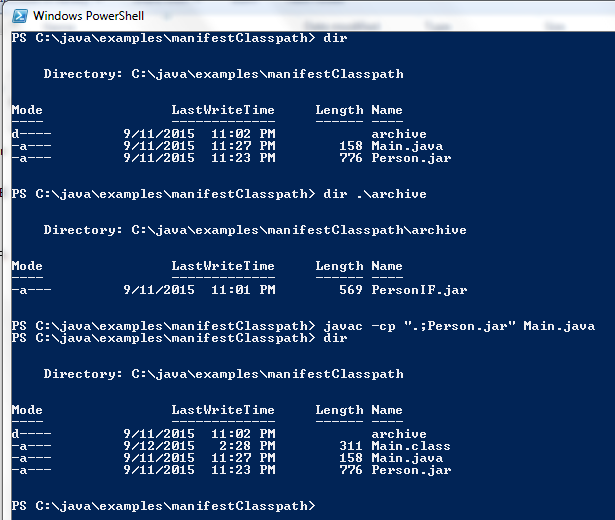
As can be seen from the code listings above, class Main depends upon (uses) class Person and class Person depends upon (implements) PersonIF. I will intentionally place the PersonIF.class file in its own JAR called PersonIF.jar and will store that JAR in a (different) subdirectory. The Person.class file will exist in its own Person.jar JAR file and that JAR file includes a MANIFEST.MF file with a Class-Path header referencing PersonIF.jar in the relative subdirectory.

I will now attempt to compile the Main.class from Main.java with only the current directory on the classpath. I formerly would have expected compilation to fail when javac would be unable to find PersonIF.jar in a separate subdirectory. However, it doesn't fail!

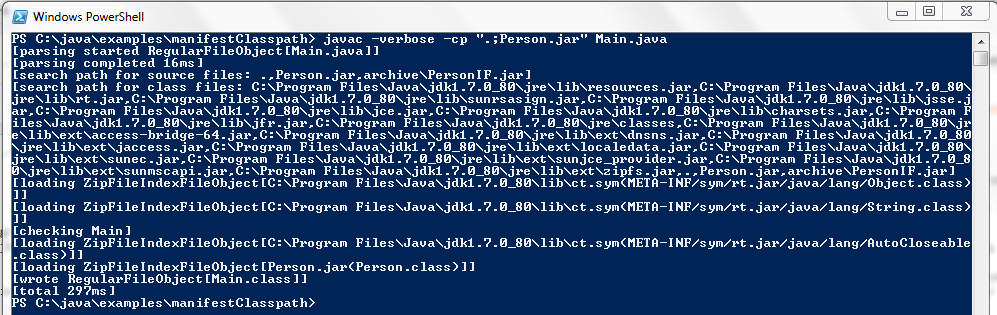
This seemed surprising to me. Why did this compile when I had not explicitly specified PersonIF.class (or a JAR containing it) as the value of classpath provided via the -cp flag? The answer can be seen by running javac with the -verbose flag.

The output of javac -verbose provides the "search path for source files" and the "search path for class files". The "search path for class files" was the significant one in this case because I had moved the PersonIF.java and Person.java source files to a completely unrelated directory not in those specified search paths. It's interesting to see that the search path for class files (as well as the search path for source files) includes archive/PersonIF.jar even though I did not specify this JAR (or even its directory) in the value of -cp. This demonstrates that the Oracle-provided Java compiler considers the classpath content specified in the Class-Path header of the MANIFEST.MF of any JAR on specified on the classpath.

The next screen snapshot demonstrates running the newly compiled Main.class class and having the dependency PersonIF.class picked up from archive/PersonIF.jar without it being specified in the value passed to the Java application launcher's java -cp flag. I expected the runtime behavior to be this way, though admittedly I had never tried it or even thought about doing it with a JAR whose MANIFEST.MF file did not have a Main-Class header (non-executable JAR). The Person.jar manifest file in this example did not specify a Main-Class header and only specified a Class-Path header, but was still able to use this classpath content at runtime when invoked with java.

The final demonstration for this post involves removing the Class-Path header and associated value from the JAR file and trying to compile with javac and the same command-line-specified classpath. In this case, the JAR containing Person.class is called Person2.jar and the following screen snapshot demonstrates that its MANIFEST.MF file does not have a Class-Path header.

The next screen snapshot demonstrates that compilation with javac fails now because, as expected, PersonIF.class is not explicitly specified on the classpath and is no longer made available by reference from the MANIFEST.MF Class-Path header of a JAR that is on the classpath.

We see from the previous screen snapshot that the search paths for source files and for class files no longer include archive/PersonIF.jar. Without that JAR available, javac is unable to find PersonIF.class and reports the error message: "class file for PersonIF not found."

General Observations

  • The Class-Path header in a MANIFEST.MF file has no dependency on the existence of a Main-Class header existing in the same JAR's MANIFEST.MF file.
    • A JAR with a Class-Path manifest header will make those classpath entries available to the Java classloader regardless of whether that JAR is executed with java -jar ... or is simply placed on the classpath of a larger Java application.
    • A JAR with a Class-Path manifest header will make those classpath entries available to the Java compiler (javac) if that JAR is included in the classpath specified for the Java compiler.
  • Because the use of Class-Path in a JAR's manifest file is not limited in scope to JARs whose Main-Class is being executed, class dependencies can be potentially inadvertently satisfied (perhaps even with incorrect versions) by these rather than resolving explicitly specified classpath entries. Caution is advised when constructing JARs with manifests that specify Class-Path or when using third-party JARs with Class-Path specified in their manifest files.
  • The importance of the JAR's manifest file is sometimes understated, but this topic is a reminder of the usefulness of being aware of what's in a particular JAR's manifest file.
  • This topic is a reminder of the insight that can be gleaned from running javac now and then with the -verbose flag to see what it's up to.
  • Whenever you place a JAR on the classpath of the javac compiler or the java application launcher, you are placing more than just the class definitions within that JAR on the classpath; you're also placing any classes and JARs referenced by that JAR's manifest's Class-Path on the classpath of the compiler or application launcher.

Conclusion

There are many places from which a Java classloader may load classes for building and running Java applications. As this post has demonstrated, the Class-Path header of a JAR's MANIFEST.MF file is another touch point for influencing which classes the classloader will load both at runtime and at compile time. The use of Class-Path does not affect only JARs that are "executable" (have a Main-Class header specified in their manifest file and run with java -jar ...), but can influence the loaded classes for compilation and for any Java application execution in which the JAR with the Class-Path header-containing manifest file lies on the classpath.

Friday, September 11, 2015

Passing Arrays to a PostgreSQL PL/pgSQL Function

It can be handy to pass a collection of strings to a PL/pgSQL stored function via a PostgreSQL array. This is generally a very easy thing to accomplish, but this post demonstrates a couple of nuances to be aware of when passing an array to a PL/pgSQL function from JDBC or psql.

The next code listing is for a contrived PL/pgSQL stored function that will be used in this post. This function accepts an array of text variables, loops over them based on array length, and reports these strings via the PL/pgSQL RAISE statement.

printStrings.sql
CREATE OR REPLACE FUNCTION printStrings(strings text[]) RETURNS void AS $printStrings$
DECLARE
   number_strings integer := array_length(strings, 1);
   string_index integer := 1;
BEGIN
   WHILE string_index <= number_strings LOOP
      RAISE NOTICE '%', strings[string_index];
      string_index = string_index + 1;
   END LOOP;
END;
$printStrings$ LANGUAGE plpgsql;

The above PL/pgSQL code in file printStrings.sql can executed in psql with \ir as shown in the next screen snapshot.

The syntax for invoking a PL/pgSQL stored function with an array as an argument is described in the section "Array Value Input" in the PostgreSQL Arrays documentation. This documentation explains that "general format of an array constant" is '{ val1 delim val2 delim ... }' where delim is a delimited of comma (,) in most cases. The same documentation shows an example: '{{1,2,3},{4,5,6},{7,8,9}}'. This example provides three arrays of integral numbers with three integral numbers in each array.

The array literal syntax just shown is straightforward to use with numeric types such as the integers in the example shown. However, for strings, there is a need to escape the quotes around the strings because there are already quotes around the entire array ('{}'). This escaping is accomplished by surrounding each string in the array with two single quotes on each side. For example, to invoke the stored function just shown on the three strings "Inspired", "Actual", and "Events", the following syntax can be used in psql: SELECT printstrings('{''Inspired'', ''Actual'', ''Events''}'); as shown in the next screen snapshot.

Arrays can be passed to PL/pgSQL functions from Java code as well. This provides an easy approach for passing Java collections to PL/pgSQL functions. The following Java code snippet demonstrates how to call the stored function shown earlier with JDBC. Because this stored function returns void (it's more like a stored procedure), the JDBC code does not need to invoke any CallableStatement's overridden registerOutParameter() methods.

JDBC Code Invoking Stored Function with Java Array
final CallableStatement callable =
   connection.prepareCall("{ call printstrings ( ? ) }");
final String[] strings = {"Inspired", "Actual", "Events"};
final Array stringsArray = connection.createArrayOf("varchar", strings);
callable.setArray(1, stringsArray);
callable.execute();
callable.close();

Java applications often work more with Java collections than with arrays, but fortunately Collection provides the toArray(T[]) for easily getting an array representation of a collection. For example, the next code listing is adapted from the previous code listing, but works against an ArrayList rather than an array.

JDBC Code Invoking Stored Function with Java Collection
final CallableStatement callable =
   connection.prepareCall("{ call printstrings ( ? ) }");
final ArrayList<String> strings = new ArrayList<>();
strings.add("Inspired");
strings.add("Actual");
strings.add("Events");
final Array stringsArray =
   connection.createArrayOf(
      "varchar",
      strings.toArray(new String[strings.size()]));
callable.setArray(1, stringsArray);
callable.execute();
callable.close();

Conclusion

The ability to pass an array as a parameter to a PostgreSQL PL/pgSQL stored function is a straightforward process. This post specifically demonstrated passing an array of strings (including proper escaping) to a PL/pgSQL stored function from psql and passing an array of Strings to a PL/pgSQL stored function from JDBC using java.sql.Array and Connection.createArrayOf(String, Object[]).