Today was the first day of the Rocky Mountain Oracle Users Group (RMOUG) Training Days 2011 regular sessions (there were half-day University Sessions yesterday with a much smaller overall participation level for these focused presentations). It was announced at lunch that this is the twentieth edition of RMOUG Training Days. They asked who was attending for the first time (a small number of hands responded to this), who had attended at least three times (greater number of hands raised), and who had attended five times, ten times, fifteen times, and all twenty times. Of the eight or so people at my table, at least four of us had attended more than ten editions of this conference. For me, this is my twelfth time attending and tenth year of presenting.
It is always satisfying to see a decent number of people show enough interest in a topic and provided abstract to attend one's presentation. Both my 90-minute Groovy presentation ("Groovier Java Scripting") and my 30-minute HTML5 presentation ("A First Look at HTML5") were relatively well attended with somewhere between 40 and 60 people in attendance in each.
There are three ways that I typically observe how interesting one of my presentations is to the general audience. The first is the obvious observation of what percentage of the audience is sleeping, obviously day dreaming, or otherwise obviously retreated to their happy place. I didn't seem to see any more people sleeping or fighting sleep than normal in either presentation and I didn't fall asleep, so things seemed to go well from that perspective.
The second measurement is the percentage of people who leave early. You can always expect a small number of people to leave as they realize a presentation or its topic is not what they were looking for or at the level they were looking for. This is especially true of longer presentations where people are more likely to abandon ship if they think they are in it for the long haul and just cannot stand the idea of that. There weren't many who left either presentation and I chose to stay the entire time, so I believe things also went well from this perspective.
The third measurement is the number and types of questions asked. I have been especially impressed with the insightful questions asked at RMOUG Training Days in recent years. These questions improve the overall value of the presentation because the answers either allow me to emphasize small points I made or thought I made or to cover points I had wanted to make but had forgotten to make. The content of the questions tells me if the audience is understanding the points I am trying to make. Today's questions in both sessions were all excellent and relative and implied to me that at least those asking the questions were hearing and understanding the implications of what I was talking about.
Both audiences at today's presentations of mine were outstanding and highly participative. Preparing for these presentations requires significant time and effort and it is more motivating for me to invest that time and energy when I have such great audiences who seem to appreciate the effort and who are actively involved. I learn much for preparing these presentations and that is a big motivator for doing so, but it is nice to feel that I may be contributing to the general good as well.
There were some changes in Training Days this year. One noticeable change was the different portion of the Colorado Convention Center in which the conference was held this year. Another change was no CD provided with presentations and papers (these are downloaded from RMOUG's Schedule Builder instead). I remember the years when we had voluminous bound books containing the white papers and it is interesting to see how far we've come.
Several other posts about RMOUG Training Days 2011 have started appearing. Kenneth Lee talks about a university session in RMOUG – First University Session. Shay Shmeltzer summarizes the presentations at Training Days 2011 related to Oracle ADF in the post ADF Sessions at RMOUG This Week. I expect to see at least a few more posts regarding this conference over the next few days.
Wednesday, February 16, 2011


Tuesday, February 15, 2011
AntBuilder: Groovy Meets Ant
One of convenient classes that Groovy provides is the AntBuilder class, whose purpose is best described in the Javadoc-based documentation: "Allows Ant tasks to be used with GroovyMarkup." The AntBuilder class provides a strong association between the Groovy programming language and the well-known and ubiquitous Ant build tool.
The Ant Integration with Groovy section of the Groovy User Guide describes three common situations in which Ant ("the predominant build environment for Java projects") and Groovy ("a leading Scripting language for the JVM") are used in conjunction with one another. The first listed approach is when developers supplement their Java-building Ant
The second listed approach for integrating Groovy and Ant is to use Ant to compile Groovy code. The groovyc Ant task (
The third listed approach for integrating Groovy and Ant is use of
There are advantages to being able to apply one's Ant knowledge from within Groovy code. First, many of us have used Ant for years and have anywhere from a passing familiarity to deep knowledge of the available Ant tasks. This is an advantage both in terms of developing the Groovy script code and in terms of others reading and maintaining the code. Even a relatively inexperienced Groovy developer who has some Ant knowledge will benefit when using
The second advantage of being able to invoke Ant functionality easily from Groovy code is that Ant has gained significant functionality over its (relatively) long existence. Ant is no longer used explicitly for simple compilation and JAR/WAR/EAR assembly. It has functionality for file copying and naming, using Java mail, and a wide breadth of other functionality. All of Ant's richness is available to the Groovy developer via
Even when the task is to build Java projects, a developer may choose to perform the build via Groovy scripts rather than via Ant and its XML directly. That is another example of an advantage offered by Groovy+Ant integration encapsulated in
The Groovy builders are particularly well suited for generating hierarchical data output. Therefore, it's no surprise that builders are useful for building markup (XML and HTML for example) and even for helping with Swing. See How Builders Work for a basic introduction into using Groovy builders and Practical Groovy: Mark it up with Groovy Builders for greater details.
demoGroovyFileCopying.groovy
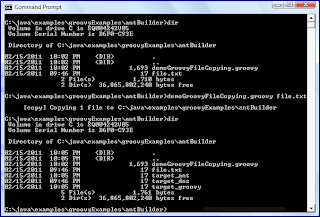
The next screen snapshot demonstrates the directory before and after this script is executed and includes the output showing the Ant functionality for file copy being invoked.
It could be argued that for file copying, using the Groovy approach with the GDK File class is the easiest approach. However, a Groovy developer not familiar with the Groovy approach might be more comfortable with the
The
tokenSource.txt
With the above source file in place with a token delimited with the
copyFileAndReplaceNameToken.groovy
The above Groovy code uses

As the last example shows,
It is relatively easy to see the mapping of the above XML to the Groovy markup the way I indented it. Of course, I could have chosen to use less whitespace to make the code appear even more concise, but at the arguable cost of being less readable.
To apply core Ant tasks (such as copy used above) within Groovy using
Conclusion
The Ant Integration with Groovy section of the Groovy User Guide describes three common situations in which Ant ("the predominant build environment for Java projects") and Groovy ("a leading Scripting language for the JVM") are used in conjunction with one another. The first listed approach is when developers supplement their Java-building Ant
build.xml scripts with Groovy using the specific to Groovy <groovy> tag or the general to Ant <script> tag and embed Groovy code inside these tag's bodies.The second listed approach for integrating Groovy and Ant is to use Ant to compile Groovy code. The groovyc Ant task (
<groovyc>) can be used to build Groovy code with the groovyc joint compiler. Although it can be desirable to run Groovy scripts and other code without explicit compilation, there are several advantages to compiling Groovy with groovyc and this groovyc Ant task makes this even easier to do.The third listed approach for integrating Groovy and Ant is use of
AntBuilder and is the focus of this blog post. Groovy's DSL capabilities are leveraged by AntBuilder to provide a "fluent" Groovy markup representation of the Ant tasks most of us are familiar with from Ant XML files.There are advantages to being able to apply one's Ant knowledge from within Groovy code. First, many of us have used Ant for years and have anywhere from a passing familiarity to deep knowledge of the available Ant tasks. This is an advantage both in terms of developing the Groovy script code and in terms of others reading and maintaining the code. Even a relatively inexperienced Groovy developer who has some Ant knowledge will benefit when using
AntBuilder in Groovy scripts.The second advantage of being able to invoke Ant functionality easily from Groovy code is that Ant has gained significant functionality over its (relatively) long existence. Ant is no longer used explicitly for simple compilation and JAR/WAR/EAR assembly. It has functionality for file copying and naming, using Java mail, and a wide breadth of other functionality. All of Ant's richness is available to the Groovy developer via
AntBuilder. In some cases, it may be easier (more concise) for the Groovy developer to use Ant's predefined task functionality than to write the equivalent functionality in Groovy.Even when the task is to build Java projects, a developer may choose to perform the build via Groovy scripts rather than via Ant and its XML directly. That is another example of an advantage offered by Groovy+Ant integration encapsulated in
AntBuilder. The developer can write Groovy scripts with conditionals, loops, and other full language constructs while still taking advantage of Ant's deep and broad building functionality. In other words, with AntBuilder, the developer can benefit from all of Ant's features without using XML.AntBuilder makes use of and is illustrative of Groovy's metaobject facilities and the ability to build Domain Specific Languages (DSLs) in Groovy. Martin Fowler describes what a domain specific language is: "a computer language that's targeted to a particular kind of problem, rather than a general purpose language that's aimed at any kind of software problem." I have illustrated another Groovy DSL (MarkupBuilder) in the post GroovySql and MarkupBuilder: SQL-to-XML. Like MarkupBuilder, AntBuilder extends the abstract base class BuilderSupport (as do SwingBuilder and NodeBuilder).The Groovy builders are particularly well suited for generating hierarchical data output. Therefore, it's no surprise that builders are useful for building markup (XML and HTML for example) and even for helping with Swing. See How Builders Work for a basic introduction into using Groovy builders and Practical Groovy: Mark it up with Groovy Builders for greater details.
AntBuilder makes it easy to harness the functionality of Ant from within Groovy code. I'll use of an example of using AntBuilder to begin my explanation of how it works and is used. Ant's support for file operations has been proven perhaps millions of times by now. The next code listing demonstrates Groovy code that uses AntBuilder to take advantage of Ant's file copying functionality. AntBuilder is not the only way to copy files in Groovy and two other ways (copying delegated to Windows/DOS operating system and copying using Groovy GDK) are also included in the example.demoGroovyFileCopying.groovy
#!/usr/bin/env groovy

/*
 * demoGroovyFileCopying.groovy
 *
 * Demonstrates copying files in Groovy with three different mechanisms:
 *   1. AntBuilder
 *   2. Operating System copying with String.execute()
 *   3. Groovy File.write(File.text)
 */

 // AntBuilder instance used throughout this script
 AntBuilder antBuilder = new AntBuilder()

 demonstrateFileCopying(args[0], "target", antBuilder)

 /**
  * Demonstrate file copying in Groovy. Generated target files will be copies of
  * the file represented by the provided sourceFilePathAndName and the generated
  * files have names that start with the targetFileNameBase and have the type of
  * Groovy copying appended to the base in the file name.
  *
  * @param sourceFilePathAndName Path and file name of source file to be copied.
  * @param targetFileNameBase Base portion of name of all target files created
  *    as copies of the source file.
  */
 def void demonstrateFileCopying(
    final String sourceFilePathAndName,
    final String targetFileNameBase,
    final AntBuilder ant)
 {
    // File copying with AntBuilder
    def targetFileFromAntCopyName = targetFileNameBase + "_ant"
    def targetFileFromAntCopy = ant.copy(file: sourceFilePathAndName,
                                         tofile: targetFileFromAntCopyName)

    // File copying with Windows/DOS operating system and GDK String.execute()
    //   (use 'copy' in DOS and need 'cmd /c')
    "cmd /c copy ${sourceFilePathAndName} ${targetFileNameBase+'_dos'}".execute()

    // File copying with Groovy GDK File functionality
    def sourceFile = new File(sourceFilePathAndName)
    new File(targetFileNameBase + '_groovy').write(sourceFile.text)
 }
The next screen snapshot demonstrates the directory before and after this script is executed and includes the output showing the Ant functionality for file copy being invoked.

It could be argued that for file copying, using the Groovy approach with the GDK File class is the easiest approach. However, a Groovy developer not familiar with the Groovy approach might be more comfortable with the
AntBuilder approach. Either approach is obviously preferable in most cases to the operating system dependent approach.The
AntBuilder approach might be easier if specialized functionality related to the copying needed to be performed that is supported by the Ant copy task but might not be so readily applied directly in Groovy. Suppose that I had a file that I not only wanted to copy, but wanted to replace tokens inside the source file with something else in the copied target file. Ant shines here and therefore so does AntBuilder. To illustrate this, I use a simple source file as shown in the next listing.tokenSource.txt
Hello, my name is @NAME@ and I like Ant and Groovy.
With the above source file in place with a token delimited with the
@ character, AntBuilder is again demonstrated in the following example.copyFileAndReplaceNameToken.groovy
#!/usr/bin/env groovy

/*
 * demoGroovyFileCopyingAndTokenReplacing.groovy
 *
 * Demonstrates copying file with Groovy and AntBuilder and replacing @NAME@
 * token in source file in the copied file.
 */

// AntBuilder instance used throughout this script
def ant = new AntBuilder()
def sourceFilePathAndName = args[0]
def targetFileFromAntCopyName =  "target_antToken"
def targetFileFromAntCopy =
   ant.copy(file: sourceFilePathAndName,
            tofile: targetFileFromAntCopyName)
            {
               filterset()
               {
                  filter(token: "NAME", value: "Dustin")
               }
            }
The above Groovy code uses
AntBuilder to not only copy the file, but to also replace the token @NAME@ with "Dustin". This output is shown in the next screen snapshot.
As the last example shows,
AntBuilder makes it easy to leverage Ant's wide set of functionality from Groovy without a hint of XML. A developer familiar with Ant's XML structure is likely to be able to map Ant XML to the Groovy markup. Builders work so well because they rely on conventions and AntBuilder is no different. The convention is that XML element names are nested within other XML element names by placing them within curly braces of the outer elements. Attributes in the XML map to name/value pairs separated by colons within the parentheses containing arguments to the names associated with XML elements. In other words, the above Groovy script for copying the file with the filter is equivalent to the XML below in an Ant build script (where "args[0]" corresponds to the String passed in as the first argument to the Groovy script). <copy file="args[0]" tofile="target_antToken">
<filterset>
<filter token="NAME" value="Dustin"/>
</filterset>
</copy>
It is relatively easy to see the mapping of the above XML to the Groovy markup the way I indented it. Of course, I could have chosen to use less whitespace to make the code appear even more concise, but at the arguable cost of being less readable.
To apply core Ant tasks (such as copy used above) within Groovy using
AntBuilder, nothing has to be placed on the script's classpath because Ant is included in the Groovy distribution. However, any optional Ant tasks that have external library dependencies require those external libraries to be placed on the classpath.Conclusion
AntBuilder provides powerful functionality for the Groovy developer. While it can certainly be used in building code, its providing of Ant's breadth and depth of features can be useful in all sorts of contexts in which Groovy might be used besides simply builds. Appropriate use of AntBuilder can reduce the necessary Groovy code required for certain operations when Ant already does the heavy lifting. AntBuilder can also serve as a crutch to the developer who knows Ant better than Groovy but wants to write Groovy scripts.
HTML5 Recommended in 2014
There are several recent developments worth noting related to HTML5.
HTML5 Specification Slated for Recommendation Status in 2014
I will be presenting A First Look at HTML5 at RMOUG Training Days 2011 tomorrow and I believe that many of those in attendance will naturally want to know the state of HTML5 today. With that in mind, the W3C announcement of HTML5's planned completion date is timely (the announcement, not the completion date). As reported in SD Times on the Web, JavaWorld/Network World/ComputerWorld/InfoWorld, The Register, and CNet, the World Wide Web Consortium (W3C) has announced plans to extend the HTML Working Group's charter, plans to meet the expectation of the HTML5 specification reaching Last Call status in May of this year, and new plans to progress the HTML5 specification to Recommendation status by 2014. Although 2014 may sound like a long way off, it's better than 2022.
Internet Explorer 9 RC Supports Geolocation API
Other big news in the world of HTML is related to something I will be discussing in tomorrow's presentation: the Geolocation API. Andy Pemberton and Matt Mehalso write that the latest beta release of Internet Explorer (IE9 RC) supports the Geolocation API in IE9 Geolocation in February Release Candidate. As I wrote in my post HTML5 Geolocation API: Your Browser Knows Where You Are, Internet Explorer 8 does NOT support the Geolocation API (though Google Toolbar for Internet Explorer can be used to provide this in IE8). See http://www.beautyoftheweb.com/ for more examples of HTML5 in IE9 RC or http://windows.microsoft.com/ie9 to download it.
W3C's Select Priorities and Milestones of 2011
The W3C has also posted W3C 2011: Select Priorities and Milestones, which does exactly what the title suggests: lists and describes specific priorities and milestones for the W3C in 2011, including focus on powerful web applications (with mention of Last Call for HTML5 in May 2011 and more work on HTML5 logo), web on television and mobile devices, and a web universally available to all.
Adobe Contributes to JQuery Mobile/HTML5
Cade Metz writes in The Register's Adobe open source code backs – gasp! – HTML5 that "Adobe is contributing to the open source jQuery Mobile" to "help create mobile components and to help create the capacity to develop more interactive and more engaging animation experiences." The article goes on to outlines other areas in which Adobe has contributed to various web browsers and HTML5 authoring tools.
Conclusion
Much is happening currently related to HTML5. The recent announcement of a planned delivery of a Recommendation for HTML5 coincides with announcements of browsers' continued enhanced support for HTML5. While all of this progress in HTML5 makes the timing of my presentation on HTML5 more current and cutting edge, it adds to the already difficult challenge I am facing of covering features of HTML5 along with the many political and process developments associated with HTML5 all in 30 minutes.
HTML5 Specification Slated for Recommendation Status in 2014
I will be presenting A First Look at HTML5 at RMOUG Training Days 2011 tomorrow and I believe that many of those in attendance will naturally want to know the state of HTML5 today. With that in mind, the W3C announcement of HTML5's planned completion date is timely (the announcement, not the completion date). As reported in SD Times on the Web, JavaWorld/Network World/ComputerWorld/InfoWorld, The Register, and CNet, the World Wide Web Consortium (W3C) has announced plans to extend the HTML Working Group's charter, plans to meet the expectation of the HTML5 specification reaching Last Call status in May of this year, and new plans to progress the HTML5 specification to Recommendation status by 2014. Although 2014 may sound like a long way off, it's better than 2022.
Internet Explorer 9 RC Supports Geolocation API
Other big news in the world of HTML is related to something I will be discussing in tomorrow's presentation: the Geolocation API. Andy Pemberton and Matt Mehalso write that the latest beta release of Internet Explorer (IE9 RC) supports the Geolocation API in IE9 Geolocation in February Release Candidate. As I wrote in my post HTML5 Geolocation API: Your Browser Knows Where You Are, Internet Explorer 8 does NOT support the Geolocation API (though Google Toolbar for Internet Explorer can be used to provide this in IE8). See http://www.beautyoftheweb.com/ for more examples of HTML5 in IE9 RC or http://windows.microsoft.com/ie9 to download it.
W3C's Select Priorities and Milestones of 2011
The W3C has also posted W3C 2011: Select Priorities and Milestones, which does exactly what the title suggests: lists and describes specific priorities and milestones for the W3C in 2011, including focus on powerful web applications (with mention of Last Call for HTML5 in May 2011 and more work on HTML5 logo), web on television and mobile devices, and a web universally available to all.
Adobe Contributes to JQuery Mobile/HTML5
Cade Metz writes in The Register's Adobe open source code backs – gasp! – HTML5 that "Adobe is contributing to the open source jQuery Mobile" to "help create mobile components and to help create the capacity to develop more interactive and more engaging animation experiences." The article goes on to outlines other areas in which Adobe has contributed to various web browsers and HTML5 authoring tools.
Conclusion
Much is happening currently related to HTML5. The recent announcement of a planned delivery of a Recommendation for HTML5 coincides with announcements of browsers' continued enhanced support for HTML5. While all of this progress in HTML5 makes the timing of my presentation on HTML5 more current and cutting edge, it adds to the already difficult challenge I am facing of covering features of HTML5 along with the many political and process developments associated with HTML5 all in 30 minutes.
Saturday, February 12, 2011
JavaOne 2011 and Oracle OpenWorld: October 2-6, 2011
JavaOne 2011 is scheduled for October 2-6, 2011, in San Francisco. It appears that JavaOne will again be held in conjunction with Oracle OpenWorld. There is also evidence that JavaOne will again not be in the Moscone due to co-located Oracle OpenWorld: the JavaOne and Oracle Develop Exhibition Floor Map shows the exhibition area being in the Continental Ballroom of the Hilton San Francisco Union Square (the exhibition contract also verifies this). Although many had hoped that JavaOne 2011 would NOT be co-located with Oracle OpenWorld or that they would be held consecutively rather than simultaneously, it definitely seems that the conferences will be co-located again.
Java State of the Union: One Year Under Oracle
In this post, I look at three recent and interesting posts related to the state of Java today.
Java State of Union
In his first Java Observer/Observable post (Change of State), Athen O'Shea makes some observations regarding "Oracle's influence on Java so far" and refers to the upcoming (February 15) OTN Techcast (Java and Oracle, One Year Later) as Oracle's "first State of the Union" for Java.
In his post, Athen states that he'd like JavaWorld readers and contributors to comment on their thoughts regarding "Oracle's influence on Java so far." Athen adds that he is not looking so much for obvious comments about obvious Oracle impacts on Java or wild attempts at fear, uncertainty, and doubt (FUD). Rather, Athen is "more interested in subtleties and contradictions" and provides three examples:
Athen has identified some interesting subtleties and contradictions. Other things I look forward to finding out is if Oracle is able to retrofit JavaFX to support standard Java APIs and to make it a popular, well-used rich interface technology. I have long believed that one of JavaFX's biggest hurdles was not really being Java in terms of language. However, even with a standard Java API, there will be concerns about JavaFX not being a standard and being proprietary.
The future of NetBeans under Oracle continues to interest me. The recent announcement of NetBeans dropping support for Ruby is obviously disappointing to Ruby developers, but may be an advantage for Java developers if more resources are applied to the Java portions and functionality of the IDE. I'd like to see continued improvements for Groovy and other alternative JVM languages. For example, I'd like to have a Groovy project without it being considered a Grails project. I also look forward to experimenting with Java 7 features in NetBeans 7. I believe that dropping of Ruby support from NetBeans is an overall positive development for most Java developers in the sense that it implies Oracle's true commitment to the Java side of the IDE. For those developers writing Java and Ruby code, it is not as positive.
A Year Later: Has Oracle Ruined or Saved Sun?
In the article A year later: Has Oracle ruined or saved Sun?, Paul Krill looks at the effect of Oracle's purchase of Sun on a wide set of Sun technologies including Java. He talks about NetBeans dropping support for Ruby (a rough week for Ruby), the confrontational relationship between Oracle and Apache (which is really a continuation of the Sun/Apache relationship), the Hudson/Jenkins developments, and the Google lawsuit over Android.
Java Ain't Dead - It's Still #1
Yakov Fain's recent post Forrester, Java ain’t dead – it’s still #1! takes issue with yet another report of Java's demise. Although just as even a broken clock is correct twice a day, the "Java is dead" posters will eventually be correct, just numerous years off on the timing of that event. I have commented on the ridiculousness of such posts previously, but I especially liked the approach Fain took in this post. Fain states (and I have often observed this to be the case): "Unfortunately, people who state that Java’s dead are not the people who use the latest Java technologies day in and day out." Fain also observes that "in this presentation the author made a number of statements that show that his perception of Java platform is based on the status of the platform several years ago." This is understandable: not everyone has the good fortunate to be able to use the latest version of Java EE. However, it also means that those people are less qualified to talk about the current state of the same technology.
I have seen this before in conjunction with Java. In the beginning, Java was slow. Unfortunately, even after years of significant investment by JVM suppliers in making their JVM implementations very efficient, I still ran into intelligent, well-meaning individuals who simply were basing statements on out-of-date personal experiences or opinions heard/read from others that were out of date. For some of these individuals, it took a while for them to come to grips with the idea that things had changed. I always learn best when I do something myself or try it out myself. Reading gets me so far, but then I need to work directly with it to really start to understand. I think many people are this way. Additionally, none of us can read and use every available alternative out there and so must trust what we read and hear from others to a certain degree. The software development blogosphere has never been truly representative of reality, but it is easy to forget that.
"Java is dead" posts are almost as old as Java itself. For a dead language, Java seems to continue to do pretty well. If languages had emotions or feelings, I bet many of the "still living" languages would love to be as dead.
By the way, the post Explained: Java is A Dead-End for Enterprise Application Development, Mike Gualtieri provides an "expansion of my arguments" from the original post Java Is A Dead-End For Enterprise App Development. From the comments, it sounds like Gualtieri's headline may be overly dramatic and more sensationalist than what the real content seems to be: use the right tool for the job. I would have liked to see the original slides themselves, but the "free registration" to download the slides requires a "business email address" (proving once again that nothing is really "free"). I don't usually give out that type of information because I have rarely found such resources to be any better or more informative or more correct than what's publicly available without strings attached.
Conclusion
What is the state of Java? In some ways it's a mess, but in some ways there seems to be lots of potential. It definitely continues to have a future. In The Rise And Fall of Languages in 2010, Andrew Binstock states: "Java, C, C++, PHP, C#, and Python are languages that are widely used and will have plenty of support in the years to come." I agree with him about this set of languages (I have worked all except for PHP, but PHP's prevalence is obvious) and Java definitely fits into the category. Like numerous others, I have stated before that the alternative JVM languages are particular exciting, but Java SE and Java EE continue to be the work horses of the platform.
Java State of Union
In his first Java Observer/Observable post (Change of State), Athen O'Shea makes some observations regarding "Oracle's influence on Java so far" and refers to the upcoming (February 15) OTN Techcast (Java and Oracle, One Year Later) as Oracle's "first State of the Union" for Java.
In his post, Athen states that he'd like JavaWorld readers and contributors to comment on their thoughts regarding "Oracle's influence on Java so far." Athen adds that he is not looking so much for obvious comments about obvious Oracle impacts on Java or wild attempts at fear, uncertainty, and doubt (FUD). Rather, Athen is "more interested in subtleties and contradictions" and provides three examples:
- Oracle alliances with powerful competitor organizations (Oracle, Apple) in OpenJDK and Oracle's JCP Executive Committee nomination of the Brazilian Java Users Group SouJava (represented by Bruno Souza)
- "Oracle's well documented unilateral stubbornness in the JCP" contrasted with Doug Lea "being a co-signer on the initial draft OpenJDK governance bylaws"
- Multiple facets of the potential of a Java fork.
Athen has identified some interesting subtleties and contradictions. Other things I look forward to finding out is if Oracle is able to retrofit JavaFX to support standard Java APIs and to make it a popular, well-used rich interface technology. I have long believed that one of JavaFX's biggest hurdles was not really being Java in terms of language. However, even with a standard Java API, there will be concerns about JavaFX not being a standard and being proprietary.
The future of NetBeans under Oracle continues to interest me. The recent announcement of NetBeans dropping support for Ruby is obviously disappointing to Ruby developers, but may be an advantage for Java developers if more resources are applied to the Java portions and functionality of the IDE. I'd like to see continued improvements for Groovy and other alternative JVM languages. For example, I'd like to have a Groovy project without it being considered a Grails project. I also look forward to experimenting with Java 7 features in NetBeans 7. I believe that dropping of Ruby support from NetBeans is an overall positive development for most Java developers in the sense that it implies Oracle's true commitment to the Java side of the IDE. For those developers writing Java and Ruby code, it is not as positive.
A Year Later: Has Oracle Ruined or Saved Sun?
In the article A year later: Has Oracle ruined or saved Sun?, Paul Krill looks at the effect of Oracle's purchase of Sun on a wide set of Sun technologies including Java. He talks about NetBeans dropping support for Ruby (a rough week for Ruby), the confrontational relationship between Oracle and Apache (which is really a continuation of the Sun/Apache relationship), the Hudson/Jenkins developments, and the Google lawsuit over Android.
Java Ain't Dead - It's Still #1
Yakov Fain's recent post Forrester, Java ain’t dead – it’s still #1! takes issue with yet another report of Java's demise. Although just as even a broken clock is correct twice a day, the "Java is dead" posters will eventually be correct, just numerous years off on the timing of that event. I have commented on the ridiculousness of such posts previously, but I especially liked the approach Fain took in this post. Fain states (and I have often observed this to be the case): "Unfortunately, people who state that Java’s dead are not the people who use the latest Java technologies day in and day out." Fain also observes that "in this presentation the author made a number of statements that show that his perception of Java platform is based on the status of the platform several years ago." This is understandable: not everyone has the good fortunate to be able to use the latest version of Java EE. However, it also means that those people are less qualified to talk about the current state of the same technology.
I have seen this before in conjunction with Java. In the beginning, Java was slow. Unfortunately, even after years of significant investment by JVM suppliers in making their JVM implementations very efficient, I still ran into intelligent, well-meaning individuals who simply were basing statements on out-of-date personal experiences or opinions heard/read from others that were out of date. For some of these individuals, it took a while for them to come to grips with the idea that things had changed. I always learn best when I do something myself or try it out myself. Reading gets me so far, but then I need to work directly with it to really start to understand. I think many people are this way. Additionally, none of us can read and use every available alternative out there and so must trust what we read and hear from others to a certain degree. The software development blogosphere has never been truly representative of reality, but it is easy to forget that.
"Java is dead" posts are almost as old as Java itself. For a dead language, Java seems to continue to do pretty well. If languages had emotions or feelings, I bet many of the "still living" languages would love to be as dead.
By the way, the post Explained: Java is A Dead-End for Enterprise Application Development, Mike Gualtieri provides an "expansion of my arguments" from the original post Java Is A Dead-End For Enterprise App Development. From the comments, it sounds like Gualtieri's headline may be overly dramatic and more sensationalist than what the real content seems to be: use the right tool for the job. I would have liked to see the original slides themselves, but the "free registration" to download the slides requires a "business email address" (proving once again that nothing is really "free"). I don't usually give out that type of information because I have rarely found such resources to be any better or more informative or more correct than what's publicly available without strings attached.
Conclusion
What is the state of Java? In some ways it's a mess, but in some ways there seems to be lots of potential. It definitely continues to have a future. In The Rise And Fall of Languages in 2010, Andrew Binstock states: "Java, C, C++, PHP, C#, and Python are languages that are widely used and will have plenty of support in the years to come." I agree with him about this set of languages (I have worked all except for PHP, but PHP's prevalence is obvious) and Java definitely fits into the category. Like numerous others, I have stated before that the alternative JVM languages are particular exciting, but Java SE and Java EE continue to be the work horses of the platform.
Wednesday, February 9, 2011
Posts on the Rise and Fall of JVM Dynamic Languages
In this post, I briefly reference two interesting posts that fall into the camp of The Rise and Fall of Dynamic Languages. The first referenced post focuses on dynamic languages on the JVM and the second referenced post focuses specifically on one Groovy developer's perception of Groovy's eventual demise.
Dynamic Languages on the JVM ... Growth or Demise
I first saw the post Dynamic Languages on the JVM ... Growth or Demise when it was referenced on Java.net on 6 February 2011 (Java.net editor Kevin Farnham has since posted more personal analysis on the post and provided this week's poll question based on that post). In Dynamic Languages on the JVM ... Growth or Demise, post author John Yeary references the Dr. Dobb's article The Rise And Fall of Languages in 2010, which itself is based on analysis of the Tiobe Programming Community Index statistics for 2010.
Yeary observes that dynamic languages are said to be in a decline and that JVM-based dynamic languages are said to be in the same decline with fellow dynamic languages. Yeary does not agree and asserts (emphasis is his): "I believe that the decline of dynamic languages is real EXCEPT on the JVM." Yeary speaks highly of Jython and has even more praise for JRuby because "it combines the ease of use in Ruby with the power and multitude of frameworks available in Java."
The Rise and Fall of the Groovy Language
Another really interesting post I ran across this week was Gavin Grover's "The Rise and Fall of the Groovy Language" (no direct link to it currently?). It is obvious from Grover's blogs and other postings that he has seriously invested time and energy into learning, using, and trying to improve Groovy. Despite that, there is obvious frustration in the post "The Rise and Fall of the Groovy Language."
Anyone who has read my blog probably knows that I really like Groovy for scripting. Colleagues also know of my interest in Groovy. Although I am growing increasingly comfortable with the language, I did learn several things about the history (he links to many earlier interesting forum threads related to Groovy development) and possible future of Groovy from Grover's post. Among other things Grover points out the early history of Groovy, the falling out with the project founder, and looks at the name change he believes is coming to the Groovy language.
Grover also outlines four major reasons he believes "[the Groovy] language has been failing." He articulates his reasons in much greater detail, but they can be summarized as follows:
I recommend this post to anyone interested in the future of Groovy. I don't know Gavin "Groovy" Grover or the other principals involved enough to formulate an opinion on the correctness of these observations and following conclusions. However, there is no doubt that I did learn several things about the earlier days of Groovy from this post and the post is a reminder that politics are in everything, even open source software development. It's also a reminder that there is often a tension between the legitimate desire to profit from previous work and the desire of other community members to continue focusing on the improvement of the product.
Dynamic Languages on the JVM ... Growth or Demise
I first saw the post Dynamic Languages on the JVM ... Growth or Demise when it was referenced on Java.net on 6 February 2011 (Java.net editor Kevin Farnham has since posted more personal analysis on the post and provided this week's poll question based on that post). In Dynamic Languages on the JVM ... Growth or Demise, post author John Yeary references the Dr. Dobb's article The Rise And Fall of Languages in 2010, which itself is based on analysis of the Tiobe Programming Community Index statistics for 2010.
Yeary observes that dynamic languages are said to be in a decline and that JVM-based dynamic languages are said to be in the same decline with fellow dynamic languages. Yeary does not agree and asserts (emphasis is his): "I believe that the decline of dynamic languages is real EXCEPT on the JVM." Yeary speaks highly of Jython and has even more praise for JRuby because "it combines the ease of use in Ruby with the power and multitude of frameworks available in Java."
The Rise and Fall of the Groovy Language
Another really interesting post I ran across this week was Gavin Grover's "The Rise and Fall of the Groovy Language" (no direct link to it currently?). It is obvious from Grover's blogs and other postings that he has seriously invested time and energy into learning, using, and trying to improve Groovy. Despite that, there is obvious frustration in the post "The Rise and Fall of the Groovy Language."
Anyone who has read my blog probably knows that I really like Groovy for scripting. Colleagues also know of my interest in Groovy. Although I am growing increasingly comfortable with the language, I did learn several things about the history (he links to many earlier interesting forum threads related to Groovy development) and possible future of Groovy from Grover's post. Among other things Grover points out the early history of Groovy, the falling out with the project founder, and looks at the name change he believes is coming to the Groovy language.
Grover also outlines four major reasons he believes "[the Groovy] language has been failing." He articulates his reasons in much greater detail, but they can be summarized as follows:
- Developer focus on profit over capital development
- Too closely tied and dependent on Grails
- Groovy language community is really not a community at all
- Combination of first and third reason: Groovy "community" is not really such
I recommend this post to anyone interested in the future of Groovy. I don't know Gavin "Groovy" Grover or the other principals involved enough to formulate an opinion on the correctness of these observations and following conclusions. However, there is no doubt that I did learn several things about the earlier days of Groovy from this post and the post is a reminder that politics are in everything, even open source software development. It's also a reminder that there is often a tension between the legitimate desire to profit from previous work and the desire of other community members to continue focusing on the improvement of the product.
Tuesday, February 8, 2011
Groovy Uses JAVA_OPTS
Developers who have used Tomcat in any significant way are likely already familiar with using the environment variable JAVA_OPTS to specify how much memory should be allocated for an instance of Tomcat. The author of CATALINA_OPTS v JAVA_OPTS - What is the difference? points out that
Perhaps the most well-known and common use of
The Groovy Native Launcher page also demonstrates using JAVA_OPTS to specify heap size for a JVM running Groovy under the heading "JAVA_OPTS" and mentions "achieving the same effect" with environmental variable
The use of
Use of
For the examples of using
findClassInJar.groovy
The above script can be run directly without explicitly using
The first demonstration involves setting

This can similarly be done with
Besides the normal
The pretty print output attempts to indent and beautify the code to enable a good representation of code's nesting structure. The contents of
The HTML output might be more interesting in some cases. I show

This output is not too surprising, but the color syntax is nice and it might be helpful to make Groovy source code available via this mechanism.
The output generated in the form of

I still find it difficult to read, but it's darn pretty and likely will impress someone.
As I stated in my post Groovy Scripts Master Their Own Classpath with RootLoader, I often use shell scripts to kick off my Groovy scripts. These shell scripts can do certain things to set up my Groovy environment just how I like it, including specifying the classpath information for the Groovy script and setting
Conclusion
The
JAVA_OPTS may be used by "other applications" and this should be a consideration when deciding whether to use CATALINA_OPTS or JAVA_OPTS. It turns out that Groovy is an example of one of those "other" applications that uses JAVA_OPTS. In this post, I look at some common uses in Groovy for JAVA_OPTS.Perhaps the most well-known and common use of
JAVA_OPTS within Groovy development is for specifying initial and maximum JVM heap sizes used by Groovy scripts and the JVM in which they run. This is specifically mentioned in the Running section of the Getting Started Guide's Quick Start under the heading "Increasing Groovy's JVM Heap Size". There's not much to say here and it's succinctly stated:To increase the amount of memory allocated to your groovy scripts, set your JAVA_OPTS environment variable. JAVA_OPTS="-Xmx..."
The Groovy Native Launcher page also demonstrates using JAVA_OPTS to specify heap size for a JVM running Groovy under the heading "JAVA_OPTS" and mentions "achieving the same effect" with environmental variable
JAVA_TOOL_OPTIONS.The use of
JAVA_OPTS with Groovy is not limited to specifying heap sizes. Indeed, the Native Launcher JAVA_OPTS section states: "The environment variable JAVA_OPTS can be used to set JVM options you want to be in effect every time you run groovy."Use of
JAVA_OPTS in Groovy is not limited to the groovy launcher or to runtime. In the blog post Using groovyc To Compile Groovy Scripts, I discussed several advantages of explicitly using groovyc and one of the advantages I mentioned is the ability to better understand Groovy's inner workings through use of groovyc. JAVA_OPTS can be used in conjunction with groovyc to further this advantage. Specifically, Groovy in Action points out that groovyc "is sensitive to" three properties that can be specified via JAVA_OPTS: antlr.ast=groovy, antlr.ast=html, and antlr.ast=mindmap. I briefly demonstrate using these with groovyc and JAVA_OPTS.For the examples of using
groovyc, JAVA_OPTS, and the "antlr.ast" settings, I will run groovyc against the script findClassInJar.groovy that was introduced in my blog post Searching JAR Files with Groovy. For convenience, I have included that code listing here.findClassInJar.groovy
#!/usr/bin/env groovy

/**
 * findClassInJar.groovy
 *
 * findClassInJar <<root_directory>> <<string_to_search_for>>
 *
 * Script that looks for provided String in JAR files (assumed to have .jar
 * extensions) in the provided directory and all of its subdirectories.
 */

import java.util.zip.ZipFile
import java.util.zip.ZipException

rootDir = args ? args[0] : "."
fileToFind = args && args.length > 1 ? args[1] : "class"
numMatchingItems = 0
def dir = new File(rootDir)
dir.eachFileRecurse
{ file->
   if (file.isFile() && file.name.endsWith("jar"))
   {
      try
      {
         zip = new ZipFile(file)
         entries = zip.entries()
         entries.each
         { entry->
            if (entry.name.contains(fileToFind))
            {
               println file
               println "\t${entry.name}"
               numMatchingItems++
            }
         }
      }
      catch (ZipException zipEx)
      {
         println "Unable to open file ${file.name}"
      }
   }
}
println "${numMatchingItems} matches found!"
The above script can be run directly without explicitly using
groovyc and this is typically how I'd use it. However, I am going to explicitly compile it here to demonstrate using JAVA_OPTS with groovyc.The first demonstration involves setting
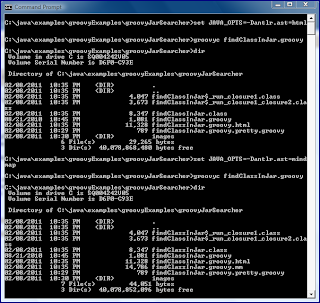
JAVA_OPTS to -Dantlr.ast=groovy which Groovy in Action tells us is for "pretty printing." Once the environmental variable is properly set, it is simply a matter of running groovyc. This is shown off in the next screen snapshot which shows just the Groovy script source at first by itself, the setting of JAVA_OPTS, the executing of groovyc, and the generated output files (.class files and the findClassInJar.groovy.pretty.groovy file generated because of the flag passed via JAVA_OPTS (-Dantlr.ast=groovy)).
This can similarly be done with
JAVA_OPTS set with -Dantlr.ast=html (generates HTML output) and -Dantlr.ast=mindmap (format used by FreeMind). Doing this for the other two properties is shown in the next screen snapshot.
Besides the normal
.class files generated by groovyc, we now have three additional generated artifacts based on the three different antlr.ast settings: findClassInJar.groovy.pretty.groovy (pretty print), findClassInJar.groovy.html (HTML output), and findClassInJar.groovy.mm (Mindmap output). Each of these output formats are focused on next.The pretty print output attempts to indent and beautify the code to enable a good representation of code's nesting structure. The contents of
findClassInJar.groovy.pretty.groovy are shown next:import java.util.zip.ZipFile
import java.util.zip.ZipException
rootDir = args?args[0]:"."
fileToFind = args && args.length > 1?args[1]:"class"
numMatchingItems = 0
def dir = new File(rootDir)
dir.eachFileRecurse
{file ->
if (file.isFile() && file.name.endsWith("jar")) {
try {
zip = new ZipFile(file)
entries = zip.entries()
entries.each
{entry ->
if (entry.name.contains(fileToFind)) {
println file
println " ${entry.name}"
numMatchingItems++
}
}
}
catch (ZipException zipEx) {
println "Unable to open file ${file.name}"
}
}
}
The HTML output might be more interesting in some cases. I show
findClassInJar.groovy.html as rendered in the Chrome web browser in the next screen image.
This output is not too surprising, but the color syntax is nice and it might be helpful to make Groovy source code available via this mechanism.
The output generated in the form of
findClassInJar.groovy.mm is not very useful when viewed directly (it's just some difficult-to-read XML), but is graphically more pleasing when that .mm file is rendered in FreeMind. This is shown in the next screen snapshot.
I still find it difficult to read, but it's darn pretty and likely will impress someone.
As I stated in my post Groovy Scripts Master Their Own Classpath with RootLoader, I often use shell scripts to kick off my Groovy scripts. These shell scripts can do certain things to set up my Groovy environment just how I like it, including specifying the classpath information for the Groovy script and setting
JAVA_OPTS appropriately before running the Groovy script and unsetting it (cleaning it out) before terminating.Conclusion
The
JAVA_OPTS environment variable is a useful approach for specifying various JVM options that one wants Groovy scripts to have access to during runtime and for specifying various JVM options that one wants the Groovy compiler to use during compilation. This post has demonstrated use of JAVA_OPTS to specify heap size for a JVM executing Groovy code and to specify to groovyc to generate additional artifacts from Groovy source code.
Subscribe to:
Posts (Atom)