Monday, January 17, 2011

Inspired by Actual Events: My Blog's New Name

I began writing this blog in October 2007 and it has been called "Dustin's Software Development Cogitations and Speculations" from the beginning. The name has definitely reflected a primary purpose for this blog: to cogitate and speculate on various software development topics. However, I've been thinking about changing this blog's name for a while and have finally decided to do it.

Many of the most popular software development blogs have short names that are easily remembered and uniquely identify the blog. Examples include Coding Horror, Pure Danger Tech, Lambda the Ultimate, Signal vs Noise, The Daily WTF, and even The BileBlog. Although there are some blogs with names of the author and/or "software" (such as Joel on Software, The Berkun Blog, Raible Designs, and Martin Fowler's Bliki), I didn't feel like "Dustin on Software" was as catchy or carried as much cachet.

I have always enjoyed watching movies as evidenced by my previous posts Classic Movie Quotes Applied to Software Development and More Movie Quotes Applied to Software Development. This might explain why I have decided to rename the blog from "Dustin's Software Cogitations and Speculations" to "Inspired by Actual Events" (with the former title becoming a "subtitle" of sorts that is included in the blog's description).

In the movies, a claim to be "inspired by actual events" can mean anything from significantly fact-based to barely traceable to any actual occurrence. For example, Horror News Net states that The Texas Chainsaw Massacre was mainly based on Tobe Hooper's observation of chainsaws being sold at a local Montgomery Ward store and had elements of the story extracted from accounts of real-life killer Ed Gein. Despite this history, one of this movie's taglines was "What happened is true. Now the motion picture that's just as real."

Some of my favorite movies are inspired by actual events, though I hope they are closer to the original events than The Texas Chainsaw Massacre. These movies include Apollo 13, The Dish, October Sky, The Right Stuff, Hoosiers, Miracle, Rudy, Cool Runnings, The Blind Side, Amadeus, Secretariat, Unstoppable, and Stand and Deliver.

The movies that are "based on a true story" or "inspired by actual events" often take certain liberties in applying dramatic license to make the story more interesting. In my blog, I try not to make things up, but I do try to add commentary and speculation regarding software development topics. Many of my blogs are based on my observations of actual events.

Some movies are not themselves based on any particular actual event, but are based on observations of many events. For example, A Christmas Story and The Bridge on the River Kwai are both excellent movies that are themselves based on fiction, but whose fiction has roots in actual events or experiences. Some of my posts are like this: they don't trace to any one event but instead represent a collage of many and diverse experiences.

Big news items often lead to movies, even if just to made-for-television movies. For example, the recent story of the trapped and rescued Chilean miners is expected to be made into a movie. The television series Law and Order: Special Victims Unit starts with the statement that episodes are "ripped from the headlines." My blog sometimes follows this pattern when I provide my own opinions and speculations and interpretation of current news events in the world of software development. An example of this was my recent post and follow-up comments on Google Chrome's announcement to not support H.264 in its <video> tag.

In short, I feel that titling my blog "Inspired by Actual Events" with the old title ("Dustin's Software Development Cogitations and Speculations") in the description is appropriate. It reflects the way I approach writing this blog and reflects my love of the movies. The most significant drawback is that "software development" is no longer included in the title, but having that referenced in the description will hopefully be sufficient.

For a short period of time, I intend to leave the main title as "Inspired by Actual Events: Dustin's Software Cogitations and Speculations," but I do plan to rename its main title to simply "Inspired by Actual Events" in the near future.

Saturday, January 15, 2011

Detecting Class Innards in Groovy

When using a new language or using new features of a language that I have not used before, I like to know what fields and methods are supported by various classes and objects in that language. This has certainly been the case as I have learned and used Groovy. In this post, I look at the many ways one can find out what a Groovy class/object has to offer.


Javadoc API Documentation

One of the things I have always liked about Java is the ready availability of its standard API documentation. Fortunately, Groovy's GDK extensions and the Groovy distribution classes are similarly well documented. I find myself frequently using these generated HTML pages to discover new APIs that are available to me in the standard Groovy distribution.


Object.toString()

Groovy inherits positive Java features including the ability for object's to easily provide their state via a standard approach by explicitly overriding Object.toString(). This is a valuable tactic in Java (see Item 9 in Effective Java) and continues to be valuable in Groovy. The most significant downside of the toString() approach is that its value relies completely on the author of the class. There are several things a developer can do to make more effective toString() methods, but there's no guarantee any of those things have been done.

In fact, there's no guarantee that a toString() metho for a given class whose instance is being used even provides an explicit overridden toString() method. The next code listing is of a simple Groovy class that fails to explicitly override toString().

/**
 * Simple Groovy class used in demonstration of Groovy detecting methods without
 * explicitly overridden inspect() method, toString() method, or dump() method.
 *
 * @author Dustin
 */
class Person
{
   String lastName

   String firstName

   Person(final String newLastName, final String newFirstName)
   {
      this.lastName = newLastName
      this.firstName = newFirstName
   }
}

When an instance of this simple Groovy class has it's toString() invoked (whether implicitly or explicitly), the output is the same as for a Java class with no explicit toString() (and as defined by Object.toString() Javadoc). It will look something like this:

Person@149eb9f


Object.inspect()

Groovy's GDK Object class specifies an inspect() method for which the Javadoc states: "Inspects returns the String that matches what would be typed into a terminal to create this object." I rarely find this method very useful, but do cover it briefly here.

The inspect() method is often not implemented. When this is the case, the same object's toString() method is invoked. If the object's toString() method is not explicitly implemented, Java's Object.toString() is invoked.

This is demonstrated in the next screen snapshots for the Java Date class and for the Groovy AntBuilder class (the latter of which does not have an explicit inspect() or an explicit toString() implementation).


The Groovy Object.inspect() method suffers the same weakness as Java's (and Groovy's) Object.toString(): the method is only as good as what the author of the class implemented (which might be nothing). In the worst case, an author might not have overridden the inspect() method or the toString() method (as was the case for AntBuilder in the example above) and then very little information is provided.

The next code listing is for a simple Groovy class that implements toString() but fails to implement inspect().

PersonWithToString.groovy
/**
 * Simple Groovy class used in demonstration of Groovy detecting methods without
 * explicitly overridden inspect() method, but with an explicitly overridden
 * toString() method.
 *
 * @author Dustin
 */
class PersonWithToString
{
   String lastName

   String firstName

   PersonWithToString(final String newLastName, final String newFirstName)
   {
      this.lastName = newLastName
      this.firstName = newFirstName
   }

   @Override
   String toString()
   {
      return this.firstName + " " + this.lastName;
   }
}

If the above class is instantiated, it will return the same String whether toString() is explicitly or implicitly called or if inspect() is called. For example, suppose the class is instantiated and invoked as shown in the next code listing.

def person2 = new PersonWithToString("Rubble", "Barney")
doToString(person2)
doInspect(person2)

def doToString(obj)
{
   println "toString(): ${obj}\n"
}

def doInspect(obj)
{
   // Inspect
   println "inspect(): ${obj.inspect()}\n"
}

The output when the above is executed looks like this:

toString(): Barney Rubble

inspect(): Barney Rubble

We can explicitly override inspect() to make it useful and to meet its advertised reason for existence. An example of how this might be done is demonstrated in the next code listing.

PersonWithInspect.groovy
/**
 * Simple Groovy class used in demonstration of Groovy detecting methods with
 * explicitly overridden inspect() method but without explicitly overridden
 * dump() method.
 *
 * @author Dustin
 */
class PersonWithInspect
{
   String lastName

   String firstName

   PersonWithInspect(final String newLastName, final String newFirstName)
   {
      this.lastName = newLastName
      this.firstName = newFirstName
   }

   @Override
   String toString()
   {
      return this.firstName + " " + this.lastName
   }

   @Override
   String inspect()
   {
      return "new Person(" + this.lastName + ", " + this.firstName + ")"
   }
}

When this code has its toString() and inspect() methods called similarly to how the last Groovy class's methods were called, the output is now different:

toString(): Barney Rubble

inspect(): new Person(Rubble, Barney)

Overriding the inspect() method made it more useful and made it so that it not only provides more/different information than already available via toString(), but also helped it achieve the declared (in comments) reason for its existence: to "return the String that matches what would be typed into a terminal to create this object."


Object.dump()

The Object.dump() method often provides more details than Object.inspect(). Its Javadoc documentation states about this method: "Generates a detailed dump string of an object showing its class, hashCode and fields."

The next screen snapshot shows what the dump method displays for a new Java Date instance.


The next screen snapshot shows the AntBuilder.dump() results, which are far more descriptive than the AntBuilder.inspect() method provided.


The Object.dump() method works even when the class whose instance it is being invoked against has not even overridden the dump method. For example, suppose that the Groovy class PersonWithInspect used above had dump() called against it. Even though that class never explicitly defines such a method, calling it leads to results like this:

<PersonWithInspect@1bbd7b2 lastName=Rubble firstName=Barney>

Although no dump() method was explicitly written, calling dump() worked and returned the name of the class with its hash code and with its two attributes (lastName and firstName).

A significant advantage of Groovy's Object.dump() is that it does provide more details about an object's current state without the class author implementing or overriding any specific methods. A Groovy developer is still free to override dump() if so desired, but this is probably rarely needed or even recommended because the existing dump() method is a reasonable implementation.

The next code listing provides a simple Groovy class in which the author has chosen (perhaps poorly) to explicitly override Object.dump().

PersonWithDump.groovy
/**
 * Simple Groovy class used in demonstration of Groovy detecting methods with
 * explicitly overridden dump() method. This is typically not necessary or even
 * desirable as the dump() method is standardly supported.
 *
 * @author Dustin
 */
class PersonWithDump
{
   String lastName

   String firstName

   PersonWithDump(final String newLastName, final String newFirstName)
   {
      this.lastName = newLastName
      this.firstName = newFirstName
   }

   @Override
   String toString()
   {
      return this.firstName + " " + this.lastName
   }

   @Override
   String inspect()
   {
      return "new Person(" + this.lastName + ", " + this.firstName + ")"
   }

   @Override
   String dump()
   {
      return toString()
   }
}

When an instantiation of the above Groovy class has its toString(), inspect(), and dump() methods called, the output appears as follows.

toString(): Barney Rubble

inspect(): new Person(Rubble, Barney)

dump(): Barney Rubble

The above example demonstrates that dump() can be overridden if desired. In this exmaple, it was overridden to simply provide the result of the toString(), which is obviously less information than the default dump() implementation provides.

Before leaving discussion of the Groovy's dump() method, one might ask oneself, "How, or even does, it work for instances of Java classes used in a Groovy context?" That's a great question. The answer to it begins with the next code listing, which shows a small piece of code that instantiates a Java String, queries it for its class and attempts to dump its contents.

def string = "Dustin was here."
println string.class
doDump(string)

def doDump(obj)
{
   println "dump(): ${obj.dump()}\n"
}

The output when the above code is executed is shown next.

class java.lang.String
dump(): <java.lang.String@796944de value=Dustin was here. offset=0 count=16 hash=2036942046>

Nice! Even the instantiated class, which is unsurprisingly treated as a Java String, has support for the Groovy-provided dump() method. That is the beauty or black magic of Groovy's dynamic metadata support in action.


Direct Reflection

So far, I've looked at detection of what a particular Groovy class has to offer via some ways that are standard to Java as well (Javadoc documentation and Object.toString()) and
have also looked at two approaches that are specific to Groovy (Object.inspect() and Object.dump()). Another way to inspect a particular object in Groovy is to use Java's reflection capabilities. Groovy makes it a little easier to use Java's reflection capabilities directly. This is a powerful technique that can require more effort than some of the other approaches, but can be used programatically and can be used to find a plethora of details about a given object's underlying class, method, and attribute structure.

The next code listing demonstrates access of a Groovy class's name, methods names, and fields names via direct Java reflection on the instance of class PersonWithDump shown above.

def doReflection(obj)
{
   println("Reflection:")
   println "\tClass Name: ${obj.class.name}"
   def methods = obj.class.declaredMethods
   def methodsNames = new StringBuilder()
   methods.each
   {
      methodsNames << it.name << " "
   }
   println "\tMethods Names: ${methodsNames}"
   def fields = obj.class.declaredFields
   def fieldsNames = new StringBuilder()
   fields.each
   {
      fieldsNames << it.name << " "
   }
   println "\tFields Names: ${fieldsNames}"
}

When the above reflection-based code is executed against an instance of PersonWithDump, the output appears as shown next.

Reflection:
 Class Name: PersonWithDump
 Methods Names: invokeMethod getMetaClass setMetaClass inspect $getCallSiteArray $createCallSiteArray class$ $getStaticMetaClass $get$$class$groovy$lang$MetaClass this$dist$invoke$2 $get$$class$java$lang$String this$dist$set$2 this$dist$get$2 super$1$wait super$1$wait super$1$wait super$1$toString super$1$notify super$1$notifyAll super$1$getClass super$1$equals super$1$clone super$1$hashCode super$1$finalize getLastName setLastName getFirstName setFirstName $get$$class$PersonWithDump setProperty getProperty toString dump 
 Fields Names: lastName firstName $staticClassInfo metaClass __timeStamp __timeStamp__239_neverHappen1295139333183 $callSiteArray $class$groovy$lang$MetaClass $class$java$lang$String $class$PersonWithDump 

This example has shown that reflection can be easily applied directly in Groovy as it is applied in Java. In fact, Groovy's use of Java reflection even supports the identification of internal Groovy-only metadata methods and fields.


Object.getProperties()

Groovy offers an additional convenience method for determining information on a Groovy class's properties. The output shown next is what one can expect to see when an instance has its getProperties() method called either by calling the method explicitly or using Groovy's syntactic sugar to access it simply with .properties.

[class:class PersonWithDump, firstName:Barney, lastName:Rubble, metaClass:org.codehaus.groovy.runtime.HandleMetaClass@14dd758[groovy.lang.MetaClassImpl@14dd758[class PersonWithDump]]]

Note that no getProperties() method was explicitly provided in the PersonWithDump class, but calling person4.properties still leads to the properties information being made available in name/value pairs. Like Object.dump(), Object.getProperties() provides useful details without needing to specifically implement/override that method.

Does this nice Groovy getProperties() approach work for Java classes used in Groovy? To find out, we start with this code listing for a simple Java class called JavaPerson.

JavaPerson.java
/**
 * Simple Java class with no set methods for its data members.
 *
 * @author Dustin
 */
public class JavaPerson
{
   private final String lastName;

   private final String firstName;

   public JavaPerson(final String newLastName, final String newFirstName)
   {
      this.lastName = newLastName;
      this.firstName = newFirstName;
   }

   public String getLastName()
   {
      return this.lastName;
   }

   public String getFirstName()
   {
      return this.firstName;
   }
}

The Java class just shown does not have an explicitly overridden toString() method. Because it's not Groovy, it doesn't override inspect() either. Of course, it is not typical to override Object.dump() or Object.getProperties() in Groovy classes, so it is really not surprising that this Java class does not override those either. Now, let's suppose that some simple Groovy code invoked these methods on an instance of the Java class JavaPerson. This might look like the code shown in the next code listing.

def person5 = new JavaPerson("Rubble", "Barney")
doToString(person5)
doInspect(person5)
doReflection(person5)
doDump(person5)
doProperties(person5)

// The methods shown above with names starting with "do" have
// been defined in previous code listings in this post, but
// doProperties is first shown here.

def doProperties(obj)
{
   println ".properties: ${obj.properties}"
}

When the code is executed in Groovy, the results on the instance of the Java class are as shown next.

toString(): JavaPerson@18622f3

inspect(): JavaPerson@18622f3

dump(): <JavaPerson@18622f3 lastName=Rubble firstName=Barney>

Reflection:
 Class Name: JavaPerson
 Methods Names: getLastName getFirstName 
 Fields Names: lastName firstName 
dump(): &lr;JavaPerson@18622f3 lastName=Rubble firstName=Barney>

.properties: [class:class JavaPerson, firstName:Barney, lastName:Rubble]

As expected, toString() and inspect() are not very interesting or useful because neither is implemented/overridden. However, dump() and .properties (Groovy approaches) are useful. Not surprisingly, reflection is useful on the Java class as well.


javap

I have blogged before on the utility of the javap tool provided with the HotSpot SDK. It is easy to compile a Groovy class or script to a .class file explicitly with the groovyc command and then javap can be applied against that generated .class file.

The next screen snapshot demonstrates compiling the PersonWithInspect Groovy class shown above with groovyc and then running javap against the generated PersonWithInspect.class file.


There are numerous methods in the output that were not explicitly part of the class's definition. This javap output is a nice mechanism for peeking into the methods the Groovy class provides and the types of parameters each method expects.

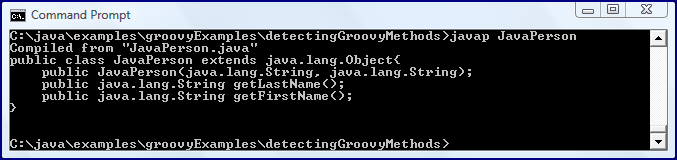
As an interesting side note here, let's look at what the javap output looks like for a Java class compiled via traditional javac as compared to the javap output for a Java class compiled via groovyc. To illustrate this, the pure Java JavaPerson class will be compiled both with javac (Java compiling) and with groovyc (Groovy/Java combination compilation). The output from running the javap tool against each generated .class file is then displayed in the screen snapshots.

javap Output for javac-Generated JavaPerson

javap Output for groovyc-Generated JavaPerson

The two images just shown demonstrate quite different output. The output from javap for the javac-compiled Java class shows the methods we expected: a constructor and two "get" methods for the two attributes. We can also see that the class simply extends the Java Object class that is extended directly or indirectly by all Java classes. The output from the groovyc-compiled Java class shows that it not only extends Object, but that it also implements the groovy.lang.GroovyObject interface. We can also observe that there are many more methods available in the version compiled with groovyc, including the automatically added "set" methods and the "meta" infrastructure methods added by Groovy.


groovy.inspect.Inspector

Groovy makes its introspection capabilities accessible via a single interface encapsulated within the groovy.inspect.Inspector class. The following code snippet shows how this handy class might be used to easily access data about a particular object (whichever object is accepted in the method call under the name 'obj').

def doInspector(obj)
{
   def inspector = new groovy.inspect.Inspector(obj)
   def inspectorReport = new StringBuilder()
   inspectorReport <<<< "Object under inspection "
   inspectorReport <<<< (inspector.isGroovy() ? "IS" : "is NOT") <<<< " Groovy!\n"
   inspectorReport <<<< "METHODS\n"
   def methods = inspector.methods
   methods.each
   {
      inspectorReport <<<< "\t" <<<< it.toString() <<<< "\n"
   }
   inspectorReport <<<< "\nMETA METHODS\n"
   def metaMethods = inspector.metaMethods
   metaMethods.each
   {
      inspectorReport <<<< "\t" <<<< it.toString() <<<< "\n"
   }
   inspectorReport <<<< "\nPROPERTY INFO\n"
   def properties = inspector.propertyInfo
   properties.each
   {
      inspectorReport <<<< "\t" <<<< it.toString() <<<< "\n"
   }
   println inspectorReport
}

If the above code is invoked and an instance of PersonWithInspect is passed to it, the output looks like the following:

Object under inspection IS Groovy!
METHODS
 [JAVA, public, PersonWithInspect, Object, invokeMethod, String, Object, ]
 [JAVA, public, PersonWithInspect, MetaClass, getMetaClass, , ]
 [JAVA, public, PersonWithInspect, void, setMetaClass, MetaClass, ]
 [JAVA, public, PersonWithInspect, String, inspect, , ]
 [JAVA, public, PersonWithInspect, Object, this$dist$invoke$2, String, Object, ]
 [JAVA, public, PersonWithInspect, void, this$dist$set$2, String, Object, ]
 [JAVA, public, PersonWithInspect, Object, this$dist$get$2, String, ]
 [JAVA, public, PersonWithInspect, void, super$1$wait, long, int, ]
 [JAVA, public, PersonWithInspect, void, super$1$wait, long, ]
 [JAVA, public, PersonWithInspect, void, super$1$wait, , ]
 [JAVA, public, PersonWithInspect, String, super$1$toString, , ]
 [JAVA, public, PersonWithInspect, void, super$1$notify, , ]
 [JAVA, public, PersonWithInspect, void, super$1$notifyAll, , ]
 [JAVA, public, PersonWithInspect, Class, super$1$getClass, , ]
 [JAVA, public, PersonWithInspect, boolean, super$1$equals, Object, ]
 [JAVA, public, PersonWithInspect, Object, super$1$clone, , ]
 [JAVA, public, PersonWithInspect, int, super$1$hashCode, , ]
 [JAVA, public, PersonWithInspect, void, super$1$finalize, , ]
 [JAVA, public, PersonWithInspect, String, getLastName, , ]
 [JAVA, public, PersonWithInspect, void, setLastName, String, ]
 [JAVA, public, PersonWithInspect, String, getFirstName, , ]
 [JAVA, public, PersonWithInspect, void, setFirstName, String, ]
 [JAVA, public, PersonWithInspect, void, setProperty, String, Object, ]
 [JAVA, public, PersonWithInspect, Object, getProperty, String, ]
 [JAVA, public, PersonWithInspect, String, toString, , ]
 [JAVA, public final native, Object, void, wait, long, InterruptedException]
 [JAVA, public final, Object, void, wait, , InterruptedException]
 [JAVA, public final, Object, void, wait, long, int, InterruptedException]
 [JAVA, public, Object, boolean, equals, Object, ]
 [JAVA, public native, Object, int, hashCode, , ]
 [JAVA, public final native, Object, Class, getClass, , ]
 [JAVA, public final native, Object, void, notify, , ]
 [JAVA, public final native, Object, void, notifyAll, , ]
 [JAVA, public, PersonWithInspect, PersonWithInspect, PersonWithInspect, String, String, ]

META METHODS
 [GROOVY, public, Object, Collection, collect, Collection, Closure, n/a]
 [GROOVY, public, Object, List, getMetaPropertyValues, , n/a]
 [GROOVY, public, Object, Object, eachWithIndex, Closure, n/a]
 [GROOVY, public, Object, void, print, PrintWriter, n/a]
 [GROOVY, public, Object, void, addShutdownHook, Closure, n/a]
 [GROOVY, public, Object, Iterator, iterator, , n/a]
 [GROOVY, public static, Object, void, sleep, long, n/a]
 [GROOVY, public, Object, Object, inject, Object, Closure, n/a]
 [GROOVY, public, Object, int, findLastIndexOf, Closure, n/a]
 [GROOVY, public, Object, void, setMetaClass, MetaClass, n/a]
 [GROOVY, public, Object, boolean, any, Closure, n/a]
 [GROOVY, public, Object, Object, use, [Ljava.lang.Object;, n/a]
 [GROOVY, public, Object, boolean, every, , n/a]
 [GROOVY, public, Object, void, println, PrintWriter, n/a]
 [GROOVY, public, Object, MetaClass, getMetaClass, , n/a]
 [GROOVY, public, Object, Collection, split, Closure, n/a]
 [GROOVY, public, Object, Collection, findAll, Closure, n/a]
 [GROOVY, public, Object, List, findIndexValues, Number, Closure, n/a]
 [GROOVY, public, Object, void, printf, String, Object, n/a]
 [GROOVY, public, Object, MetaProperty, hasProperty, String, n/a]
 [GROOVY, public, Object, Object, asType, Class, n/a]
 [GROOVY, public, Object, String, sprintf, String, Object, n/a]
 [GROOVY, public, Object, Object, getAt, String, n/a]
 [GROOVY, public, Object, List, collect, Closure, n/a]
 [GROOVY, public, Object, boolean, every, Closure, n/a]
 [GROOVY, public, Object, Collection, grep, Object, n/a]
 [GROOVY, public, Object, String, dump, , n/a]
 [GROOVY, public, Object, int, findIndexOf, int, Closure, n/a]
 [GROOVY, public, Object, Object, use, Class, Closure, n/a]
 [GROOVY, public, Object, Object, identity, Closure, n/a]
 [GROOVY, public, Object, Map, getProperties, , n/a]
 [GROOVY, public, Object, void, println, , n/a]
 [GROOVY, public, Object, Object, invokeMethod, String, Object, n/a]
 [GROOVY, public, Object, List, findIndexValues, Closure, n/a]
 [GROOVY, public, Object, boolean, is, Object, n/a]
 [GROOVY, public, Object, int, findIndexOf, Closure, n/a]
 [GROOVY, public, Object, String, inspect, , n/a]
 [GROOVY, public, Object, boolean, asBoolean, , n/a]
 [GROOVY, public, Object, Object, with, Closure, n/a]
 [GROOVY, public, Object, boolean, any, , n/a]
 [GROOVY, public, Object, void, printf, String, [Ljava.lang.Object;, n/a]
 [GROOVY, public, GroovyObject, MetaClass, getMetaClass, , n/a]
 [GROOVY, public, Object, void, println, Object, n/a]
 [GROOVY, public, Object, MetaClass, metaClass, Closure, n/a]
 [GROOVY, public, Object, List, respondsTo, String, n/a]
 [GROOVY, public, Object, Object, each, Closure, n/a]
 [GROOVY, public, Object, Object, find, Closure, n/a]
 [GROOVY, public, Object, boolean, isCase, Object, n/a]
 [GROOVY, public, Object, void, print, Object, n/a]
 [GROOVY, public, Object, void, putAt, String, Object, n/a]
 [GROOVY, public static, Object, void, sleep, long, Closure, n/a]
 [GROOVY, public, Object, int, findLastIndexOf, int, Closure, n/a]
 [GROOVY, public, Object, String, toString, , n/a]
 [GROOVY, public, Object, Object, use, List, Closure, n/a]
 [GROOVY, public, Object, List, respondsTo, String, [Ljava.lang.Object;, n/a]
 [GROOVY, public, Object, String, sprintf, String, [Ljava.lang.Object;, n/a]

PROPERTY INFO
 [GROOVY, public, n/a, Class, class, class PersonWithInspect]
 [GROOVY, public, n/a, String, firstName, "Barney"]
 [GROOVY, public, n/a, String, lastName, "Rubble"]
 [GROOVY, public, n/a, MetaClass, metaClass, org.codehaus.groovy.runtime.HandleMetaClass@e53220[groovy.lang.MetaClassImpl@e53220[class PersonWithInspect]]]

There is significant data provided by Inspector. The "GROOVY" or "JAVA" portions indicate the origin of the field or method (Groovy or Java source code).

Out of curiosity, what does Inspector report for a Java class compiled with groovyc (or compiled implicitly when accessed by a Groovy script)? The following output shows what Inspector reports (including the fact that the underlying class is NOT Groovy, though there are Groovy methods added).

Object under inspection is NOT Groovy!
METHODS
 [JAVA, public, JavaPerson, String, getLastName, , ]
 [JAVA, public, JavaPerson, String, getFirstName, , ]
 [JAVA, public final native, Object, void, wait, long, InterruptedException]
 [JAVA, public final, Object, void, wait, , InterruptedException]
 [JAVA, public final, Object, void, wait, long, int, InterruptedException]
 [JAVA, public, Object, boolean, equals, Object, ]
 [JAVA, public, Object, String, toString, , ]
 [JAVA, public native, Object, int, hashCode, , ]
 [JAVA, public final native, Object, Class, getClass, , ]
 [JAVA, public final native, Object, void, notify, , ]
 [JAVA, public final native, Object, void, notifyAll, , ]
 [JAVA, public, JavaPerson, JavaPerson, JavaPerson, String, String, ]

META METHODS
 [GROOVY, public, Object, List, collect, Closure, n/a]
 [GROOVY, public, Object, Map, getProperties, , n/a]
 [GROOVY, public, Object, boolean, every, , n/a]
 [GROOVY, public, Object, void, print, Object, n/a]
 [GROOVY, public, Object, boolean, any, , n/a]
 [GROOVY, public, Object, MetaClass, metaClass, Closure, n/a]
 [GROOVY, public static, Object, void, sleep, long, Closure, n/a]
 [GROOVY, public, Object, String, inspect, , n/a]
 [GROOVY, public, Object, int, findLastIndexOf, int, Closure, n/a]
 [GROOVY, public, Object, Collection, split, Closure, n/a]
 [GROOVY, public, Object, boolean, asBoolean, , n/a]
 [GROOVY, public, Object, Object, use, Class, Closure, n/a]
 [GROOVY, public, Object, boolean, every, Closure, n/a]
 [GROOVY, public, Object, void, println, Object, n/a]
 [GROOVY, public, Object, List, getMetaPropertyValues, , n/a]
 [GROOVY, public, Object, String, sprintf, String, [Ljava.lang.Object;, n/a]
 [GROOVY, public, Object, int, findIndexOf, Closure, n/a]
 [GROOVY, public, Object, int, findLastIndexOf, Closure, n/a]
 [GROOVY, public, Object, void, println, , n/a]
 [GROOVY, public, Object, Object, identity, Closure, n/a]
 [GROOVY, public, Object, Collection, collect, Collection, Closure, n/a]
 [GROOVY, public, Object, String, toString, , n/a]
 [GROOVY, public, Object, MetaClass, getMetaClass, , n/a]
 [GROOVY, public, Object, String, dump, , n/a]
 [GROOVY, public, Object, Object, find, Closure, n/a]
 [GROOVY, public, Object, Object, each, Closure, n/a]
 [GROOVY, public, Object, MetaProperty, hasProperty, String, n/a]
 [GROOVY, public, Object, List, findIndexValues, Closure, n/a]
 [GROOVY, public, Object, Object, use, List, Closure, n/a]
 [GROOVY, public, Object, Object, inject, Object, Closure, n/a]
 [GROOVY, public, Object, Collection, grep, Object, n/a]
 [GROOVY, public, Object, void, println, PrintWriter, n/a]
 [GROOVY, public, Object, boolean, is, Object, n/a]
 [GROOVY, public, Object, List, findIndexValues, Number, Closure, n/a]
 [GROOVY, public, Object, boolean, isCase, Object, n/a]
 [GROOVY, public, Object, int, findIndexOf, int, Closure, n/a]
 [GROOVY, public, Object, Object, invokeMethod, String, Object, n/a]
 [GROOVY, public, Object, Object, asType, Class, n/a]
 [GROOVY, public static, Object, void, sleep, long, n/a]
 [GROOVY, public, Object, boolean, any, Closure, n/a]
 [GROOVY, public, Object, void, addShutdownHook, Closure, n/a]
 [GROOVY, public, Object, void, printf, String, Object, n/a]
 [GROOVY, public, Object, void, putAt, String, Object, n/a]
 [GROOVY, public, Object, void, print, PrintWriter, n/a]
 [GROOVY, public, Object, List, respondsTo, String, [Ljava.lang.Object;, n/a]
 [GROOVY, public, Object, Object, eachWithIndex, Closure, n/a]
 [GROOVY, public, Object, Collection, findAll, Closure, n/a]
 [GROOVY, public, Object, Iterator, iterator, , n/a]
 [GROOVY, public, Object, void, printf, String, [Ljava.lang.Object;, n/a]
 [GROOVY, public, Object, List, respondsTo, String, n/a]
 [GROOVY, public, Object, Object, getAt, String, n/a]
 [GROOVY, public, Object, Object, use, [Ljava.lang.Object;, n/a]
 [GROOVY, public, Object, Object, with, Closure, n/a]
 [GROOVY, public, Object, void, setMetaClass, MetaClass, n/a]
 [GROOVY, public, Object, String, sprintf, String, Object, n/a]

PROPERTY INFO
 [GROOVY, public, n/a, Class, class, class JavaPerson]
 [GROOVY, public, n/a, String, firstName, "Barney"]
 [GROOVY, public, n/a, String, lastName, "Rubble"]


ObjectBrowser

In this post, I have looked at general Java techniques (Javadoc, Object.toString(), javap) for peeking inside of Groovy objects as well as Groovy-specific approaches. I have saved an extremely useful Groovy-specific approach for last. The Groovy graphical-based ObjectBrowser is a user-friendly approach for seeing the innards of a Groovy object. It is based on Groovy's many inspection techniques including those already discussed here. In fact, it's Javadoc comments state about it: "A little GUI to show some of the Inspector capabilities." In other words, ObjectBrowser provides graphical access to the capabilities provided by groovy.inspect.Inspector.

There is more than one way to access ObjectBrowser. When using Groovy Shell, for example, one can type the "inspect" command to invoke ObjectBrowser. This is demonstrated in the next screen snapshot.


The ObjectBrowser can be invoked outside of the Groovy Shell as well. For example, the ObjectBrowser GUI is automatically started when groovy.inspect.swingui.ObjectBrowser.inspect(obj) is invoked within Groovy code (and obj is the name of the object to be evaluated).

As shown in the image above, the Groovy Object Browser provides details of the public fields and methods as well as the Groovy meta methods. It shows the name, current value, data type, modifier, and declarer for each. It also supplies the origin (Groovy or Java) of each. Advantages of this approach includes its being graphical in nature and easy to use as well as the breadth of information (including current values) that it provides.


Integrated Development Environments

Integrated Development Environments (IDEs) have lagged behind in their support for dynamic languages as compared to their support for static languages. That being stated, IDEs continue to offer improved support and plug-ins for Groovy and can be useful in determining details of what a Groovy class has to offer.


Conclusion

I have discussed and demonstrated several different Groovy-specific and Java-general approaches for determining characteristics of a Groovy object. These approaches overlap (and some even make sure of each other) and have their own advantages and disadvantages. There is no shortage of approaches for learning more about the characteristics of a given Groovy object, so which is best to use often depends on the particular situation and the developer's needs.


Further Reading

⇒ Groovy Introspection: Know What You Have

⇒ Groovy Goodness: Getting Information about Objects

⇒ Difference Between inspect() and dump()

⇒ Background on dump() and inspect()

⇒ Groovy inspect()/Eval for Externalizing Data

Tuesday, January 11, 2011

Recent HTML5 Links of Interest

HTML5 is all the rage right now. There seems to be an increasing number of blog posts and articles on HTML5 each day. In this post, I look at some of the recent posts on HTML5 that I have found particularly interesting.


Chrome Dropping Video Codec H.264

It was big news when World Wide Web Consortium's (W3C's) Philippe Le Hegaret stated, "The problem we’re facing right now is there is already a lot of excitement for HTML5, but it’s a little too early to deploy it because we’re running into interoperability issues." In his coverage of this quote in W3C: Hold off on deploying HTML5 in websites, Paul Krill summarizes a particular sticking point in HTML5's progress:

HTML5 still does not have a video codec. It can’t use the popular MPEG-4 format because it has “patent issues” according to Le Hegaret. Google is hoping that its open source WebM format could become the default, but that is far from settled yet.

The problem of the video codecs was illustrated clearly today with the announcement that the Chrome web browser will be dropping its H.264 support in order to "focus investments" on "technologies that are developed and licensed based on open web principles." Chrome will support "WebM (VP8) and Theora video codecs" and may provide "support for other high-quality open codecs in the future." These statements are specifically talking about Chrome's support for the HTML5 <video> element.

The announcement is interesting because it illustrates the struggles of HTML5 to have standard video implementations. Other browsers will likely continue supporting H.264 for the forseeable future. Developers are stuck with the unenviable position of needing to decide which codecs to encode their video with or making multiple copies of their video for the different formats. In all likelihood, most developers will likely simply use Flash or Silverlight to do this heavy lifting if the browsers cannot improve standardization and compliance on the video front.

The comments on the Chrome announcement regarding dropping of H.264 support (numbering nearly 400 at time of this writing) are an interesting read as well. There is a wide range of responses. Even developers who want to see open standards prevail are at odds over whether this is a good move or not. Some developers think it is good for open standards because Google is choosing "open" over proprietary. Others who want open standards to progress feel it will lead to just the opposite result: developers and users will continue/return to Flash/Silverlight and abandon or minimize HTML5. Some feel the move is simply another tactic in the increasing clashes between Google and Apple similar to Google's pulling out of JavaOne 2010 in its spat with Oracle.

End users are not too happy about the Chrome announcement either. The general demographic of the people commenting on this post seems to be technically-minded individuals and even many of them realize that they will likely shift to a browser that plays a video format as prevalent as H.264. I have a difficult time believing that ends user with less technical savvy will want to continue using a browser that doesn't play many of the videos out there (or they'll simply make sure they have Flash installed!).

On the one hand, developers admire Google's decision choosing open over closed. On the other hand, some developers argue that choice is always best and that Chrome should support open standards but should not remove support for the closed but common (defacto standard) format.

I'll admit that I'm torn on the issue and understand the various arguments and can appreciate them. In the end, though, I too think that if it becomes too much of a pain for me as an end user, it's all too easy to switch to one of the many other fine web browsers that are available. There's much to like about Chrome, but it still has a relatively small percentage of users compared to Internet Explorer and Firefox. I'd expect this usage to stop growing and even decline among general users without standard video support unless Flash is able to cover the gap (the most likely scenario for web developers to deliver if they want to make their customers' video experience consistent). Chrome is more popular among developers, but even its popularity in that group could be reduced because of this move.


Undetectable HTML5 Features

Scott Gilbertson's post A Guide to HTML5 Features You Can’t Detect references Modernizr's wiki page on The Undetectables. I have blogged previously on using Modernizr to detect HTML5 compliance in Firefox, Chrome, Safari, and Internet Explorer and on using Modernizr to detect HTML5 compliance in Opera. Unfortunately, there are HTML5 features that are not sufficiently supported in one or more browsers whose lack of availability cannot be detected through the typical feature detection mechanism. The Modernizr wiki page The Undetectables lists features whose presence/absence cannot be determined via feature detection and enumerates the three possibilities left to the web developer for dealing with these.


HTML5 Templates

The HTML5 Boilerplate is well known among HTML5 developers as a starting point for HTML5/CSS/JavaScript and as an example of what can be done with these technologies. However, some find it too difficult or too large to use as-is as evidenced in The Real HTML5 Boilerplate post. HTML5 templates seem to be popular now and two examples are Easy HTML5 Template and Five Free Beautiful HTML5 Templates.


People of HTML5

Chris Heilmann, "Principal Evangelist at Mozilla for HTML5 and open web," has started a series of posts called People of HTML5 and so far he has highlighted Bruce Lawson and Remy Sharp. I typically don't care much about posts about individuals, but these are interesting because of the insight they provide into HTML5 as it is today and as it is expected to be tomorrow.


Conclusion

I really like many things about HTML5, a large number of which are already well supported and an even larger number of which will be really well supported among the two dominant web browsers when Firefox 4 and Internet Explorer 9 come out of beta. However, there are legitimate concerns about portions of HTML5 such as video that appear to be potentially troublesome for the near future. The frequency of HTML5 posts demonstrates the enthusiasm for it, but legal and political realities seem to still be hurdles. It is most likely that, much like previous versions of HTML, some portions of HTML5 will enjoy greater consistency of implementation than others. Developers will be likely to favor those HTML5 features with the greatest consistency in support and to provide fallbacks for other features if used at all.

Monday, January 10, 2011

MySQL and Other Topics in RMOUG SQL>Update Winter 2010 Edition

The Winter 2010 edition of RMOUG SQL>Update (the newsletter of the Rocky Mountain Oracle Users Group) arrived this week. It had several interesting articles that I'll reference here. As usual, the newsletter was largely oriented toward database administration, but I still found some things of interest to developers.

Peggy King's "From the President" column provided a summary of RMOUG happenings in 2010. About Training Days 2010, King states, "Over eighty speakers from RMOUG and around the world came together to present what has become known as one of the top Oracle conferences." I presented at RMOUG Training Days 2010 on REST and Groovy and will be presenting on Groovy and HTML5 at RMOUG Training Days 2011 next month.

King also states in her column that over 25 Oracle Aces/Ace Directors attended Training Days 2010 and that 2010's edition was the first to feature an Oracle Ace Panel. Peggy also highlighted RMOUG's three quarterly training meetings, the RMOUG newsletter SQL>Update, and other RMOUG events in 2010.

Technical articles featured in the Winter 2010 edition of RMOUG SQL>Update include Steven Feuerstein's "Guarantee Application Success." A "PL/SQL Evangelist for Quest Software since January 2001," Feuerstein starts his article with these two sentences:

The lawyers at Quest Software asked me to clarify something right up front: using our software will not guarantee that you will be successful. Having said that, I do believe that if you follow the ideas in this paper and my presentation you are likely to improve the chances of delivering a successful application.

The presentation referenced in that quote is probably the Oracle OpenWorld 2010 presentation Guarantee Application Success and is probably related to Guarantee Application Success with the Toad Development Suite. In the article, Feuerstein sets up criteria that an application must be correct, fast enough, and maintainable and then goes into the general high-level approaches he believes should be followed to achieve these desirable criteria. Although PL/SQL is mentioned specifically, most of these ideas apply to development in any language.

John Krahulec's "Enterprise Social Networking: It's Now Ready for the Workplace" begins with an introduction to "Enterprise Social Networking." Krahulec states that "Enterprise Social Networking connects People to People and People to Information." He writes about the merits of social networking and how to deliver those merits to the enterprise. He also discusses the obstacles to adoption of enterprise social networking and discusses use of an Oracle database in application of an enterprise social network. I am interested to see if Enterprise Social Networking continues to grow or if it will fizzle out because of various issues and concerns.

In "ASM - The Next Generation," Tim Mishek looks at the current state of Automatic Storage Management. After describing ASM Dynamic Volume Manager, ASM Clustered File System, ASM Configuration Assistant (asmca), ASM Command Line Interface (ASMCMD), and other issues related to ASM, Mishek concludes, "Oracle has really done it right. Not only is ASM an absolute necessity for database clustering technologies, but is now a better option for general database storage. ... ASM has become a full featured storage solution."

The most interesting article in this edition of the newsletter for me is the single page article "Four Things to Know about MySQL" by Benjamin Wood. During Oracle's acquisition of Sun and its MySQL assets, some were concerned that Oracle only wanted MySQL to kill it. Several Oracle actions since the acquisition have proven otherwise. This article on MySQL by an Oracle Sales Consultant in a magazine heavily targeted at Oracle database administrators is further evidence that Oracle plans to continue supporting and providing MySQL. Wood provides explanation for his "four things," but I only list the four items here (see page 20 of the newsletter for the explanations). The four things Wood states we should know about MySQL follow:

1. MySQL is Now an Oracle Product
2. MySQL Powers the High Volume Web
3. MySQL Powers Critical Infrastructure
4. Oracle 11g and MySQL Work Together

Wood ends his article by explaining how to acquire MySQL from edelivery.oracle.com. He concludes, "Leverage your Oracle knowledge and get started with the world's most popular open source database -- now an Oracle product!"

Dan Hotka is the subject of the "RMOUG Member Focus" column. It is interesting to read about the technology advancements he has seen in his career. It is also interesting to read about the various twists in his career that I believe most of us experience if we stay in the technology-oriented careers long enough.

Heidi Kuhn is the subject of the "RMOUG Board Focus" column. As the RMOUG Administrative Assistant, Kuhn has access to interesting statistical information about RMOUG. Her column includes pie charts indicating the membership types in RMOUG ("Individuals" dominate with 77% of the memberships) and the percentage of RMOUG members associated with a company (67% associated with a company, 32% individual, and 1% students). Perhaps most interesting of all is the line chart showing RMOUG membership from 1998 through 2010. Current numbers (less than 1000 members) are the lowest on the chart and the peak was in the early 2000s (~2000 members).

Although Oracle now owns many products outside of the Oracle database, I don't think there's any question that RMOUG is still primarily made up of database administrators and focused on database administration. That being stated, RMOUG does work to have presentations at Training Days that are not database related (mine are typically good examples of this) and to address other technology areas as well. Although I'm not a DBA and have no desire to become one, I do find it advantageous to know at least a little about the database.

Recent Postings of Interest - 10 January 2011

I have read numerous blog posts recently that I wanted to make note of because I have found them interesting and because I'd like to keep a reference to them. Because one of my blog's purposes is as a glorified bookmark, this post points to these useful posts and adds a little detailed description. Topics covered by the referenced posts include HTML5, Java, Perl, perception of what's cool in software development.


Top Ten Rising Web Technologies in 2010

In Highlights of web technology surveys, January 2011: Top 10 rising web technologies in 2010, Matthias Gelbmann posts a list of web technologies that were most frequently adopted by web sites in 2010. The results are based on absolute number of sites adding the technology rather than on percentage adoption. Web technologies on the list include UTF-8, Google Analytics, and XHTML.

It was the XHTML adoption that I found to be particularly interesting. The quote that really got me thinking was a quote addressing the current trend of widening XHTML use: "This trend could be reversed in 2011 by the movement towards HTML5." HTML5 brings the XHTML and HTML specifications back together under a single specification (its single sentence description is "A vocabulary and associated APIs for HTML and XHTML"), but it is interesting to consider that there is potential for this combined HTML/XHTML specification to actually reduce the number of sites using XHTML.

The history of HTML/XHTML is full of political intrigue. The HTML5 specification attempts to gather everyone back into the fold. The specification overview (see HTML versus XHTML section) currently describes when the HTML5 "concrete syntax" is expected to be used and when XHTML "concrete syntax" is expected to be used in conjunction with HTML5:

The first such concrete syntax is the HTML syntax. This is the format suggested for most authors. It is compatible with most legacy Web browsers. If a document is transmitted with an HTML MIME type, such as text/html, then it will be processed as an HTML document by Web browsers. This specification defines version 5 of the HTML syntax, known as "HTML5".

The second concrete syntax is the XHTML syntax, which is an application of XML. When a document is transmitted with an XML MIME type, such as application/xhtml+xml, then it is treated as an XML document by Web browsers, to be parsed by an XML processor. Authors are reminded that the processing for XML and HTML differs; in particular, even minor syntax errors will prevent a document labeled as XML from being rendered fully, whereas they would be ignored in the HTML syntax. This specification defines version 5 of the XHTML syntax, known as "XHTML5".

There are several things worth highlighting here. First, applying XHTML continues to be more than a matter of simply using XML grammar and maintaining well-formed XML. XHTML-ness is really determined by the use an on XML MIME type (typically application/xhtml+xml). Second, I found it interesting that the statement is made that HTML5 (as opposed to XHTML5) is "the format suggested for most authors."

It will be interesting to see if HTML5 adoption does indeed reduce the popularity and use of XHTML.


What Makes Technologies Hip?

Su-Shee's post And suddenly, you're hip makes some interesting observations. The author looks at how certain strategies and tactics have made certain languages and software development tools popular. A differentiation is made between concepts like recognition and publicity versus real user base. An example used in this post is vim and the author maintains that there has been renewed interest in vim recently because of certain events and actions in the vim community. I'm a fan of vim. I blogged on Faithful Old Development Tools and mentioned using vi, but the truth is that I actually use vim much of the time.

Besides the author's observations about what types of things can make a language or tool be perceived as cooler, more hip, or more exciting, I found it interesting that this thinking was applied to Perl. For me, there are some similarities, but there are also some differences. Both Perl and vim (or vi more strictly) are available on practically any Linux-based system I might ever encounter. I have used both vim (vi) and Perl throughout my software development career. All of this being stated, however, I can still say that while I enjoy vim, I generally avoid Perl when I can.

Java IDEs have come a long way and they are very powerful. I use them for most of my Java development. There are times, however, when I need the conciseness and different type of power of vim and I use it then. I know when each type of editor works best for me and use them when appropriate. The best of both worlds is obtained when I can have a vi emulator on my Java IDE.

One of my issues with Perl is that although most of us have had to dabble in it from time to time, it is still very difficult to read anyone else's Perl code. There are too many ways to do the same thing and we all seem to choose a different way. I don't even like to read my own Perl too far out from when I wrote it and I certainly don't want to read the other person's Perl. If Java is the "write once run anywhere" language, Perl (for me) is the "write once" language (hope you never need to return to maintain it).

I think there are times when a scripting language works best and times when I want more of a full-fledged production language. The problem is that Perl is never my first choice for either. For development of applications, I prefer language such as Java and C#. For scripting, I prefer Ruby or Groovy. I have not done much with Python, but my guess is that I'd prefer it over Perl as well.

My general avoidance of Perl is a matter of personal taste gained from experience with it and with alternatives. I don't think there's much the Perl community can do, short of overhauling the language, to change my mind. That being stated, I actually agree with most of the author's sentiments regarding what makes a technology appear "cool." It's just that in my case, it's difficult to imagine these same tactics having the same degree of positive effect for my perception of Perl.

I expect that I'll be using Perl for years to come. There's just too much of it out there to think otherwise. I don't see myself choosing to start greenfield scripting with Perl. The author also implied (to me at least) that the impact and influence of Ruby might arguably be even greater than its actual deployment base. Perl has had both: it has been heavily deployed and has influenced newer scripting languages. The modern scripting languages have, in my opinion, taken the best of Perl and left some of its warts behind.

Putting my natural reaction to Perl aside, I also appreciate the author's delineation of the types of strategies that can make a language or framework or tool more likely to be used and discussed. The author outlines strategies such as creating screen casts, providing more beginning-level documentation, and "confessional blog posts."

Even if you don't use Perl, hope to never use Perl, and don't care what the Perl community does to make Perl more popular, you still may find this post interesting. It's a reminder of how easily perception can be formed if enough evangelists keep pounding the message and presenting it in appropriate and mixed ways.


HTML5 Does Not Mean the Death of Silverlight

There are all types of posts claiming Java is Dead or Flash is Dead or Silverlight is Dead. Of course, these are usually the post author's hope rather than reality. Dan Wahlin's post Silverlight is Dead, the Moon is Made of Cheese, and HTML 5 is Ready for Prime Time does a nice job of explaining the upside of HTML5 while also injecting some reality into the HTML5 hype. He explains why he both plans to invest time in learning and using HTML5, but also plans to continue using Silverlight. Many of the same arguments can be used to understand that although HTML5 has much promise, technologies such as Flash/Flex or even Java on the web are not going away anytime soon.

It is easy to get caught up in the HTML5 wave of enthusiasm. There is much to be excited about and the perception tactics discussed earlier in this post are being used in full press. However, one simply needs to use most of the HTML5 features across multiple browsers to realize that HTML5 support is still wanting. There is also the now well-known statement from a W3C official that HTML5 is not ready for primetime. There are also numerous online posts explaining why HTML5 won't be the end of Flash anytime soon.

Other recent articles on the HTML5 subject range from the ultra positive Why HTML5 Will Really Matter in 2011 to the negative ("HTML5 is a scam!") lies and facts post.


DZone's Refcard on REST

DZone has issued a new (#129) Refcard in its popular Refcardz series. This newest edition is called REST: Foundations of RESTful Architecture and focuses on principles behind the Representational State Transfer architectural style.

The "REST: Foundations of RESTful Architecture" refcard is written by Brian Sletten and covers topics such as the basics of REST, REST frameworks, REST definitions, REST resources (in multiple senses), and the Richardson Maturity Model.


Understanding How Java Debug Works

Carlo Scarioni's post Understanding How Java Debug Works is the type of post I often like to write in that he focuses on details at a lower level than many of us traditionally think. Understanding things at a deeper level than that which we use them can be of tremendous value at times. For example, most of us use calculators for a wide variety of mathematical operations, but it is always better to understand the math behind what the calculator is doing.


Java Concurrency Bug Patterns for Multicore Systems

I believe that concurrent programming is the "next big thing" in software development. The transition to "thinking in threading" is going to be similar to the transition from procedural programming to "thinking in objects." Because of this, I like to read as much as I have time for related to Java concurrency support and best practices. The IBM developerWorks article Java Concurrency Bug Patterns for Multicore Systems is informative and is focused on six "bug patterns" that are perhaps less well known than others, but which "do show up frequently in real Java applications."

HotSpot JVM Options Displayed: -XX:+PrintFlagsInitial and -XX:+PrintFlagsFinal

Inspecting HotSpot JVM Options is a great post for those wishing to understand better the options provided by Oracle's (formerly Sun's) HotSpot Java Virtual Machine. In this thorough post, Zahid Qureshi discusses how to use the option -XX:+PrintFlagsFinal in conjunction with -XX:+UnlockDiagnosticVMOptions to "dump out every JVM option and its value." Zahid goes further than this and runs these flags against the HotSpot JVM in both client (his client output here) and server mode (his server output here), compares/diffs the options each uses (his diff results here), and analyzes some of the differences. In doing so, Zahid also demonstrates the "super option" -XX:+AggressiveOpts.

Before reading Zahid's post, I had never seen or read about the XX:+PrintFlagsFinal option. After downloading the latest SDK (Java SE 6 Update 23), I was able to use the option.

Neither specifying -version or specifying -XX:+UnlockDiagnosticVMOptions are required to use the -XX:+PrintFlagsFinal option, but there are advantages of doing so. The advantage of specifying -version is that doing so leads to only the version information being printed after the options rather than the longer Java application launcher usage being printed. The advantage of specifying the unlocking of diagnostic VM options with -XX:+UnlockDiagnosticVMOptions is that diagnostic VM options are included in the output. This is shown in the next screen snapshot.


The -XX:+PrintFlagsFinal (emphasis on "Final") option displays what options HotSpot ended up using for running Java code while -XX:+PrintFlagsInitial (emphasis on "Initial") displays what options were provided to HotSpot initially, before HotSpot has made its own tweaks. Comparing the results of -XX:+PrintFlagsFinal to -XX:+PrintFlagsInitial can obviously be helpful in understanding optimizations that HotSpot has made. More details on these options are available in Re: Bleeding Edge JVM Options and SDN Bug 6914622.

I haven't seen any formal explanation regarding these options (Zahid refers to one of them being "hidden away in the JVM source code" - an advantage of open source!). From the output generated, however, it is possible to gain a good idea of what is displayed. The output of running java -XX:+PrintFlagsFinal -XX:+UnlockDiagnosticVMOptions -version is text with a header row stating [Global flags] followed by numerous rows with one option and its metdata per row. Each row of the output represents a particular global option and has four columns.

The first column appears to reflect the data type of the option (intx, uintx, uint64_t, bool, double, ccstr, ccstrlist). The second column is the name of the flag and the third column is the value, if any, that the flag is set to. The fourth column appears to indicate the type of flag and has values such as {product}, {pd product}, {C1 product} for client or {C2 product} for server, {C1 pd product} for client or {C2 pd product} for server, {product rw}, {diagnostic} (only if -XX:+UnlockDiagnosticVMOptions was specified), {experimental}, and {manageable}. See Eugene Kuleshov's The most complete list of -XX options for Java 6 JVM for a brief description of most of these categories as well as a listing of most of these options themselves.

The plethora of virtual machine options offered makes it possible to understand and control the virtual machine's behavior more granularly. Although a small subset of the virtual machine options for HotSpot are available online, it is always nice to be able to list them explicitly when needed. The option -XX:+PrintFlagsFinal does just that.

Revisiting My HTML5 Posts with Opera 11

When I first wrote my abstract for my upcoming RMOUG Training Days 2011 presentation "A First Look at HTML5," I wrote that I'd demonstrate HTML5 in versions of the three most commonly used web browsers: Internet Explorer, Firefox, and Chrome. By the time the abstract was accepted, I had decided to add Safari to the list. I have since decided to add Opera as a fifth web browser. Although Opera doesn't enjoy the widespread use of the first three browsers, it supports some of the HTML5 features as well or better than some of the other browsers and so is useful for a presentation on what HTML5 features will likely be supported. I have already written some posts on HTML5 features and demonstrated those features in the other four browsers. This post "catches up" for Opera and demonstrates the HTML5 Form placeholder support, the Geolocation API, and the Web Storage API in Opera 11.


Opera 11 on Modernizr.com

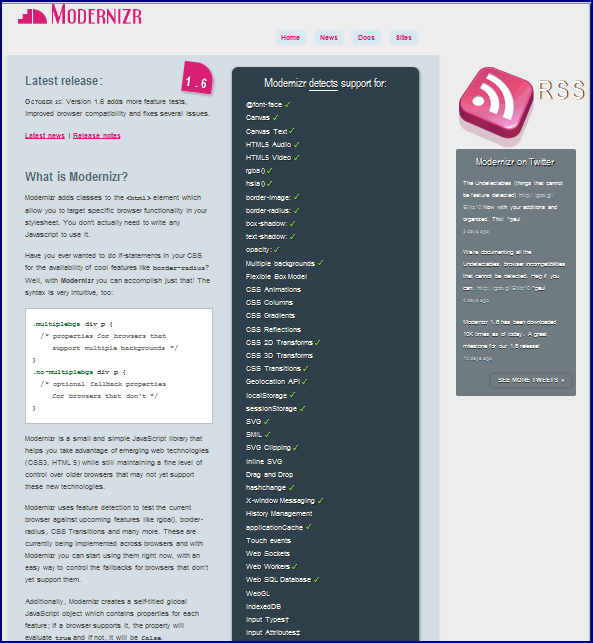
One of the first things I like to do if using a new web browser and wanting to understand what HTML5 support it has is to visit the Modernizr.com page. In Modernizr: A Handy HTML5 Tool, I looked at the pages rendered at the Modernizr.com site for versions of Internet Explorer, Firefox, Chrome, and Safari. A snasphot of this page rendered on Opera 11 is displayed next.


The screen snapshot demonstrates that Opera 11 provides significant breadth of HTML5 coverage.


Opera 11 and HTML5 Form Placeholder

The next two screen snapshots show for the Opera 11 browser what was shown for the other four browsers in my post HTML5 Form Placeholder Text. As the snapshots demonstrate, Opera 11 does support the placeholder text nicely.


Opera 11 and the Geolocation API

Although it's not technically part of the HTML5 specification, I blogged about the Geolocation API in HTML5 Geolocation API: Your Browser Knows Where You Are. The next series of screenshots demonstrate that this is well supported in Opera. An interesting twist in the Opera sequence is that not only is there a request asks the user if he or she really wants to allow the web site to see the geolocation information, but there is also a follow-on popup window ensuring that the user agrees to terms and conditions associated with this.


To turn off Opera 11's geolocation support, click on "Menu" -> "Settings" -> "Preferences" and then select the "Advanced" tab and select "Network" on the left. At this point, you should be able to uncheck the check box for "Enable geolocation." The next two screen snapshots show this navigation.


I don't show it here, but it's worth noting that when geolocation is disabled for Opera 11 using the setting just shown, the initial page in my example still shows it as enabled, but it simply doesn't work when the button is clicked. The status is updated to "Finished," but never gets to "W o r k i n g . . ." and never displays the latitude or longitude. Two of the web browsers covered previously behaved like this when this feature was turned off.


Opera 11 Web Storage

I blogged about Web Storage in the post HTML5 Local Storage: Web Storage. Opera 11 provides some nice support for Web Storage, which is not technically part of the HTML5 specification anymore, but is treated as part of the bigger "HTML5" concept by many of us. Here are some snapshots showing Opera's useful Web Storage in action. Note that I was able to use HTML source from my local filesystem to see Web Storage work. As I stated in the earlier post, that's not the case for all browsers.

Example Page on Initial Load (No Movie Titles in Storage)


Movie Titles Entered into Form But Not Persisted


"Save" Button Pressed and Movie Titles Persisted


Browser Shut Down and Reloaded


"Load" Button Pressed


To control Web Storage in Opera 11, use its Menu->Settings->Preferences (a screen snapshot in the Geolocation API section shows this), select the "Advanced" tab, and select "Storage" on the left. The ensuing popup is shown next.


Conclusion

As the images in this post have shown, Opera 11 provides excellent support for the "HTML5" features that I have covered so far in blog posts. I intend to regularly include Opera in future posts on browser support for other HTML5 features and I intend to use Opera 11 at my presentation at RMOUG Training Days 2011 next month.