Saturday, May 31, 2008

Highly Useful JPA-Related Blogs

I stated in a previous blog entry that I had to cut quite a bit of material from my first draft of the article Basic JPA Best Practices. In this blog entry, I want to discuss in more detail some of the blogs I have found that are most useful in my JPA development. While I was able to briefly mention the value of using such blogs in my article, I was not able to coverage them individually as well as I would have liked.

Blogs, by their nature, have certain advantages over other forms of communicating details on a specific technology. First, it is difficult to think of a faster way to communicate new information than a blog. Blog entries typically don't have the review process of a formal article and, in fact, are often even written more quickly by an author than an article would be. That, of course, is also the primary disadvantage of blogs -- they are not reviewed and their quality varies greatly from downright incorrect to highly valuable, informative, and leading edge.

Another advantage of the blog medium of communication is that it allows for highly focused coverage that appeals to a narrow audience that might not justify publication of a book or article. While books can be more detailed than articles, there is typically a significant period of time between a book's initial concept and its publication. In fact, it is this advantage of blogs (the ability to focus on narrow topics) that I am taking advantage of with this particular blog entry. I am focusing on some of the most useful JPA-related blogs I have encountered because I could not spend that much time on them in the article.

A final advantage of blogs over more traditional software development literature mediums is that many highly skilled, highly experienced, and knowledgeable developers may be more willing to write a blog entry or respond to a blog entry than they would be to take the time to write and publish an article or book.

Because of these advantages of the blog as a form of communication, it is useful for a JPA developer to read from and learn from the work of others as covered in JPA-related blogs. With these advantages established, it is time to look at some of the JPA-related blogs that I have found most useful in my own JPA work.

What Michael Bouschen's Blog lacks in terms of number of entries, it makes up for in terms of the unusually high quality of the entries. As of this writing, there are the only two entries as far as I can tell. Still, the two entries are useful enough to JPA developers to warrant this blog getting referenced in the article. The first entry, Using Relationships in the Java Persistence Query Language (July 2006), provides thorough but concise coverage of different types of joins that can be performed in JPA Query Language along with some other useful details about JPA Query Language relationships. I found the next blog entry, Java Persistence Query Return Types (April 2007), to be even more interesting and useful. This entry is also thorough but concise in its coverage of various methods of querying in JPA.

Wonseok Kim's Blog has many blog entries, including a large number on JPA, TopLink Essentials, and other JPA-related themes. There are too many entries to cover them individually here, but a good sample of the value provided in this blog can be found in the blog entry Understanding the Cache of of TopLink Essentials (GlassFish JPA). Of course, this will most interest users of TopLink Essentials as their JPA provider, but I imagine that is a fairly large group considering that it is the JPA 1.0 reference implementation and is bundled with GlassFish.

Sahoo's Blog is another valuable source of detailed JPA information. Sahoo has also posted several JPA-related entities, so I narrow my focus to two closely related examples. In the blog entries A javac Plugin to Manage Your persistence.xml and An annotation processor to update your persistence.xml during javac, Sahoo demonstrates how to use custom annotation processing to generate the persistence.xml file from in-source annotations in the Java code. This is similar to what I demonstrated for generating the orm.xml file (or equivalent multiple files) from in-source annotations in the OTN article Better JPA, Better JAXB, and Better Annotations Processing with Java SE 6.

There are, of course, many other blogs covering the Java Persistence API. Some (such as On Persistence [Shaun Smith], Java Persistence [Doug Clarke], and the EclipseLink Team Blog) are pretty much focused on JPA. Others (such as my blog, Chris Maki's blog, and the AMIS Technology Blog) have a more general software development focus, but occasionally feature JPA-specific blog entries.

JPA-related blog entries can provide many advantages such as timeliness, access to authoritative experts that might not wish to write a book or article, greater focus on details that don't warrant a full book or article, and other advantages associated with the so-called Web 2.0 social network. The one caveat is that not all blogs are created equal. The ones I have highlighted here are, in my opinion, of very high value and quality. However, especially with blogs you are not familiar with, it always makes sense to balance what you read in a blog entry with your own experience and with the experience of others as reflected in their blogs, articles, and books.

Friday, May 30, 2008

A First Look at JMX Web Services Connector

JSR 262 ("Web Services Connector for Java Management Extensions (JMX) Agents") holds much promise an an alternative to the standard remote JMX connector. While the only remote JMX connector required by the JMX Specification (RMI) has been satisfactory for many needs, it has its limitations. RMI is commonly associated with firewall concerns and necessarily requires the JMX client to be implemented in Java. Also, being based on web services is advantageous because of the standardization of web services.

Although work on JSR-262 is still underway, there is already a reference implementation that can be used to gain a more practical perspective on how the JSR enables JMX clients to communicate with a JMX agent via web services. In future blog entries, I hope to blog about additional details related to JSR-262 and its reference implementation such as the association of WS-Management ("Web Services for Management") and the Java-based WS-Management implementation called Wiseman. For now, though, I'll concentrate on trying out one of the Web Services Connector for Java Management Extensions (JMXTM) Agents Reference Implementation Project samples.

The Early Access 3 version of ws-jmx-connector can be downloaded as jsr262-ri.jar and this JAR includes libraries needed for client and server side as well as Javadoc documentation and samples that can be run to try out the web services connector. Most of the necessary dependencies are included in the download (such as wiseman-core.jar), but one significant set of dependencies that must be downloaded separately is the unbundled JAX-WS libraries. The ws-jmx-connector sample documentation states that JAX-WS 2.1.3 should be downloaded, but I downloaded 2.1.4 and had no problems with that version. Once downloaded, the jaxws-ri libraries (all the JARs in the lib directory of the jaxws-ri expanded directory should be copied into the lib directory of the directory expanded from the jsr262-ri.jar. In other words, all contents of the jaxws-ri.jar-expanded lib directory should be copied in to the same-named lib directory of the jsr262-ri.jar expanded directory. If these JAX-WS libraries are not copied into the sample's lib directory, the following error will be seen when trying to run the sample's server.


Without the unbundled JAX-WS libraries copied into the lib directory of the JMX-WS RI lib directory, the client side of the sample will have trouble similar to the server. This is shown in the next screen snapshot.


In both cases (server and client sample code), the error messages provided for the client and for the server clearly point out that the JAX-WS 2.1 bundled with Java SE 6 is not sufficient and that the unbundled JAX-WS 2.1 is needed instead.

While on the subject of Java SE 6 and JAX-WS, this is probably a good time to point out that things are easiest if you use a version of Java SE 6 Update 4 or later. This is because the JAX-WS 2.1 API was included in the rt.jar in that update.

The version of Java used affects which additional libraries besides the jaxws-ri.jar lib contents are needed. Likewise, the version of Ant used to run the samples is significant (at least Ant 1.6 is required). The following screen snapshot demonstrates that I am using a new enough version of Java SE 6 to not need to worry about extra handling associated with J2SE 5 or versions of Java SE 6 earlier than Update 4. The same screen snapshot shows that my Ant version is sufficient and that I have JAVA_HOME and ANT_HOME set properly.


The ws-jmx-connector project's download includes samples that can be run with only minor changes to see the JMX web service support in action. I found that I did need to make some minor changes to get it to work on my Windows-based machine. Specifically, I needed to change the classpath entry separators in the common.properties file included with the samples from a Unix/Linux-friendly colon to a Windows-friendly semicolon. No matter which platform you use, you must change the jdk-install-path property to be set to your JDK's installation directory. If you're using Windows, remember to separate each directory with two backslashes. For example, instead of assigning jdk-install-path to be C:\Program Files\Java\jdk1.6.0_06, make sure that it is C:\\Program Files\\Java\\jdk1.6.0_06. The next screen snapshot shows the types of errors you might see if you are using Windows and neglect changing colons to semicolons or don't add a separate backslash to separate directories in your JDK installation specification.


The ws-jmx-connector reference implementation not only includes client and server samples, but include an HTML-based page documenting how to run these examples. That page contains some of the same details I have already mentioned (such as the need for the unbundled JAX-WS libraries and the need for certain versions of Ant and Java) as well as some additional details not mentioned in this blog entry. The last of the examples discussed in this document is one in which JConsole is used on the client side to monitor the server-side agent via Wiseman and the JMX WS Connector.

To run the JConsole example, one simply need ensure that the proper prerequisites (many of which have been discussed here) have been met and then use Ant to run both the server side and the client side. The next screen snapshot shows what a successful server-side run looks like from the console.


I really like the fact that the server side example provides the JMXServiceURL for the client side to use as a part of its standard output. This can then be easily pasted into the Remote field of JConsole to make the connection. This JConsole connection behavior is shown in the next two screen snapshots. The first snapshot shows the client side console view into running JConsole successfully and the second screen snapshot shows the JMXServiceURL entered into the remote field.


Once we're connected with JConsole via the JMX Web Services connector, we can go to the MBeans tab in JConsole and look at the JAX-WS version and at the "Hello World(s)!" string returned by the server-side JMX agent (used in all of the samples). The next two screen snapshots show these two views.


The Ant tasks provided with the samples hid many of the complexities of running the client side. One of the disadvantages of the Web Services JMX connector (at least in its current form) is the large number of classes needed on the classpath. Similarly, having to worry about different versions of JAX-WS than that which is provided with Java SE 6 adds a little extra effort that would be nice not to have to expend.

It sounds like Java SE 7 will likely include JSR-262 and I would hope that this would relieve at least some of the extra effort (especially the JAX-WS mismatch) currently required. For developers needing another standardized remote JMX connector mechanism free of firewall issues and/or needing to develop JMX clients in a language other than Java, the JMX Web Services Connector should be just the thing they're looking for.

Basic JPA Best Practices Article Published

My article Basic Java Persistence API Best Practices was published on Oracle Technology Network (OTN) today. In this blog entry, I intend to provide a little background and extra information that I could not squeeze into the article itself.

As with most "best practices," the items discussed in this article are generally the "best" approach in my experience. That being said, almost nothing is always the better regardless of the circumstances and some practices closer to always being the best than are others. The focus of this article was on "basic" or relatively easy-to-implement practices that typically provide later benefits. In other words, I tried to cover JPA techniques and approaches that provide significant value for little extra effort or cost.

The focus on "basic" also meant that the article is largely targeted at developers just learning or starting to use JPA. More advanced JPA best practices are covered in JPA - Best Practices and Tips (2007 JavaOne Conference presentation referenced in my article), Java Persistence API - Portability Do's and Don'ts (another 2007 JavaOne Conference presentation referenced in my article), Java Persistence API: The Good, the Bad, and the Ugly, and the "under construction" EclipseLink FAQ on JPA Best Practices.

My original draft of this article was over twice as long as the final version. One of the technical editors pointed out (rightly) that the original version was too long. The final version is much easier to read quickly and meets my usual expectation that tighter and more concise articles are preferable to longer-winded articles. The only drawback to removing so much content is that I was forced to remove coverage of some things I thought were useful for developers just learning JPA, but which were not as significant as what did make the cut. I hope in future blog entries to cover some of these details that did not make the final article. In addition, I also plan to use this blog to provide additional background on why certain practices are "best" in my opinion and to provide source code examples to illustrate some of these best practices.

I mentioned/quoted/paraphrased Mike Keith a couple times in this article. His Colorado Software Summit 2007 presentations on JPA are both related to "JPA best practices" and are now available online. They are called JPA Portability: What You Should Know When Writing Portable JPA Applications and EJB 3.0 Puzzlers (focus is on JPA specifically rather than the more general EJB 3).

Two recent and highly detailed blog entries that look at subjects I touched upon in this article are Why Sometimes a Reference to an Entity Manager Inside JPA Entities is Needed and The Tense Relationship Between JPA, Enums, and Generics.

Finally, with JPA 2.0 getting more attention, there is much to look forward to in future Java Persistence API development.

Thursday, May 29, 2008

String, StringBuffer, and StringBuilder: There Is A Performance Difference

A recent posting on the New to Java forum served as a reminder of how the immutable Java String can significantly impact performance when used in a situation where a mutable StringBuffer or StringBuilder would be more appropriate (such as String concatenation inside a loop). The original poster's application that generated a web page from a database query resultset improved from ten minutes to less than three seconds when two strategic uses of String were replaced with StringBuffer. The poster also reported that an application that previously ran for over 30 minutes was running in fewer than 7 seconds with a similar String-to-StringBuffer change.

I have been cognizant of the difference between String and StringBuffer for some time, but it is easy to forget how significant of an impact the incorrect use of the immutable String can have until you use it or see it used incorrectly. I decided to play with String, StringBuffer, and StringBuilder to see how dramatic the difference really is.

The following code listing shows a simple Java class that pits String, StringBuffer, and StringBuilder in a contest that an immutable String really has no business being in.


import java.util.ArrayList;
import java.util.List;

/**
* Simple class testing the rough differences in performance of String,
* StringBuffer, and StringBuilder in repeated (looping) String concatenations.
*
* @see java.lang.String
* @see java.lang.StringBuffer
* @see java.lang.StringBuilder
*/
public class StringPerformanceTester
{
final private String CONSTANT_STRING;

/**
* Constructor accepting the String to be used for appending or concatenating
* to the main String. The ability to specify this String provides additional
* flexibility in the performance testing.
*/
public StringPerformanceTester(final String stringToBeUsed)
{
CONSTANT_STRING = stringToBeUsed;
}

/**
* Concatenate Strings repeatedly the specified number of times.
*
* @param numberOfStrings Number of times to concatenate Strings.
* @return Time in milliseconds required to concatenate Strings.
*/
public long concatenateStrings(final int numberOfStrings)
{
String masterString = "";
final long startTime = System.currentTimeMillis();
for ( int i=0; i < numberOfStrings; ++i )
{
masterString += CONSTANT_STRING;
}
final long endTime = System.currentTimeMillis();
return endTime - startTime;
}

/**
* Concatenate Strings repeatedly the specified number of times using
* StringBuffer.
*
* @param numberOfStrings Number of times to append Strings.
* @return Time in milliseconds required to append Strings.
*/
public long useStringBuffer(final int numberOfStrings)
{
final StringBuffer masterString =
new StringBuffer(CONSTANT_STRING.length()*numberOfStrings);
final long startTime = System.currentTimeMillis();
for ( int i=0; i < numberOfStrings; ++i )
{
masterString.append(CONSTANT_STRING);
}
final long endTime = System.currentTimeMillis();
return endTime - startTime;
}

/**
* Concatenate Strings repeatedly the specified number of times using
* StringBuilder.
*
* @param numberOfStrings Number of times to append Strings.
* @return Time in milliseconds required to append Strings.
*/
public long useStringBuilder(final int numberOfStrings)
{
final StringBuilder masterString =
new StringBuilder(CONSTANT_STRING.length()*numberOfStrings);
final long startTime = System.currentTimeMillis();
for ( int i=0; i < numberOfStrings; ++i )
{
masterString.append(CONSTANT_STRING);
}
final long endTime = System.currentTimeMillis();
return endTime - startTime;
}

/**
* Main method for executing timing tests of different methods of String
* concatenation.
*
* @param numberOfStringsForTest Number of strings to be concatenated or appended.
* @return Results of running all three types of tests against provided
* number of Strings.
*/
public TestResults runTimingTests(final int numberOfStringsForTest)
{
final TestResults testResults =
this.new TestResults(numberOfStringsForTest);
testResults.millisecondsString = concatenateStrings(numberOfStringsForTest);
testResults.millisecondsBuffer = useStringBuffer(numberOfStringsForTest);
testResults.millisecondsBuilder = useStringBuilder(numberOfStringsForTest);
return testResults;
}

/**
* Main executable for testing String performance.
*/
public static void main(final String[] arguments)
{
final StringPerformanceTester me = new StringPerformanceTester("constant");
final List<TestResults> testResults = new ArrayList<TestResults>();

testResults.add( me.runTimingTests(1000) );
testResults.add( me.runTimingTests(10000) );
testResults.add( me.runTimingTests(100000) );
System.out.println(testResults);
}

/**
* Class for easy storage and output of test results.
*/
private class TestResults
{
private int numberOfStrings;
private long millisecondsString;
private long millisecondsBuffer;
private long millisecondsBuilder;

/**
* Constructor accepting the number of String concatenations or appends.
*
* @param numberOfStrings Number of String concatenations or appends.
*/
public TestResults(final int numberOfStrings)
{
this.numberOfStrings = numberOfStrings;
}

/**
* Provide String representation of me.
*
* @return String representation of me.
*/
@Override
public String toString()
{
final StringBuffer sb = new StringBuffer();
sb.append("#: " + numberOfStrings);
sb.append("\tSTRING: " + millisecondsString);
sb.append("\tBUFFER: " + millisecondsBuffer);
sb.append("\tBUILDER: " + millisecondsBuilder + "\n");
return sb.toString();
}
}
}


When the test above is run, the results are dramatic. The largest test run involved concatenating the same String one hundred thousand times using String's += operator and the append method of the StringBuilder and StringBuffer classes. The results are so striking that the String's results for 100,000 concatenations is most easily measured in minutes while the StringBuffer and StringBuffer accomplish the same concatenation in time most easily measured in miliiseconds.

The following screen snapshot shows the results of the run.


For performance tests and benchmark runs to be useful, many runs of the same code under carefully controlled circumstances are often required to get accurate results. However, in this simple case, the sheer magnitude of the performance difference implies that even variables introduced by too few of runs in too loosely controlled environments cannot be explained by these inconsistencies.

There are several things one could try in conjunction with these tests for further measurements. For example, I took advantage of knowing the size of my StringBuffer and StringBuilder at instantiation time. If I started with smaller sizes and forced them to expand as needed, I might see a little worse performance. I could also try running with the -server option and could try different sizes of Strings and different number of Strings.

One lesson I think it pretty clear from this is that when frequent String concatenation is required (especially in loops), StringBuffer is easily preferable to String. I'll generally favor StringBuffer in such situations and only use the unsynchronized StringBuilder if I need to squeeze every last millisecond out and am in a single-thread situation. Otherwise, the synchronized StringBuffer competes well enough with the unsynchronized StringBuilder that I prefer StringBuffer for general String concatenation needs.

There are several good resources that explain the difference between String, StringBuffer, and StringBuilder. A concise overview of the differences and when to use each is provided in Java Tip - Difference Between String, StringBuffer, and StringBuilder. A useful blog comparing these is Difference Between String and StringBuffer/StringBuilder in Java. A satirical look at String versus StringBuffer is available in Maximize Java Performance by Avoiding StringBuffer (some of its feedback comments are interesting as well). Another worthwhile blog entry is StringBuffer/StringBuilder Performance Improvements.


UPDATE (18 August 2008): Another interesting resource on Strings is the PMD (PMD doesn't stand for anything) String and StringBuffer Rules description.

UPDATE (25 August 2008): See the blog entry Don't Use StringBuffer! for a compelling post on why StringBuilder is almost always preferable to StringBuffer.

Monday, May 26, 2008

OpenLaszlo Conditional Compilation

In a previous blog entry, I talked about Flex 3's support for conditional compilation. In this blog entry, I cover OpenLaszlo's conditional compilation support.

In the OpenLaszlo Application Developer's Guide, Chapter 49 ("Understanding Compilation") discusses two types of condition compilation available in OpenLaszlo (Conditional Compilation of Runtime-Dependent Code and Compile-time Constants). A third specific type of conditional compilation available in OpenLaszlo is discussed in Conditional Compilation of Debugging Code in Chapter 51 ("Debugging") of the same OpenLaszlo Application Developer's Guide.

The OpenLaszlo blog entry Conditional Compilation also discusses all three conditional compilation types, but does not provide examples as thorough as what are in the OpenLaszlo Application Developer's Guide or in my blog entry here.

Here is a code sample that attempts to demonstrate the three primary types of conditional compilation in OpenLaszlo. I'll break this overall code sample down into the individual parts for each of the three types of conditional compilation in OpenLaszlo after the code listing.


<canvas width="750" height="500">
<script>
<![CDATA[
// See http://weblog.openlaszlo.org/archives/2005/11/conditional-compilation/
// for additional details on conditional compilation in OpenLaszlo. See also
// Chapter 49 ("Understanding Compilation") in the OpenLaszlo Application
// developer's guide.
]]>
</script>
<window id="MainWindow"
title="Demonstrate Conditional Compilation">
<simplelayout axis="y" spacing="10" />
<statictext id="mainLabel"
width="500"
height="25">Enter Who To Greet
</statictext>
<edittext id="inputTextArea" width="500"/>
<button>
Click Me to See Greeting
<handler name="onclick">
<![CDATA[
if ($formal)
{
greetingStr = "Good day, ";
}
else
{
greetingStr = "What do you think of this weather?, ";
}
greetingStr += inputTextArea.text;
greeting.setText(greetingStr);
]]>
</handler>
</button>
<statictext id="greeting" width="500" height="25" />
<switch>
<when runtime="dhtml">
<statictext>You specified DHTML runtime.</statictext>
</when>
<when runtime="swf7">
<statictext>You specified Flash 7 runtime.</statictext>
</when>
<when runtime="swf8">
<statictext>You specified Flash 8 runtime.</statictext>
</when>
<otherwise>
<statictext>You didn't specify a runtime explicitly.</statictext>
</otherwise>
</switch>

<text id="debugStatus" width="500" height="25">
<handler name="onconstruct">
<![CDATA[
if ($debug)
{
debugStatus.setText("Debug is turned ON.");
}
else
{
debugStatus.setText("Debug is turned OFF.");
}
]]>
</handler>
</text>
</window>
</canvas>


The code highlighted above in dark green is part of the illustration of compile-time constants conditional compilation. The code highlighted in brown demonstrates use of debugging conditional compilation and the code highlighted in blue illustrates runtime-dependent conditional compilation.

The first compilation with the OpenLaszlo command-line compiler lzc is shown in the next screen snapshot.


The lzc use in this snapshot shows that the code above was compiled to SWF8, was compiled with debug turned on (the -g2 option), and was compiled with a -Dformal=true option.

The next two screen snapshots show the initial OpenLaszlo application rendered when the resultant SWF is run followed by how it appears when a value is submitted in the form. The example shows that the application is able to tell that debugging was set (the -g2 option to the lzc compiler) and that the runtime the application was compiled to was indeed SWF8. However, the compile-time constant did not seem to work. In the next example, we'll add a $ in front of the name passed to the -D option.


The next example compiles the same source code, but this time the source code is compiled without the debug flag (no -g2 option), with the SWF7 runtime, and with an attempt at trying to get the compile-time constant to work by adding a $ to the name passed to the -D option.


When the code is compiled as above, the application looks as follows when the SWF is executed and text is supplied to the input text field.


In the rendered output, we see that the Flash Player is version 7 and we also see that it is not in debug mode both because our conditional told us that and because the OpenLaszlo debugger window is not present. Unfortunately, the presence of the "What do you think of this weather?" in this output indicates that the compile-time constant is still not being recognized even though we added a dollar sign ($) in front of the name passed to the compiler with the lzc compiler.

To this point, I have not been able to get compile-time constants to work correctly with OpenLaszlo. If someone else has, please let me know what I'm doing incorrectly here. However, as the code examples and output examples above demonstrate, the OpenLaszlo runtime conditional compilation and debug conditional compilation are both easy to use.

Saturday, May 24, 2008

DHTML/SWF Differences in OpenLaszlo

OpenLaszlo is well known for supporting the ability to compile the same source code into either Flash Player-ready code (SWF) or into dynamic HTML (DHTML). While significant amounts of code can be written in OpenLaszlo's LZX and JavaScript subset languages that does compile to both runtime platforms, there are certain APIs and libraries that are specific to one runtime or the other.

In this blog entry, I attempt to collect some of these differences for easy future reference. Note that this is a collection based on what the OpenLaszlo documentation says, what others' blogs and articles say, and what I have found in my own OpenLaszlo development. The reason to note this is that things may and probably will change and some things may have already changed since the sources I have used were originally written.

Before diving into the list of items in OpenLaszlo that are specific to either DHTML or to SWF, it is also important to note that, as of this writing, the two production-ready runtime environments for OpenLaszlo appear to be Flash 7 (SWF7) and Flash 8 (SWF8). While OpenLaszlo's DHTML runtime support already covers significant functionality, the OpenLaszlo 4.0.12 Release Notes (currently the latest stable version) states that DHTML support is still in "beta" and that it will move out of beta with the release of OpenLaszlo 4.1. As I blogged about earlier, the 4.1 release will likely be delayed because of renewed emphasis on finishing OpenLaszlo's support for Flash Player 9.


Different Runtime Environment Support

The most obvious differences between OpenLaszlo SWF and DHTML support may be in the classes OpenLaszlo expressly provides for the different runtimes. The advantage of using these runtimes is that doing so is largely transparent to the developer. The three classes are LzBrowser (mentioned in a previous blog entry), LzKeys, and LzHistory. These unique and different versions of the same three classes for the different runtimes appears to be an OpenLaszlo 4.1 feature.


Assets

Chapter 8 ("Introduction to Media and Art Assets") of the OpenLaszlo Application Developer's Guide has a specific section on Runtime Considerations that warns that SWF assets cannot be used in DHTML applications and that formats not available in the Flash runtime are obviously not available to DHTML applications hosted in SOLO mode.

Chapter 18 ("Media Resources") of the OpenLaszlo Application Developer's Guide points out that more image types can be loaded by the Flash Player 8 than by Flash Player 7 in the section Flash 7 and Flash 8 Limitations (applies to SOLO deployments).

Chapter 21 ("Text Views") of the OpenLaszlo Application Developer's Guide reminds the reader that only image formats supported by the Flash Player can be used in an OpenLaszlo application intended for the Flash Player as at least one of its target runtimes.

All of the discussion in Chapter 42 ("Audio and Video") of the OpenLaszlo Application Developer's Guide is devoted to Flash-only runtime.


Text and Fonts

Chapter 9 ("Introduction to Text and Fonts") of the OpenLaszlo Application Developer's Guide also warns about potential use of things (text fonts in this case) that are specific to one runtime or the other. Chapter 23 ("Fonts") of this same document provides greater detail on the SWF-specific font support that is available as well as the difference in rendering of DHTML applications as opposed to SWF applications. An example of differences between the two runtimes' handling is the availability of embedded fonts in Flash runtimes (albeit with larger downloads) that are not available for DHTML (client or system fonts are the only ones available there). The implication of this is that consistency of font appearance cannot be guaranteed for DHTML applications like it can be for SWF if embedded fonts are used in the Flash Player.

Chapter 22 ("Rich Text") of the OpenLaszlo Application Developer's Guide covers the richinputtext LZX tag and states that this is for Flash runtime only.


Browser Integration

Whether compiling one's OpenLaszlo application to Flash (SWF7 or SWF8 as of now) or to DHTML, it is almost certain that the deployed application will be run in a web browser. Chapter 35 ("Browser Integration") of the OpenLaszlo Application Developer's Guide points out differences in browser integration for Flash runtimes versus DHTML runtime. The section Applications Compiled to SWF points out that LzBrowser allows the OpenLaszlo-generated SWF to be visible to the hosting browser's JavaScript and the setCanvasAttribute can be used for the OpenLaszlo application to access hosting JavaScript. For DHTML, as documented in the section Applications Compiled to DHTML, the OpenLaszlo application is an object in the browser's DOM and therefore can directly access and be accessed by that Document Object Model.


Miscellaneous Differences

There are some less significant differences between OpenLaszlo applications compiled to DHTML and those compiled to Flash such as differences in recommended debugging tools (general web development tools useful for DHTML are not useful for Flash in most cases). Perhaps the most common difference I run into when compiling to these different runtimes is in the appearance detail. Often, my OpenLaszlo applications work in both DHTML and Flash at a minimum level, but the appearance can differ greatly between the Flash runtime and the DHTML runtime. While the application does technically "work," the statement the devil is in the details truly applies because it can take a lot of iterative trial-and-error to get layouts, fonts, and other presentation aspects set just right to appear correctly in Flash and in the major browsers' DHTML rendering.


What Does This All Mean?

I have referenced the OpenLaszlo Application Developer's Guide repeatedly in this blog entry because that seems to be the best source of details on which aspects of OpenLaszlo work only in DHTML or only in SWF. A particularly useful overview of the DHTML versus Flash runtime decision also comes from this same document. Chapter 2 ("Language Preliminaries") of this document contains a section called On Runtimes and Deployment Modes and the 'Core' API. This section points out the four major choices an OpenLaszlo developer can make when considering runtimes. Before OpenLaszlo 4 (and really until OpenLaszlo 4.1 is available with DHTML support out of beta), Flash is the safest bet for production runtime and having a Flash-only solution (ensuring no DHTML-only code in the application and leveraging some features provided by the Flash Player) is likely a popular option. On the other hand, if a particular user set does not have access to the Flash Player or the developer has other concerns about the Flash Player, he or she may choose the DHTML-only solution (do not use any Flash-specific features or code and do take advantage of some DHTML-specific features). The developer who wants the freedom to switch between runtimes easily will choose to either use only the "core" APIs that don't have features specific to either runtime or will choose the last option, which is to write the code to conditionally use specific features only when in that particular runtime. An example of this last option, conditionally compiling depending on the runtime, is discussed in the OpenLaszlo Application Developer's Guide in Chapter 49 ("Understanding Compilation") in the section Conditional Compilation of Runtime-Dependent Code.


Conclusion

For the most part OpenLaszlo code can be compiled into either Flash or DHTML runtimes and it is likely that the DHTML support that is now in beta will be much better with the OpenLaszlo 4.1 release. While I currently prefer OpenLaszlo's Flash runtime support, it is an advantage knowing that all or significant portions of my OpenLaszlo applications can likely be readily compiled to DHTML should a situation arise in which use of the Flash Player by clients, customers, and other users is not practical.

Monday, May 19, 2008

Simple Remote JMX with GlassFish

In this blog entry, I attempt to demonstrate how one can connect to GlassFish's exposed administrative MBeans via Remote JMX. I will use JConsole and a simple client built with standard JMX Connector Client APIs to demonstrate this.

It is easy to connect to GlassFish via JConsole in Java SE 6 if you are running GlassFish on the same host that you run JConsole on and if the same username is used to start both GlassFish and JConsole. This is easy because JConsole will automatically listed all JMX-exposed MBeans on the same host and running under the same user as the JConsole itself. In fact, JConsole exposes its own MBeans via itself! For this blog entry, however, I wish to focus on remote JMX access of GlassFish and so will demonstrate that next.

When you start GlassFish up with the command asadmin start-domain, the console prints out the information you need to access GlassFish's administrative MBeans. The next screen snapshot shows this, including the statement highlighted with a yellow box that says it all: "Standard JMX Clients (like JConsole) can connect to JMXServiceURL: [service:jmx:rmi:///jndi/rmi://MARX-PC:8686/jmxrmi] for domain management purposes."
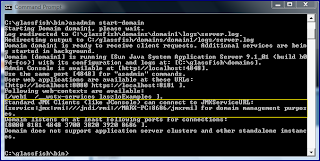


Because GlassFish provides us with the text String for JMXServiceURL, the most difficult part (knowing the JMX Connector URL) is already complete.

If I start up JConsole with the jconsole command from the command prompt, I can select the GlassFish MBean Server locally as shown in the next screen snapshot (the highlighted entry "com.sun.enterprise.server.PELaunch start"). This allows me to connect to GlassFish's MBean server without username, password, or URL if I have GlassFish running on the same host and under the same username.
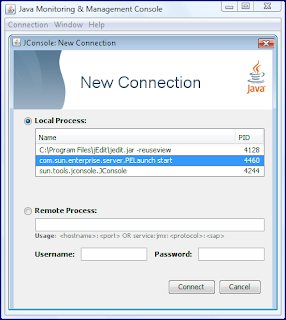


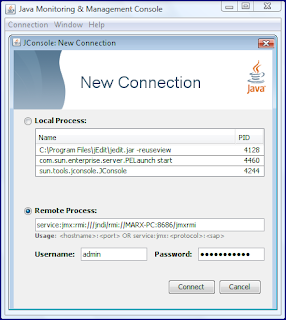
While the above will work for local JMX connections, the remote case is the focus of this entry. I can paste the URL provided by GlassFish (service:jmx:rmi:///jndi/rmi://MARX-PC:8686/jmxrmi) in the text field below the "Remote Process" label. This is shown in the next screen snapshot.
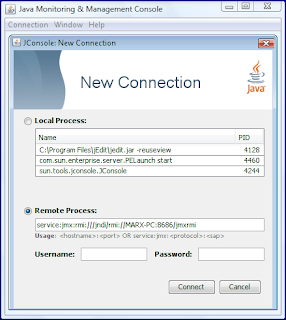


Unfortunately, when I click the "Connect" button with only the remote JMXServiceURL specified without username or password specified, I get the connection error shown in the next screen snapshot:
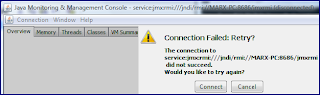


So, GlassFish is expecting credentials (username and password) to be specified. If you use the defaults for GlassFish, these will be a username of admin and a password of adminadmin. Specifying JConsole to connect remotely using these credentials is shown in the next screen snapshot.


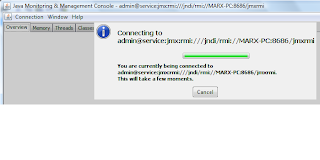
With credentials specified appropriately, JConsole can remotely connect to the running GlassFish JMX MBean server as shown in the next two screen snapshots. The first screen snapshot shows the successful "Connecting ..." message and the second screen snapshot shows a portion of the "MBeans" tab in JConsole.
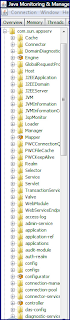


So, we have now been able to connect to GlassFish remotely using JConsole. We can use the same JMXServiceURL and connect to GlassFish from our own JMX clients as well. The remainder of this blog entry demonstrates that.

The following code listing shows a simple JMX client that connects to the same running GlassFish domain instance connected to by JConsole above.


package jmx.dustin;

import java.io.IOException;
import java.net.MalformedURLException;
import java.util.Arrays;
import java.util.HashMap;
import java.util.Map;
import java.util.Set;
import java.util.TreeSet;

import javax.management.MBeanServerConnection;
import javax.management.ObjectName;
import javax.management.remote.JMXConnector;
import javax.management.remote.JMXConnectorFactory;
import javax.management.remote.JMXServiceURL;

/**
* Simple example of a JMX client for connecting with GlassFish application
* server.
*/
public class SimpleGlassFishJmxClient
{
/**
* Main executable driver for GlassFish Remote JMX Client. Pass one command
* line parameter to serve as hostname where GlassFish application server
* is running.
*
* @param commandLineArgs Command-line arguments; one expected (host on
* which the GlassFish application server is running).
*/
public static void main(final String[] commandLineArgs)
{
final int port = 8686; // standard GlassFish JMX port.
final String host =
(commandLineArgs.length > 0) ? commandLineArgs[0] : "localhost";
final String jmxGlassFishConnectorString =
"service:jmx:rmi:///jndi/rmi://" + host + ":" + port + "/jmxrmi";
System.out.println( "Using JMXServiceURL string "
+ jmxGlassFishConnectorString);
try
{
final JMXServiceURL jmxUrl =
new JMXServiceURL(jmxGlassFishConnectorString);
final Map jmxEnv = new HashMap();
final String[] credentials = new String[] {"admin", "adminadmin"};
jmxEnv.put( JMXConnector.CREDENTIALS, credentials );

final JMXConnector connector =
JMXConnectorFactory.connect(jmxUrl, jmxEnv);
final MBeanServerConnection mbsc = connector.getMBeanServerConnection();
System.out.println("\nDomains:");
final String domains[] = mbsc.getDomains();
Arrays.sort(domains);
for (String domain : domains)
{
System.out.println("\t" + domain);
}
System.out.println( "\nMBeanServer default domain = "
+ mbsc.getDefaultDomain());
System.out.println("\nMBean count = " + mbsc.getMBeanCount());
System.out.println("\nQuery MBeanServer MBeans:");
@SuppressWarnings("unchecked")
final Set allObjectNames =
new TreeSet(mbsc.queryNames(null, null));
for (ObjectName objectName : allObjectNames)
{
System.out.println("\t" + objectName);
}
connector.close();
}
catch (MalformedURLException badUrl) // for JMXServiceURL instantiation
{
System.err.println( jmxGlassFishConnectorString
+ " is not a valid JMXServiceURL:\n"
+ badUrl.getMessage() );
}
catch (IOException ioEx) // for JMX/RMI connection
{
System.err.println( "Could not connect to JMX Server using URL "
+ jmxGlassFishConnectorString + ":\n"
+ ioEx.getMessage() );
}
}
}


The code in the example above is adapted from example code available in the highly useful Java Tutorial JMX Trail entry Creating a Custom JMX Client and the Sun Java System Application Server documentation Connecting to the MBean Server entry.

If I had not included the highlighted code above, I would have not been able to connect for the same reason I could not connect with JConsole without specifying a username and password. The next screen snapshot shows the results of trying to connect without username and password.



When I do include username and password as shown by the highlighted code above, I achieve success and get the results shown here (WARNING: there is a lot of output here):


Using JMXServiceURL string service:jmx:rmi:///jndi/rmi://localhost:8686/jmxrmi

Domains:
JMImplementation
amx
amx-support
com.sun.appserv
com.sun.jbi
com.sun.jbi.esb
com.sun.management
java.lang
java.util.logging

MBeanServer default domain = DefaultDomain

MBean count = 495

Query MBeanServer MBeans:
JMImplementation:type=MBeanServerDelegate
amx:J2EEApplication=__JWSappclients,J2EEServer=server,WebModule=//server/__JWSappclients,j2eeType=Servlet,name=JWSSystemServlet
amx:J2EEApplication=__JWSappclients,J2EEServer=server,WebModule=//server/__JWSappclients,j2eeType=Servlet,name=default
amx:J2EEApplication=__JWSappclients,J2EEServer=server,WebModule=//server/__JWSappclients,j2eeType=Servlet,name=jsp
amx:J2EEApplication=__JWSappclients,J2EEServer=server,j2eeType=WebModule,name=//server/__JWSappclients
amx:J2EEApplication=null,J2EEServer=server,WebModule=//__asadmin/,j2eeType=Servlet,name=DownloadServlet
amx:J2EEApplication=null,J2EEServer=server,WebModule=//__asadmin/,j2eeType=Servlet,name=FacesServlet
amx:J2EEApplication=null,J2EEServer=server,WebModule=//__asadmin/,j2eeType=Servlet,name=ThemeServlet
amx:J2EEApplication=null,J2EEServer=server,WebModule=//__asadmin/,j2eeType=Servlet,name=XmlHttpProxy
amx:J2EEApplication=null,J2EEServer=server,WebModule=//__asadmin/,j2eeType=Servlet,name=default
amx:J2EEApplication=null,J2EEServer=server,WebModule=//__asadmin/,j2eeType=Servlet,name=jsp
amx:J2EEApplication=null,J2EEServer=server,WebModule=//__asadmin/web1,j2eeType=Servlet,name=AdminAPIEntryServlet
amx:J2EEApplication=null,J2EEServer=server,WebModule=//__asadmin/web1,j2eeType=Servlet,name=ConnectServlet
amx:J2EEApplication=null,J2EEServer=server,WebModule=//__asadmin/web1,j2eeType=Servlet,name=RemoteJmxConnectorServlet
amx:J2EEApplication=null,J2EEServer=server,WebModule=//__asadmin/web1,j2eeType=Servlet,name=SynchronizationServlet
amx:J2EEApplication=null,J2EEServer=server,WebModule=//__asadmin/web1,j2eeType=Servlet,name=UploadServlet
amx:J2EEApplication=null,J2EEServer=server,WebModule=//__asadmin/web1,j2eeType=Servlet,name=default
amx:J2EEApplication=null,J2EEServer=server,WebModule=//__asadmin/web1,j2eeType=Servlet,name=jsp
amx:J2EEApplication=null,J2EEServer=server,WebModule=//server/,j2eeType=Servlet,name=default
amx:J2EEApplication=null,J2EEServer=server,WebModule=//server/,j2eeType=Servlet,name=jsp
amx:J2EEApplication=null,J2EEServer=server,WebModule=//server/__wstx-services,j2eeType=Servlet,name=ActivationCoordinatorPortTypeImpl
amx:J2EEApplication=null,J2EEServer=server,WebModule=//server/__wstx-services,j2eeType=Servlet,name=ActivationRequesterPortTypeImpl
amx:J2EEApplication=null,J2EEServer=server,WebModule=//server/__wstx-services,j2eeType=Servlet,name=CompletionCoordinatorPortTypeImpl
amx:J2EEApplication=null,J2EEServer=server,WebModule=//server/__wstx-services,j2eeType=Servlet,name=CompletionInitiatorPortTypeImpl
amx:J2EEApplication=null,J2EEServer=server,WebModule=//server/__wstx-services,j2eeType=Servlet,name=CoordinatorPortTypeImpl
amx:J2EEApplication=null,J2EEServer=server,WebModule=//server/__wstx-services,j2eeType=Servlet,name=ParticipantPortTypeImpl
amx:J2EEApplication=null,J2EEServer=server,WebModule=//server/__wstx-services,j2eeType=Servlet,name=RegistrationCoordinatorPortTypeImpl
amx:J2EEApplication=null,J2EEServer=server,WebModule=//server/__wstx-services,j2eeType=Servlet,name=RegistrationPortTypeImpl
amx:J2EEApplication=null,J2EEServer=server,WebModule=//server/__wstx-services,j2eeType=Servlet,name=RegistrationRequesterPortTypeImpl
amx:J2EEApplication=null,J2EEServer=server,WebModule=//server/__wstx-services,j2eeType=Servlet,name=default
amx:J2EEApplication=null,J2EEServer=server,WebModule=//server/__wstx-services,j2eeType=Servlet,name=jsp
amx:J2EEApplication=null,J2EEServer=server,WebModule=//server/__wstx-services,j2eeType=WebServiceEndpoint,name=ActivationCoordinatorPortTypeImpl
amx:J2EEApplication=null,J2EEServer=server,WebModule=//server/__wstx-services,j2eeType=WebServiceEndpoint,name=ActivationRequesterPortTypeImpl
amx:J2EEApplication=null,J2EEServer=server,WebModule=//server/__wstx-services,j2eeType=WebServiceEndpoint,name=CompletionCoordinatorPortTypeImpl
amx:J2EEApplication=null,J2EEServer=server,WebModule=//server/__wstx-services,j2eeType=WebServiceEndpoint,name=CompletionInitiatorPortTypeImpl
amx:J2EEApplication=null,J2EEServer=server,WebModule=//server/__wstx-services,j2eeType=WebServiceEndpoint,name=CoordinatorPortTypeImpl
amx:J2EEApplication=null,J2EEServer=server,WebModule=//server/__wstx-services,j2eeType=WebServiceEndpoint,name=ParticipantPortTypeImpl
amx:J2EEApplication=null,J2EEServer=server,WebModule=//server/__wstx-services,j2eeType=WebServiceEndpoint,name=RegistrationCoordinatorPortTypeImpl
amx:J2EEApplication=null,J2EEServer=server,WebModule=//server/__wstx-services,j2eeType=WebServiceEndpoint,name=RegistrationPortTypeImpl
amx:J2EEApplication=null,J2EEServer=server,WebModule=//server/__wstx-services,j2eeType=WebServiceEndpoint,name=RegistrationRequesterPortTypeImpl
amx:J2EEApplication=null,J2EEServer=server,WebModule=//server/laszloExamples,j2eeType=Servlet,name=AuthenticationServlet
amx:J2EEApplication=null,J2EEServer=server,WebModule=//server/laszloExamples,j2eeType=Servlet,name=AxisServlet
amx:J2EEApplication=null,J2EEServer=server,WebModule=//server/laszloExamples,j2eeType=Servlet,name=LPS
amx:J2EEApplication=null,J2EEServer=server,WebModule=//server/laszloExamples,j2eeType=Servlet,name=LZViewer
amx:J2EEApplication=null,J2EEServer=server,WebModule=//server/laszloExamples,j2eeType=Servlet,name=default
amx:J2EEApplication=null,J2EEServer=server,WebModule=//server/laszloExamples,j2eeType=Servlet,name=jsp
amx:J2EEApplication=null,J2EEServer=server,j2eeType=WebModule,name=//__asadmin/
amx:J2EEApplication=null,J2EEServer=server,j2eeType=WebModule,name=//__asadmin/web1
amx:J2EEApplication=null,J2EEServer=server,j2eeType=WebModule,name=//server/
amx:J2EEApplication=null,J2EEServer=server,j2eeType=WebModule,name=//server/__wstx-services
amx:J2EEApplication=null,J2EEServer=server,j2eeType=WebModule,name=//server/laszloExamples
amx:J2EEServer=server,j2eeType=J2EEApplication,name=__JWSappclients
amx:J2EEServer=server,j2eeType=JVM,name=server1211253100850
amx:X-AdminServiceConfig=na,X-ConfigConfig=server-config,X-JMXConnectorConfig=system,j2eeType=X-SSLConfig,name=na
amx:X-ConfigConfig=server-config,j2eeType=X-DASConfig,name=na,X-AdminServiceConfig=na
amx:X-AdminServiceConfig=na,X-ConfigConfig=server-config,j2eeType=X-JMXConnectorConfig,name=system
amx:X-ConfigConfig=server-config,j2eeType=X-EJBTimerServiceConfig,name=na,X-EJBContainerConfig=na
amx:X-ConfigConfig=server-config,X-HTTPListenerConfig=http-listener-2,j2eeType=X-SSLConfig,name=na,X-HTTPServiceConfig=na
amx:X-ConfigConfig=server-config,j2eeType=X-AccessLogConfig,name=na,X-HTTPServiceConfig=na
amx:X-ConfigConfig=server-config,j2eeType=X-ConnectionPoolConfig,name=na,X-HTTPServiceConfig=na
amx:X-ConfigConfig=server-config,j2eeType=X-HTTPFileCacheConfig,name=na,X-HTTPServiceConfig=na
amx:X-ConfigConfig=server-config,j2eeType=X-HTTPListenerConfig,name=admin-listener,X-HTTPServiceConfig=na
amx:X-ConfigConfig=server-config,j2eeType=X-HTTPListenerConfig,name=http-listener-1,X-HTTPServiceConfig=na
amx:X-ConfigConfig=server-config,j2eeType=X-HTTPListenerConfig,name=http-listener-2,X-HTTPServiceConfig=na
amx:X-ConfigConfig=server-config,j2eeType=X-HTTPProtocolConfig,name=na,X-HTTPServiceConfig=na
amx:X-ConfigConfig=server-config,j2eeType=X-KeepAliveConfig,name=na,X-HTTPServiceConfig=na
amx:X-ConfigConfig=server-config,j2eeType=X-RequestProcessingConfig,name=na,X-HTTPServiceConfig=na
amx:X-ConfigConfig=server-config,j2eeType=X-VirtualServerConfig,name=__asadmin,X-HTTPServiceConfig=na
amx:X-ConfigConfig=server-config,j2eeType=X-VirtualServerConfig,name=server,X-HTTPServiceConfig=na
amx:X-ConfigConfig=server-config,X-IIOPListenerConfig=SSL,j2eeType=X-SSLConfig,name=na,X-IIOPServiceConfig=na
amx:X-ConfigConfig=server-config,X-IIOPListenerConfig=SSL_MUTUALAUTH,j2eeType=X-SSLConfig,name=na,X-IIOPServiceConfig=na
amx:X-ConfigConfig=server-config,j2eeType=X-IIOPListenerConfig,name=SSL,X-IIOPServiceConfig=na
amx:X-ConfigConfig=server-config,j2eeType=X-IIOPListenerConfig,name=SSL_MUTUALAUTH,X-IIOPServiceConfig=na
amx:X-ConfigConfig=server-config,j2eeType=X-IIOPListenerConfig,name=orb-listener-1,X-IIOPServiceConfig=na
amx:X-ConfigConfig=server-config,j2eeType=X-ORBConfig,name=na,X-IIOPServiceConfig=na
amx:X-ConfigConfig=server-config,j2eeType=X-JMSHostConfig,name=default_JMS_host,X-JMSServiceConfig=na
amx:X-ConfigConfig=server-config,j2eeType=X-ModuleLogLevelsConfig,name=na,X-LogServiceConfig=na
amx:X-ConfigConfig=server-config,X-MessageSecurityConfig=SOAP,X-ProviderConfig=ClientProvider,j2eeType=X-RequestPolicyConfig,name=na,X-SecurityServiceConfig=na
amx:X-ConfigConfig=server-config,X-MessageSecurityConfig=SOAP,X-ProviderConfig=ClientProvider,j2eeType=X-ResponsePolicyConfig,name=na,X-SecurityServiceConfig=na
amx:X-ConfigConfig=server-config,X-MessageSecurityConfig=SOAP,X-ProviderConfig=ServerProvider,j2eeType=X-RequestPolicyConfig,name=na,X-SecurityServiceConfig=na
amx:X-ConfigConfig=server-config,X-MessageSecurityConfig=SOAP,X-ProviderConfig=ServerProvider,j2eeType=X-ResponsePolicyConfig,name=na,X-SecurityServiceConfig=na
amx:X-ConfigConfig=server-config,X-MessageSecurityConfig=SOAP,X-ProviderConfig=XWS_ClientProvider,j2eeType=X-RequestPolicyConfig,name=na,X-SecurityServiceConfig=na
amx:X-ConfigConfig=server-config,X-MessageSecurityConfig=SOAP,X-ProviderConfig=XWS_ClientProvider,j2eeType=X-ResponsePolicyConfig,name=na,X-SecurityServiceConfig=na
amx:X-ConfigConfig=server-config,X-MessageSecurityConfig=SOAP,X-ProviderConfig=XWS_ServerProvider,j2eeType=X-RequestPolicyConfig,name=na,X-SecurityServiceConfig=na
amx:X-ConfigConfig=server-config,X-MessageSecurityConfig=SOAP,X-ProviderConfig=XWS_ServerProvider,j2eeType=X-ResponsePolicyConfig,name=na,X-SecurityServiceConfig=na
amx:X-ConfigConfig=server-config,X-MessageSecurityConfig=SOAP,j2eeType=X-ProviderConfig,name=ClientProvider,X-SecurityServiceConfig=na
amx:X-ConfigConfig=server-config,X-MessageSecurityConfig=SOAP,j2eeType=X-ProviderConfig,name=ServerProvider,X-SecurityServiceConfig=na
amx:X-ConfigConfig=server-config,X-MessageSecurityConfig=SOAP,j2eeType=X-ProviderConfig,name=XWS_ClientProvider,X-SecurityServiceConfig=na
amx:X-ConfigConfig=server-config,X-MessageSecurityConfig=SOAP,j2eeType=X-ProviderConfig,name=XWS_ServerProvider,X-SecurityServiceConfig=na
amx:X-ConfigConfig=server-config,j2eeType=X-ModuleMonitoringLevelsConfig,name=na,X-MonitoringServiceConfig=na
amx:X-ConfigConfig=server-config,j2eeType=X-AuditModuleConfig,name=default,X-SecurityServiceConfig=na
amx:X-ConfigConfig=server-config,X-SecurityServiceConfig=na,j2eeType=X-AuthRealmConfig,name=admin-realm
amx:X-ConfigConfig=server-config,X-SecurityServiceConfig=na,j2eeType=X-AuthRealmConfig,name=certificate
amx:X-ConfigConfig=server-config,X-SecurityServiceConfig=na,j2eeType=X-AuthRealmConfig,name=file
amx:X-ConfigConfig=server-config,j2eeType=X-JACCProviderConfig,name=default,X-SecurityServiceConfig=na
amx:X-ConfigConfig=server-config,j2eeType=X-MessageSecurityConfig,name=SOAP,X-SecurityServiceConfig=na
amx:X-ConfigConfig=server-config,j2eeType=X-ManagerPropertiesConfig,name=na,X-WebContainerConfig=na,X-SessionConfig=na,X-SessionManagerConfig=na
amx:X-ConfigConfig=server-config,j2eeType=X-StorePropertiesConfig,name=na,X-WebContainerConfig=na,X-SessionConfig=na,X-SessionManagerConfig=na
amx:X-ConfigConfig=server-config,j2eeType=X-SessionManagerConfig,name=na,X-WebContainerConfig=na,X-SessionConfig=na
amx:X-ConfigConfig=server-config,j2eeType=X-SessionPropertiesConfig,name=na,X-WebContainerConfig=na,X-SessionConfig=na
amx:X-ConfigConfig=server-config,j2eeType=X-SessionConfig,name=na,X-WebContainerConfig=na
amx:X-ConfigConfig=server-config,j2eeType=X-AdminServiceConfig,name=na
amx:X-ConfigConfig=server-config,j2eeType=X-DiagnosticServiceConfig,name=na
amx:X-ConfigConfig=server-config,j2eeType=X-EJBContainerConfig,name=na
amx:X-ConfigConfig=server-config,j2eeType=X-HTTPServiceConfig,name=na
amx:X-ConfigConfig=server-config,j2eeType=X-IIOPServiceConfig,name=na
amx:X-ConfigConfig=server-config,j2eeType=X-JMSServiceConfig,name=na
amx:X-ConfigConfig=server-config,j2eeType=X-JavaConfig,name=na
amx:X-ConfigConfig=server-config,j2eeType=X-LogServiceConfig,name=na
amx:X-ConfigConfig=server-config,j2eeType=X-MDBContainerConfig,name=na
amx:X-ConfigConfig=server-config,j2eeType=X-ManagementRulesConfig,name=na
amx:X-ConfigConfig=server-config,j2eeType=X-MonitoringServiceConfig,name=na
amx:X-ConfigConfig=server-config,j2eeType=X-SecurityServiceConfig,name=na
amx:X-ConfigConfig=server-config,j2eeType=X-ThreadPoolConfig,name=thread-pool-1
amx:X-ConfigConfig=server-config,j2eeType=X-TransactionServiceConfig,name=na
amx:X-ConfigConfig=server-config,j2eeType=X-WebContainerConfig,name=na
amx:X-ServerRootMonitor=server,j2eeType=X-HTTPServiceVirtualServerMonitor,name=server,X-HTTPServiceMonitor=na
amx:X-ServerRootMonitor=server,j2eeType=X-ApplicationMonitor,name=__JWSappclients
amx:j2eeType=X-CallFlowMonitor,name=server,X-ServerRootMonitor=server
amx:X-ServerRootMonitor=server,j2eeType=X-HTTPServiceMonitor,name=na
amx:X-ServerRootMonitor=server,j2eeType=X-JVMMonitor,name=na
amx:j2eeType=X-Logging,name=server,X-ServerRootMonitor=server
amx:X-ServerRootMonitor=server,j2eeType=X-ServerRootMonitor,name=server
amx:X-StandaloneServerConfig=server,j2eeType=X-DeployedItemRefConfig,name=JBIFramework
amx:X-StandaloneServerConfig=server,j2eeType=X-DeployedItemRefConfig,name=MEjbApp
amx:X-StandaloneServerConfig=server,j2eeType=X-DeployedItemRefConfig,name=WSTCPConnectorLCModule
amx:X-StandaloneServerConfig=server,j2eeType=X-DeployedItemRefConfig,name=WSTXServices
amx:X-StandaloneServerConfig=server,j2eeType=X-DeployedItemRefConfig,name=__JWSappclients
amx:X-StandaloneServerConfig=server,j2eeType=X-DeployedItemRefConfig,name=__ejb_container_timer_app
amx:X-StandaloneServerConfig=server,j2eeType=X-DeployedItemRefConfig,name=adminapp
amx:X-StandaloneServerConfig=server,j2eeType=X-DeployedItemRefConfig,name=admingui
amx:X-StandaloneServerConfig=server,j2eeType=X-DeployedItemRefConfig,name=laszloExamples
amx:X-StandaloneServerConfig=server,j2eeType=X-ResourceRefConfig,name=jdbc/__CallFlowPool
amx:X-StandaloneServerConfig=server,j2eeType=X-ResourceRefConfig,name=jdbc/__TimerPool
amx:X-StandaloneServerConfig=server,j2eeType=X-ResourceRefConfig,name=jdbc/__default
amx:X-StandaloneServerConfig=server,j2eeType=X-ResourceRefConfig,name=jdbc/sample
amx:j2eeType=J2EEDomain,name=amx
amx:j2eeType=J2EEServer,name=server
amx:j2eeType=X-BulkAccess,name=na
amx:j2eeType=X-ConfigConfig,name=server-config
amx:j2eeType=X-ConfigDottedNames,name=na
amx:j2eeType=X-DeploymentMgr,name=na
amx:j2eeType=X-DomainConfig,name=na
amx:j2eeType=X-DomainRoot,name=amx
amx:j2eeType=X-J2EEApplicationConfig,name=MEjbApp
amx:j2eeType=X-J2EEApplicationConfig,name=__JWSappclients
amx:j2eeType=X-J2EEApplicationConfig,name=__ejb_container_timer_app
amx:j2eeType=X-JDBCConnectionPoolConfig,name=DerbyPool
amx:j2eeType=X-JDBCConnectionPoolConfig,name=SamplePool
amx:j2eeType=X-JDBCConnectionPoolConfig,name=__CallFlowPool
amx:j2eeType=X-JDBCConnectionPoolConfig,name=__TimerPool
amx:j2eeType=X-JDBCResourceConfig,name=jdbc/__CallFlowPool
amx:j2eeType=X-JDBCResourceConfig,name=jdbc/__TimerPool
amx:j2eeType=X-JDBCResourceConfig,name=jdbc/__default
amx:j2eeType=X-JDBCResourceConfig,name=jdbc/sample
amx:j2eeType=X-JMXMonitorMgr,name=na
amx:j2eeType=X-LifecycleModuleConfig,name=JBIFramework
amx:j2eeType=X-LifecycleModuleConfig,name=WSTCPConnectorLCModule
amx:j2eeType=X-MonitoringDottedNames,name=na
amx:j2eeType=X-MonitoringRoot,name=na
amx:j2eeType=X-NotificationEmitterService,name=DomainNotificationEmitterService
amx:j2eeType=X-NotificationServiceMgr,name=na
amx:j2eeType=X-QueryMgr,name=na
amx:j2eeType=X-Sample,name=na
amx:j2eeType=X-StandaloneServerConfig,name=server
amx:j2eeType=X-SystemInfo,name=na
amx:j2eeType=X-UpdateStatus,name=na
amx:j2eeType=X-UploadDownloadMgr,name=na
amx:j2eeType=X-WebModuleConfig,name=WSTXServices
amx:j2eeType=X-WebModuleConfig,name=adminapp
amx:j2eeType=X-WebModuleConfig,name=admingui
amx:j2eeType=X-WebModuleConfig,name=laszloExamples
amx:j2eeType=X-WebServiceMgr,name=na
amx-support:name=amx-debug
amx-support:name=mbean-loader
com.sun.appserv:j2eeType=Servlet,name=JWSSystemServlet,WebModule=//server/__JWSappclients,J2EEApplication=__JWSappclients,J2EEServer=server
com.sun.appserv:j2eeType=Servlet,name=default,WebModule=//server/__JWSappclients,J2EEApplication=__JWSappclients,J2EEServer=server
com.sun.appserv:j2eeType=Servlet,name=jsp,WebModule=//server/__JWSappclients,J2EEApplication=__JWSappclients,J2EEServer=server
com.sun.appserv:j2eeType=WebModule,name=//server/__JWSappclients,J2EEApplication=__JWSappclients,J2EEServer=server
com.sun.appserv:j2eeType=Servlet,name=DownloadServlet,WebModule=//__asadmin/,J2EEApplication=null,J2EEServer=server
com.sun.appserv:j2eeType=Servlet,name=FacesServlet,WebModule=//__asadmin/,J2EEApplication=null,J2EEServer=server
com.sun.appserv:j2eeType=Servlet,name=ThemeServlet,WebModule=//__asadmin/,J2EEApplication=null,J2EEServer=server
com.sun.appserv:j2eeType=Servlet,name=XmlHttpProxy,WebModule=//__asadmin/,J2EEApplication=null,J2EEServer=server
com.sun.appserv:j2eeType=Servlet,name=default,WebModule=//__asadmin/,J2EEApplication=null,J2EEServer=server
com.sun.appserv:j2eeType=Servlet,name=jsp,WebModule=//__asadmin/,J2EEApplication=null,J2EEServer=server
com.sun.appserv:j2eeType=Servlet,name=AdminAPIEntryServlet,WebModule=//__asadmin/web1,J2EEApplication=null,J2EEServer=server
com.sun.appserv:j2eeType=Servlet,name=ConnectServlet,WebModule=//__asadmin/web1,J2EEApplication=null,J2EEServer=server
com.sun.appserv:j2eeType=Servlet,name=RemoteJmxConnectorServlet,WebModule=//__asadmin/web1,J2EEApplication=null,J2EEServer=server
com.sun.appserv:j2eeType=Servlet,name=SynchronizationServlet,WebModule=//__asadmin/web1,J2EEApplication=null,J2EEServer=server
com.sun.appserv:j2eeType=Servlet,name=UploadServlet,WebModule=//__asadmin/web1,J2EEApplication=null,J2EEServer=server
com.sun.appserv:j2eeType=Servlet,name=default,WebModule=//__asadmin/web1,J2EEApplication=null,J2EEServer=server
com.sun.appserv:j2eeType=Servlet,name=jsp,WebModule=//__asadmin/web1,J2EEApplication=null,J2EEServer=server
com.sun.appserv:j2eeType=Servlet,name=default,WebModule=//server/,J2EEApplication=null,J2EEServer=server
com.sun.appserv:j2eeType=Servlet,name=jsp,WebModule=//server/,J2EEApplication=null,J2EEServer=server
com.sun.appserv:j2eeType=WebServiceEndpoint,name=ActivationCoordinatorPortTypeImpl,WebModule=//server/__wstx-services,J2EEApplication=null,J2EEServer=server,category=runtime
com.sun.appserv:j2eeType=WebServiceEndpoint,name=ActivationRequesterPortTypeImpl,WebModule=//server/__wstx-services,J2EEApplication=null,J2EEServer=server,category=runtime
com.sun.appserv:j2eeType=WebServiceEndpoint,name=CompletionCoordinatorPortTypeImpl,WebModule=//server/__wstx-services,J2EEApplication=null,J2EEServer=server,category=runtime
com.sun.appserv:j2eeType=WebServiceEndpoint,name=CompletionInitiatorPortTypeImpl,WebModule=//server/__wstx-services,J2EEApplication=null,J2EEServer=server,category=runtime
com.sun.appserv:j2eeType=WebServiceEndpoint,name=CoordinatorPortTypeImpl,WebModule=//server/__wstx-services,J2EEApplication=null,J2EEServer=server,category=runtime
com.sun.appserv:j2eeType=WebServiceEndpoint,name=ParticipantPortTypeImpl,WebModule=//server/__wstx-services,J2EEApplication=null,J2EEServer=server,category=runtime
com.sun.appserv:j2eeType=WebServiceEndpoint,name=RegistrationCoordinatorPortTypeImpl,WebModule=//server/__wstx-services,J2EEApplication=null,J2EEServer=server,category=runtime
com.sun.appserv:j2eeType=WebServiceEndpoint,name=RegistrationPortTypeImpl,WebModule=//server/__wstx-services,J2EEApplication=null,J2EEServer=server,category=runtime
com.sun.appserv:j2eeType=WebServiceEndpoint,name=RegistrationRequesterPortTypeImpl,WebModule=//server/__wstx-services,J2EEApplication=null,J2EEServer=server,category=runtime
com.sun.appserv:j2eeType=Servlet,name=ActivationCoordinatorPortTypeImpl,WebModule=//server/__wstx-services,J2EEApplication=null,J2EEServer=server
com.sun.appserv:j2eeType=Servlet,name=ActivationRequesterPortTypeImpl,WebModule=//server/__wstx-services,J2EEApplication=null,J2EEServer=server
com.sun.appserv:j2eeType=Servlet,name=CompletionCoordinatorPortTypeImpl,WebModule=//server/__wstx-services,J2EEApplication=null,J2EEServer=server
com.sun.appserv:j2eeType=Servlet,name=CompletionInitiatorPortTypeImpl,WebModule=//server/__wstx-services,J2EEApplication=null,J2EEServer=server
com.sun.appserv:j2eeType=Servlet,name=CoordinatorPortTypeImpl,WebModule=//server/__wstx-services,J2EEApplication=null,J2EEServer=server
com.sun.appserv:j2eeType=Servlet,name=ParticipantPortTypeImpl,WebModule=//server/__wstx-services,J2EEApplication=null,J2EEServer=server
com.sun.appserv:j2eeType=Servlet,name=RegistrationCoordinatorPortTypeImpl,WebModule=//server/__wstx-services,J2EEApplication=null,J2EEServer=server
com.sun.appserv:j2eeType=Servlet,name=RegistrationPortTypeImpl,WebModule=//server/__wstx-services,J2EEApplication=null,J2EEServer=server
com.sun.appserv:j2eeType=Servlet,name=RegistrationRequesterPortTypeImpl,WebModule=//server/__wstx-services,J2EEApplication=null,J2EEServer=server
com.sun.appserv:j2eeType=Servlet,name=default,WebModule=//server/__wstx-services,J2EEApplication=null,J2EEServer=server
com.sun.appserv:j2eeType=Servlet,name=jsp,WebModule=//server/__wstx-services,J2EEApplication=null,J2EEServer=server
com.sun.appserv:j2eeType=Servlet,name=AuthenticationServlet,WebModule=//server/laszloExamples,J2EEApplication=null,J2EEServer=server
com.sun.appserv:j2eeType=Servlet,name=AxisServlet,WebModule=//server/laszloExamples,J2EEApplication=null,J2EEServer=server
com.sun.appserv:j2eeType=Servlet,name=LPS,WebModule=//server/laszloExamples,J2EEApplication=null,J2EEServer=server
com.sun.appserv:j2eeType=Servlet,name=LZViewer,WebModule=//server/laszloExamples,J2EEApplication=null,J2EEServer=server
com.sun.appserv:j2eeType=Servlet,name=default,WebModule=//server/laszloExamples,J2EEApplication=null,J2EEServer=server
com.sun.appserv:j2eeType=Servlet,name=jsp,WebModule=//server/laszloExamples,J2EEApplication=null,J2EEServer=server
com.sun.appserv:j2eeType=WebModule,name=//__asadmin/,J2EEApplication=null,J2EEServer=server
com.sun.appserv:j2eeType=WebModule,name=//__asadmin/web1,J2EEApplication=null,J2EEServer=server
com.sun.appserv:j2eeType=WebModule,name=//server/,J2EEApplication=null,J2EEServer=server
com.sun.appserv:j2eeType=WebModule,name=//server/__wstx-services,J2EEApplication=null,J2EEServer=server
com.sun.appserv:j2eeType=WebModule,name=//server/laszloExamples,J2EEApplication=null,J2EEServer=server
com.sun.appserv:j2eeType=J2EEApplication,name=__JWSappclients,J2EEServer=server,category=runtime
com.sun.appserv:j2eeType=JVM,name=server1211253100850,J2EEServer=server,category=runtime
com.sun.appserv:j2eeType=J2EEDomain,name=com.sun.appserv,category=runtime
com.sun.appserv:j2eeType=J2EEServer,name=server,category=runtime
com.sun.appserv:name=logmanager,category=runtime,server=server
com.sun.appserv:name=domain-status
com.sun.appserv:type=Cache,host=__asadmin,path=/
com.sun.appserv:type=Cache,host=__asadmin,path=/web1
com.sun.appserv:type=Cache,host=server,path=/
com.sun.appserv:type=Cache,host=server,path=/__JWSappclients
com.sun.appserv:type=Cache,host=server,path=/__wstx-services
com.sun.appserv:type=Cache,host=server,path=/laszloExamples
com.sun.appserv:type=Connector,port=4848,address=0.0.0.0
com.sun.appserv:type=Connector,port=8080,address=0.0.0.0
com.sun.appserv:type=Connector,port=8181,address=0.0.0.0
com.sun.appserv:type=DomainDiagnostics,name=server,category=monitor
com.sun.appserv:type=Engine
com.sun.appserv:type=GlobalRequestProcessor,name=http4848
com.sun.appserv:type=GlobalRequestProcessor,name=http8080
com.sun.appserv:type=GlobalRequestProcessor,name=http8181
com.sun.appserv:type=Host,host=__asadmin
com.sun.appserv:type=Host,host=server
com.sun.appserv:type=JVMInformation,category=monitor,server=server
com.sun.appserv:type=JVMInformationCollector,category=monitor,server=server
com.sun.appserv:type=JspMonitor,name=jsp,WebModule=//server/__JWSappclients,J2EEApplication=__JWSappclients,J2EEServer=server
com.sun.appserv:type=JspMonitor,name=jsp,WebModule=//__asadmin/,J2EEApplication=null,J2EEServer=server
com.sun.appserv:type=JspMonitor,name=jsp,WebModule=//__asadmin/web1,J2EEApplication=null,J2EEServer=server
com.sun.appserv:type=JspMonitor,name=jsp,WebModule=//server/,J2EEApplication=null,J2EEServer=server
com.sun.appserv:type=JspMonitor,name=jsp,WebModule=//server/__wstx-services,J2EEApplication=null,J2EEServer=server
com.sun.appserv:type=JspMonitor,name=jsp,WebModule=//server/laszloExamples,J2EEApplication=null,J2EEServer=server
com.sun.appserv:type=Loader,path=/,host=__asadmin
com.sun.appserv:type=Loader,path=/web1,host=__asadmin
com.sun.appserv:type=Loader,path=/,host=server
com.sun.appserv:type=Loader,path=/__JWSappclients,host=server
com.sun.appserv:type=Loader,path=/__wstx-services,host=server
com.sun.appserv:type=Loader,path=/laszloExamples,host=server
com.sun.appserv:type=Manager,path=/,host=__asadmin
com.sun.appserv:type=Manager,path=/web1,host=__asadmin
com.sun.appserv:type=Manager,path=/,host=server
com.sun.appserv:type=Manager,path=/__JWSappclients,host=server
com.sun.appserv:type=Manager,path=/__wstx-services,host=server
com.sun.appserv:type=Manager,path=/laszloExamples,host=server
com.sun.appserv:type=Mapper
com.sun.appserv:type=PWCConnectionQueue,name=http4848
com.sun.appserv:type=PWCConnectionQueue,name=http8080
com.sun.appserv:type=PWCConnectionQueue,name=http8181
com.sun.appserv:type=PWCFileCache,name=http4848
com.sun.appserv:type=PWCFileCache,name=http8080
com.sun.appserv:type=PWCFileCache,name=http8181
com.sun.appserv:type=PWCKeepAlive,name=http4848
com.sun.appserv:type=PWCKeepAlive,name=http8080
com.sun.appserv:type=PWCKeepAlive,name=http8181
com.sun.appserv:type=Realm,path=/,host=__asadmin
com.sun.appserv:type=Realm,path=/web1,host=__asadmin
com.sun.appserv:type=Realm,path=/,host=server
com.sun.appserv:type=Realm,path=/__JWSappclients,host=server
com.sun.appserv:type=Realm,path=/__wstx-services,host=server
com.sun.appserv:type=Realm,path=/laszloExamples,host=server
com.sun.appserv:type=Selector,name=http4848
com.sun.appserv:type=Selector,name=http8080
com.sun.appserv:type=Selector,name=http8181
com.sun.appserv:type=Service,serviceName=null
com.sun.appserv:type=TransactionService,J2EEServer=server,category=runtime
com.sun.appserv:type=Valve,name=BasicAuthenticator,path=/web1,host=__asadmin
com.sun.appserv:type=Valve,name=FormAuthenticator,path=/,host=__asadmin
com.sun.appserv:type=Valve,name=StandardContextValve,path=/,host=__asadmin
com.sun.appserv:type=Valve,name=StandardContextValve,path=/web1,host=__asadmin
com.sun.appserv:type=Valve,name=StandardHostValve,host=__asadmin
com.sun.appserv:type=Valve,name=NonLoginAuthenticator,path=/,host=server
com.sun.appserv:type=Valve,name=NonLoginAuthenticator,path=/__JWSappclients,host=server
com.sun.appserv:type=Valve,name=NonLoginAuthenticator,path=/__wstx-services,host=server
com.sun.appserv:type=Valve,name=NonLoginAuthenticator,path=/laszloExamples,host=server
com.sun.appserv:type=Valve,name=StandardContextValve,path=/,host=server
com.sun.appserv:type=Valve,name=StandardContextValve,path=/__JWSappclients,host=server
com.sun.appserv:type=Valve,name=StandardContextValve,path=/__wstx-services,host=server
com.sun.appserv:type=Valve,name=StandardContextValve,path=/laszloExamples,host=server
com.sun.appserv:type=Valve,name=StandardHostValve,host=server
com.sun.appserv:type=Valve,name=StandardEngineValve
com.sun.appserv:type=access-log,config=server-config,category=config
com.sun.appserv:type=admin-service,config=server-config,category=config
com.sun.appserv:name=__JWSappclients,type=application,category=monitor,server=server
com.sun.appserv:type=application-ref,ref=JBIFramework,server=server,category=config
com.sun.appserv:type=application-ref,ref=MEjbApp,server=server,category=config
com.sun.appserv:type=application-ref,ref=WSTCPConnectorLCModule,server=server,category=config
com.sun.appserv:type=application-ref,ref=WSTXServices,server=server,category=config
com.sun.appserv:type=application-ref,ref=__JWSappclients,server=server,category=config
com.sun.appserv:type=application-ref,ref=__ejb_container_timer_app,server=server,category=config
com.sun.appserv:type=application-ref,ref=adminapp,server=server,category=config
com.sun.appserv:type=application-ref,ref=admingui,server=server,category=config
com.sun.appserv:type=application-ref,ref=laszloExamples,server=server,category=config
com.sun.appserv:type=applications,category=config
com.sun.appserv:type=applications,category=monitor,server=server
com.sun.appserv:type=audit-module,name=default,config=server-config,category=config
com.sun.appserv:type=auth-realm,name=admin-realm,config=server-config,category=config
com.sun.appserv:type=auth-realm,name=certificate,config=server-config,category=config
com.sun.appserv:type=auth-realm,name=file,config=server-config,category=config
com.sun.appserv:type=config,name=server-config,category=config
com.sun.appserv:type=configs,category=config
com.sun.appserv:type=configurator
com.sun.appserv:type=connection-managers,category=monitor,server=server
com.sun.appserv:type=connection-pool,config=server-config,category=config
com.sun.appserv:type=connector-service,category=monitor,server=server
com.sun.appserv:type=controller
com.sun.appserv:type=das-config,config=server-config,category=config
com.sun.appserv:type=diagnostic-service,config=server-config,category=config
com.sun.appserv:type=domain,category=config
com.sun.appserv:name=dotted-name-get-set,type=dotted-name-support
com.sun.appserv:name=dotted-name-monitoring-registry,type=dotted-name-support
com.sun.appserv:name=dotted-name-registry,type=dotted-name-support
com.sun.appserv:type=ejb-container,config=server-config,category=config
com.sun.appserv:type=ejb-timer-service,config=server-config,category=config
com.sun.appserv:type=http-file-cache,config=server-config,category=config
com.sun.appserv:type=http-listener,id=admin-listener,config=server-config,category=config
com.sun.appserv:type=http-listener,id=http-listener-1,config=server-config,category=config
com.sun.appserv:type=http-listener,id=http-listener-2,config=server-config,category=config
com.sun.appserv:type=http-protocol,config=server-config,category=config
com.sun.appserv:type=http-service,config=server-config,category=config
com.sun.appserv:type=http-service,category=monitor,server=server
com.sun.appserv:type=iiop-listener,id=SSL,config=server-config,category=config
com.sun.appserv:type=iiop-listener,id=SSL_MUTUALAUTH,config=server-config,category=config
com.sun.appserv:type=iiop-listener,id=orb-listener-1,config=server-config,category=config
com.sun.appserv:type=iiop-service,config=server-config,category=config
com.sun.appserv:type=j2ee-application,name=MEjbApp,category=config
com.sun.appserv:type=j2ee-application,name=__JWSappclients,category=config
com.sun.appserv:type=j2ee-application,name=__ejb_container_timer_app,category=config
com.sun.appserv:type=jacc-provider,name=default,config=server-config,category=config
com.sun.appserv:type=java-config,config=server-config,category=config
com.sun.appserv:type=jdbc-connection-pool,name=DerbyPool,category=config
com.sun.appserv:type=jdbc-connection-pool,name=SamplePool,category=config
com.sun.appserv:type=jdbc-connection-pool,name=__CallFlowPool,category=config
com.sun.appserv:type=jdbc-connection-pool,name=__TimerPool,category=config
com.sun.appserv:type=jdbc-resource,jndi-name=jdbc/__CallFlowPool,category=config
com.sun.appserv:type=jdbc-resource,jndi-name=jdbc/__TimerPool,category=config
com.sun.appserv:type=jdbc-resource,jndi-name=jdbc/__default,category=config
com.sun.appserv:type=jdbc-resource,jndi-name=jdbc/sample,category=config
com.sun.appserv:type=jms-host,name=default_JMS_host,config=server-config,category=config
com.sun.appserv:type=jms-service,config=server-config,category=config
com.sun.appserv:type=jms-service,category=monitor,server=server
com.sun.appserv:type=jmx-connector,name=system,config=server-config,category=config
com.sun.appserv:type=jndi,category=monitor,server=server
com.sun.appserv:type=jvm,category=monitor,server=server
com.sun.appserv:type=keep-alive,config=server-config,category=config
com.sun.appserv:type=lifecycle-module,name=JBIFramework,category=config
com.sun.appserv:type=lifecycle-module,name=WSTCPConnectorLCModule,category=config
com.sun.appserv:type=log-service,config=server-config,category=config
com.sun.appserv:type=management-rules,config=server-config,category=config
com.sun.appserv:type=manager-properties,config=server-config,category=config
com.sun.appserv:type=mdb-container,config=server-config,category=config
com.sun.appserv:type=message-security-config,name=SOAP,config=server-config,category=config
com.sun.appserv:type=module-log-levels,config=server-config,category=config
com.sun.appserv:type=module-monitoring-levels,config=server-config,category=config
com.sun.appserv:type=monitoring-service,config=server-config,category=config
com.sun.appserv:type=orb,config=server-config,category=config
com.sun.appserv:type=orb,category=monitor,server=server
com.sun.appserv:type=protocolHandler,className=com.sun.enterprise.web.connector.grizzly.GrizzlyHttpProtocol
com.sun.appserv:type=provider-config,name=ClientProvider,message-security-config=SOAP,config=server-config,category=config
com.sun.appserv:type=provider-config,name=ServerProvider,message-security-config=SOAP,config=server-config,category=config
com.sun.appserv:type=provider-config,name=XWS_ClientProvider,message-security-config=SOAP,config=server-config,category=config
com.sun.appserv:type=provider-config,name=XWS_ServerProvider,message-security-config=SOAP,config=server-config,category=config
com.sun.appserv:type=request-policy,provider-config=ClientProvider,message-security-config=SOAP,config=server-config,category=config
com.sun.appserv:type=request-policy,provider-config=ServerProvider,message-security-config=SOAP,config=server-config,category=config
com.sun.appserv:type=request-policy,provider-config=XWS_ClientProvider,message-security-config=SOAP,config=server-config,category=config
com.sun.appserv:type=request-policy,provider-config=XWS_ServerProvider,message-security-config=SOAP,config=server-config,category=config
com.sun.appserv:type=request-processing,config=server-config,category=config
com.sun.appserv:type=resource-ref,ref=jdbc/__CallFlowPool,server=server,category=config
com.sun.appserv:type=resource-ref,ref=jdbc/__TimerPool,server=server,category=config
com.sun.appserv:type=resource-ref,ref=jdbc/__default,server=server,category=config
com.sun.appserv:type=resource-ref,ref=jdbc/sample,server=server,category=config
com.sun.appserv:type=resources,category=config
com.sun.appserv:type=resources,category=monitor,server=server
com.sun.appserv:type=response-policy,provider-config=ClientProvider,message-security-config=SOAP,config=server-config,category=config
com.sun.appserv:type=response-policy,provider-config=ServerProvider,message-security-config=SOAP,config=server-config,category=config
com.sun.appserv:type=response-policy,provider-config=XWS_ClientProvider,message-security-config=SOAP,config=server-config,category=config
com.sun.appserv:type=response-policy,provider-config=XWS_ServerProvider,message-security-config=SOAP,config=server-config,category=config
com.sun.appserv:type=root,category=monitor,server=server
com.sun.appserv:type=security-service,config=server-config,category=config
com.sun.appserv:type=server,name=server,category=config
com.sun.appserv:type=servers,category=config
com.sun.appserv:type=session-config,config=server-config,category=config
com.sun.appserv:type=session-manager,config=server-config,category=config
com.sun.appserv:type=session-properties,config=server-config,category=config
com.sun.appserv:type=ssl,config=server-config,http-listener=http-listener-2,category=config
com.sun.appserv:type=ssl,config=server-config,iiop-listener=SSL,category=config
com.sun.appserv:type=ssl,config=server-config,iiop-listener=SSL_MUTUALAUTH,category=config
com.sun.appserv:type=ssl,config=server-config,jmx-connector=system,category=config
com.sun.appserv:name=//__asadmin/,type=standalone-web-module,category=monitor,server=server
com.sun.appserv:name=//__asadmin/web1,type=standalone-web-module,category=monitor,server=server
com.sun.appserv:name=//server/,type=standalone-web-module,category=monitor,server=server
com.sun.appserv:name=//server/__wstx-services,type=standalone-web-module,category=monitor,server=server
com.sun.appserv:name=//server/laszloExamples,type=standalone-web-module,category=monitor,server=server
com.sun.appserv:type=store-properties,config=server-config,category=config
com.sun.appserv:type=system-services,server=server
com.sun.appserv:type=thread-pool,thread-pool-id=thread-pool-1,config=server-config,category=config
com.sun.appserv:type=thread-pools,config=server-config,category=config
com.sun.appserv:type=thread-pools,category=monitor,server=server
com.sun.appserv:type=transaction-service,config=server-config,category=config
com.sun.appserv:type=transactions-recovery,category=config
com.sun.appserv:type=virtual-server,id=__asadmin,config=server-config,category=config
com.sun.appserv:type=virtual-server,id=server,config=server-config,category=config
com.sun.appserv:name=server,type=virtual-server,category=monitor,server=server
com.sun.appserv:type=web-container,config=server-config,category=config
com.sun.appserv:application=__JWSappclients,name=//server/__JWSappclients,type=web-module,category=monitor,server=server
com.sun.appserv:type=web-module,name=WSTXServices,category=config
com.sun.appserv:type=web-module,name=adminapp,category=config
com.sun.appserv:type=web-module,name=admingui,category=config
com.sun.appserv:type=web-module,name=laszloExamples,category=config
com.sun.jbi:JbiName=server,ServiceName=AdminService,ControlType=AdministrationService,ComponentType=System
com.sun.jbi:JbiName=server,ServiceName=ConfigurationService,ControlType=ConfigurationService,ComponentType=System
com.sun.jbi:JbiName=domain,ServiceName=ConfigurationService,ControlType=DeploymentService,ComponentType=System
com.sun.jbi:JbiName=server,ServiceName=ConfigurationService,ControlType=DeploymentService,ComponentType=System
com.sun.jbi:JbiName=server,ServiceName=DeploymentService,ControlType=DeploymentService,ComponentType=System
com.sun.jbi:JbiName=server,ServiceName=AdminService,ControlType=HeartBeat,ComponentType=System
com.sun.jbi:JbiName=domain,ServiceName=ConfigurationService,ControlType=InstallationService,ComponentType=System
com.sun.jbi:JbiName=server,ServiceName=ConfigurationService,ControlType=InstallationService,ComponentType=System
com.sun.jbi:JbiName=server,ServiceName=InstallationService,ControlType=InstallationService,ComponentType=System
com.sun.jbi:JbiName=server,ServiceName=AdminService,ControlType=Lifecycle,ComponentType=System
com.sun.jbi:JbiName=server,ServiceName=ConfigurationService,ControlType=Lifecycle,ComponentType=System
com.sun.jbi:JbiName=server,ServiceName=DeploymentService,ControlType=Lifecycle,ComponentType=System
com.sun.jbi:JbiName=server,ServiceName=InstallationService,ControlType=Lifecycle,ComponentType=System
com.sun.jbi:JbiName=server,ServiceName=LoggingService,ControlType=Lifecycle,ComponentType=System
com.sun.jbi:JbiName=server,ServiceName=MessageService,ControlType=Lifecycle,ComponentType=System
com.sun.jbi:JbiName=server,ServiceName=JBI,ControlType=Logger,ComponentType=System,LoggerName=com.sun.jbi
com.sun.jbi:JbiName=server,ServiceName=Framework,ControlType=Logger,ComponentType=System,LoggerName=com.sun.jbi.framework
com.sun.jbi:JbiName=server,ServiceName=ManagementService,ControlType=Logger,ComponentType=System,LoggerName=com.sun.jbi.management
com.sun.jbi:JbiName=server,ServiceName=AdminService,ControlType=Logger,ComponentType=System,LoggerName=com.sun.jbi.management.AdminService
com.sun.jbi:JbiName=server,ServiceName=ConfigurationService,ControlType=Logger,ComponentType=System,LoggerName=com.sun.jbi.management.ConfigurationService
com.sun.jbi:JbiName=server,ServiceName=DeploymentService,ControlType=Logger,ComponentType=System,LoggerName=com.sun.jbi.management.DeploymentService
com.sun.jbi:JbiName=server,ServiceName=InstallationService,ControlType=Logger,ComponentType=System,LoggerName=com.sun.jbi.management.InstallationService
com.sun.jbi:JbiName=server,ServiceName=LoggingService,ControlType=Logger,ComponentType=System,LoggerName=com.sun.jbi.management.LoggingService
com.sun.jbi:JbiName=server,ServiceName=MessageService,ControlType=Logger,ComponentType=System,LoggerName=com.sun.jbi.messaging
com.sun.jbi:JbiName=domain,ServiceName=ConfigurationService,ControlType=LoggingService,ComponentType=System
com.sun.jbi:JbiName=server,ServiceName=ConfigurationService,ControlType=LoggingService,ComponentType=System
com.sun.jbi:JbiName=server,ServiceName=LoggingService,ControlType=LoggingService,ComponentType=System
com.sun.jbi:JbiName=server,ServiceName=MessageService,ControlType=MessageService,ComponentType=System
com.sun.jbi:JbiName=server,ServiceName=Framework,ControlType=Statistics,ComponentType=System
com.sun.jbi:JbiName=domain,ServiceName=ConfigurationService,ControlType=System,ComponentType=System
com.sun.jbi:JbiName=server,ServiceName=ConfigurationService,ControlType=System,ComponentType=System
com.sun.jbi:ServiceName=JbiAdminUiService,ComponentType=System
com.sun.jbi:ServiceName=JbiReferenceAdminUiService,ComponentType=System
com.sun.jbi:Target=domain,ServiceName=AdminService,ServiceType=Admin
com.sun.jbi:Target=server,ServiceName=AdminService,ServiceType=Admin
com.sun.jbi:Target=domain,ServiceName=ConfigurationService,ServiceType=Deployment
com.sun.jbi:Target=server,ServiceName=ConfigurationService,ServiceType=Deployment
com.sun.jbi:Target=domain,ServiceName=ConfigurationService,ServiceType=Installation
com.sun.jbi:Target=server,ServiceName=ConfigurationService,ServiceType=Installation
com.sun.jbi:Target=domain,ServiceName=ConfigurationService,ServiceType=System
com.sun.jbi:Target=server,ServiceName=ConfigurationService,ServiceType=System
com.sun.jbi:Target=domain,ServiceName=DeploymentService,ServiceType=Deployment
com.sun.jbi:Target=server,ServiceName=DeploymentService,ServiceType=Deployment
com.sun.jbi:Target=domain,ServiceName=FileTransferService,ServiceType=Download
com.sun.jbi:Target=domain,ServiceName=FileTransferService,ServiceType=Upload
com.sun.jbi:Target=domain,ServiceName=InstallationService,ServiceType=Installation
com.sun.jbi:Target=server,ServiceName=InstallationService,ServiceType=Installation
com.sun.jbi.esb:ServiceType=ArchiveUpload
com.sun.management:type=HotSpotDiagnostic
java.lang:type=ClassLoading
java.lang:type=Compilation
java.lang:type=GarbageCollector,name=Copy
java.lang:type=GarbageCollector,name=MarkSweepCompact
java.lang:type=Memory
java.lang:type=MemoryManager,name=CodeCacheManager
java.lang:type=MemoryPool,name=Code Cache
java.lang:type=MemoryPool,name=Eden Space
java.lang:type=MemoryPool,name=Perm Gen
java.lang:type=MemoryPool,name=Survivor Space
java.lang:type=MemoryPool,name=Tenured Gen
java.lang:type=OperatingSystem
java.lang:type=Runtime
java.lang:type=Threading
java.util.logging:type=Logging


One final thing to note is that any access of a specific MBean associated with GlassFish would be most easily accomplished using client-side proxies as discussed in the "Performing Operations on Remote MBeans via Proxies" section of the previously mentioned Creating Custom JMX Clients tutorial entry and as recommended in the Standard MBean interfaces section of the JMX Best Practices document.

This blog entry has demonstrated how JConsole or a custom Java JMX client can be written to access the MBeans hosted in GlassFish. While GlassFish provides its own excellent web-based administration console that leverages these same MBeans, there may be situations when custom clients need access to the same administrative MBeans.

Saturday, May 17, 2008

Access the Flash Player in OpenLaszlo

In previous blog entries, I demonstrated using the Flash Player via Flex to write data to the clipboard and to read/write Flash cookies. In this blog entry, I intend to demonstrate how to interact with the Flash Player from OpenLaszlo.

I'll specifically use these same two functions (writing data to the clipboard and interacting with Flash Cookies) to demonstrate OpenLaszlo interaction with the Flash Player. One very important note here is that, as of today (17 May 2008), OpenLaszlo specifically supports SWF7 or SWF8 but not SWF9. On the other hand, Flex only supports SWF9 and not SWF7 or SWF8. For the utilities I am demonstrating here, this distinction does not matter.

Using Flash with OpenLaszlo to Write to Clipboard

The code below shows a simple OpenLaszlo LZX file that adequately demonstrates the ability to write to the clipboard in OpenLaszlo via the Flash Player.


<canvas width="750" height="500">
<script>
<![CDATA[
function placeInputTextOnClipboard()
{
LzBrowser.setClipboard(inputTextArea.text);

}
]]>
</script>
<window id="MainWindow"
title="Write to Clipboard via Flash Player">
<simplelayout axis="y" spacing="10" />
<statictext id="mainLabel"
width="500"
height="25">Enter a string below to write to the clipboard.
</statictext>
<edittext id="inputTextArea" width="500"/>
<button onclick="placeInputTextOnClipboard()">
Click Me to Place Text on Clipboard
</button>
</window>
</canvas>


The single highlighted line in the code listing above is all that it takes to write to the clipboard from OpenLaszlo code. This line uses OpenLaszlo's LzBrowser (swf) class. The advantage of using this LzBrowser class is that the code that uses this class is portable to the DHTML runtime as well, thanks to the LzBrowser class for DHTML. The ability of this code to compile for both SWF and DHTML deployments is proven with the following two screen snapshots that show a successful command-line compilation of the code above for SWF8 and a successful compilation of the same code for DHTML.

Compiling to SWF8 with LzBrowser.setClipboard


Compiling to DHTML with LzBrowser.setClipboard


The easiest way to see other common functionalities available for SWF and DHTML environments is to read the LzBrowser documentation for both SWF and DHTML. Doing so shows that other supported functions include callJs, getVersion, and loadURL.

I need to take a single paragraph detour here for an important note. At the time of my writing of this blog entry, my use of LzBrowser.setClipboard() for DHTML was not working properly and was reporting "LFCdhtml-debug.js#18026: System is not defined". I am not sure if this is me missing a necessary OpenLaszlo file in my WAR file or a DHTML bug that will be fixed before OpenLaszlo's DHTML support is formally released with OpenLaszlo 4.1 or if it is some other issue altogether. In the LFCdhtml-debug.js file at line 18026, there is a line "System.setClipboard()" that looks like it is the Flash Player call rather than a DHTML-appropriate call. Because I most often use OpenLaszlo's SWF8 capabilities, this has not been an issue for me personally. Note that the LzBrowser.getVersion works properly for me in both SWF compilations (reports Flash Player's version) and in DHTML (reports web browser name and version).

It was easy to write data to the clipboard in OpenLaszlo in both the SWF and DHTML code because the LzBrowser class specifically supported this functionality. However, there are other Flash Player functions that are not explicitly supported in LzBrowser. To access these from OpenLaszlo, we'll need to access them using the Flash Player ActionScript classes that provide access to the Flash Player.

In my blog entry on Flash Cookies with Flex, I demonstrated use of the flash.net.SharedObject class to write and read Flash cookies. OpenLaszlo provides a handle for calling ActionScript classes. This can be used to call this same flash.net.SharedObject class. The simple code below shows how one can write to a Flash Cookie from OpenLaszlo:


<canvas width="750" height="500">
<script>
<![CDATA[
function writeInputTextToCookie()
{
var lso = SharedObject.getLocal("dustinLaszloLocalSharedObject");
lso.data.text = inputTextArea.text;

persistedText.setText(inputTextArea.text);
}
]]>
</script>
<window id="MainWindow"
title="Write and Read Flash Cookies">
<simplelayout axis="y" spacing="10" />
<statictext id="mainLabel"
width="500"
height="25">Enter a string below to write to the Flash Cookie.
</statictext>
<edittext id="inputTextArea" width="500"/>
<statictext id="persistedText" width="500" height="25">TBD</statictext>
<button onclick="writeInputTextToCookie()">
Click Me to Write Text to Flash Cookie
</button>
</window>
</canvas>


I highlighted the applicable code for writing to a Flash cookie from OpenLaszlo. It looks suspiciously similar to the Flex code for persisting Flash cookies because both take advantage of Flash-specific ActionScript classes.

The next screenshot shows how the compilation process of the above code looks:


Once the OpenLaszlo-based, Flash Cookie-writing application has been compiled into its SWF8 version, it can be run as shown in the next screen snapshot. In this example, I entered the text "Please write this out to cookie." in the input text field. After clicking on the only available button, that same string is shown to indicate that it was processed and the cookie is persisted.


I can verify that the cookie was written by going to my local storage drive and checking for the cookie. I documented in the Flash Cookies with Flex blog entry regarding this operating-system specific location. The next two screen snapshots indicate the presence of this newly written file from a Windows Explorer viewpoint and from a Windows PowerShell viewpoint. Note that I have intentionally marked-out the portion of the directory that is specific to me and randomly named for security reasons.

Windows Explorer View of OpenLaszlo-Persisted Flash Cookie


Windows PowerShell View of OpenLaszlo-Persisted Flash Cookie


I highlighted with a yellow-ish rectangle the text contents of the Flash Cookies as viewed in PowerShell with the type command. The text contents match what was specified in the OpenLaszlo application to be written to a Flash Cookie.

It was remarkably easy to access Flash Player ActionScript classes to work with the Flash Player. However, the one major drawback to directly accessing these ActionScript classes is that they are not supported in the DHTML runtime environment. Although the LZC compiler can compile the file okay even with --runtime=dhtml set, the application does not work correctly. When debug is turned on, the error preventing the application from running in DHTML mode becomes clear: the Flash Player-specific ActionScript class SharedObject cannot be found. The next screen snapshot displays this:


While it is not surprising that DHTML runtime cannot support a Flash Player-specific ActionScript class, it is important to make note of it because using such classes might benefit an OpenLaszlo application to be deployed to Flash Player runtime but will not work and might even hinder the same application's deployment to the DHTML runtime.

Conclusion

OpenLaszlo provides extremely easy access to a few of the most common Flash Player functions via its LzBrowser classes for SWF and DHTML. The advantages of this approach include ease of use and support for the multiple runtime environments.

It is not much more difficult to use the Flash Player ActionScript classes directly to obtain Flash Player functionality not included in LzBrowser. However, the one major disadvantage here is that these classes are Flash-specific and so do not work in the DHTML runtime. There are other things that one can do with OpenLaszlo that are also Flash-only, so these things can and are done. They simply require extra care (and probably a second thought) when adding them to OpenLaszlo applications.

Friday, May 16, 2008

Flash Player 10 Prerelease Announced

With yesterday's (15 May 2008) announcement (PDF) of the prerelease of Flash Player 10 (code named "Astro"), a Flex and/or OpenLaszlo developer cannot help but start thinking about the possibilities and what this might mean to his or her development possibilities. One cannot help but wonder how Flex, OpenLaszlo, the new Pixel Bender (formerly known by code name "Hydra"), and Flash Player 10 will all work together.

For now, the demonstrations that can run on Flash Player 10 are "preauthored," meaning that the intent of the prerelease is not so much for people to write Flash applications to run on this new player, but rather the intent is for people to use the new Flash Player against existing Flash applications and sites.

Additional coverage of the Flash Player 10 prerelease can be found in the article Adobe Refreshes the Flash Player, in the CNNMoney.com article Adobe Flash Player 10 Beta Delivers New Creative Features to Transform Rich Internet Experiences, and the DMX Zone article Adobe Unveils Flash Player 10 Beta.

A NetBeans Disappointment: No UML Version Control

While there is much to be excited about in NetBeans 6.1 (see my previous blog entries on NetBeans JavaScript support and JAXB support for examples), there are some disappointments as well (as there are with virtually any product or tool). One of my biggest disappointments resulted from learning the hard way that NetBeans 6.1 does not provide version control support for its UML Modeling tool. This is one of those cases where failing to read the instructions first cost me some lost time and effort.

The NetBeans Wiki entry FaqUMLCollaborate clearly states: "At present NetBeans does not provide good support for sharing a UML model among multiple users." This entry then provides the primary workaround: to manually handle version control via operating system level version control commands and by ensuring that only one person edits the UML model at a time.

Other important observations related to NetBeans UML version control include the distinction of the files underlying NetBeans' UML Modeling tool. The .etld and .etlp files contain the UML diagrams while the .etd and .etup files contain the model data that underlies the diagrams. The documentation also points out that NetBeans generates the nbproject/private directory and its contents, so neither this directory nor the .ettm files should be version controlled in any way.

The blog entry Facing Software Configuration Management on NetBeans IDE looks at this issue and specifically addresses placing UML and other NetBeans-maintained non-source code files into Subversion. Additional background information can also be found here.

The good news is that the NetBeans UMLRoadmap indicates intentions to address version control awareness of metadata model in the first half of 2009 and to address a visual diff/merge tool in the second half of 2009.

The NetBeans 6.1 release in general and the UML Modeling Tool specifically offer many nice features. However, the lack of integrated NetBeans version control for UML modeling and class diagram files reduces the effectiveness of using the NetBeans UML Modeling tool with a large set of designers and developers.

Using Collections Methods emptyList(), emptyMap(), and emptySet()

Early this year (2008), a reasonable question was asked on one of the Sun forums (the Core APIs - Collections: Lists, Sets, and Maps forum): When should I use emptyList(), emptySet() or emptyMap()?

Some responders replied with obvious answers that probably provided no new information to the person asking the question. What the person was really asking is why would one ever want a method that returns a Java List, a Java Set, or a Java Map that is empty and immutable. The Javadoc API documentation for the three methods Collections.emptyList(), Collections.emptyMap(), and Collections.emptySet() make it clear that these methods are for returning immutable, empty List, Map, and Set respectively. So, the question really is why would one want an empty immutable List, Map, or Set?

Item #27 in Joshua Bloch's first edition of Effective Java is called "Return zero-length arrays, not nulls" and this item describes some of the advantages of returning an empty array rather than a null from a method call. Although I have not gotten my hands on a copy of the recently released second edition of Effective Java, I suspect that its altered item on not returning null (now Item #43 - "Return empty arrays or collections, not null") demonstrates returning an empty collection and perhaps even demonstrates using these emptyList, emptySet, and emptyMap methods on the Collections class to get an empty collection that also has the additional benefit of being immutable (the new edition's Item #15 is "Minimize Mutability").

Why is returning an empty and immutable Collection often preferable to returning a null or even to returning a mutable collection? The most obvious disadvantage of returning a null is forcing the client of the method to deal with that null. The most obvious advantage to an immutable collection is the advantages associated with immutable objects and collections in concurrent programming. Discussion of why immutable objects and collections are highly desirable in multi-threaded environments can be found in Effective Concurrency for the Java Platform and in the Java Tutorials Concurrency Trail.

The example code below provides an example of using one of these methods:


import java.util.Collections;
import java.util.HashSet;
import java.util.Set;

public class FunWithEmptyImmutableCollections
{
private Set<String> states;

/**
* Prepare the states data member with some sample names of states.
*/
private void prepareStates()
{
states = new HashSet<String>();
states.add("Alabama");
states.add("Alaska");
states.add("Arizona");
states.add("Arkansas");
states.add("California");
states.add("Colorado");
states.add("Connecticut");
states.add("Delaware");
states.add("Florida");
}

/**
* Provide names of all states that begin with provided alphabet letter.
*
* @param firstLetter Letter for which matching state names are desired.
* @return Set of names of states that begin with provided firstLetter.
*/
private Set<String> getStatesStartingWithDesignatedLetter(
final String firstLetter)
{
if ( (firstLetter == null)
|| (firstLetter.isEmpty())
|| (firstLetter.length() > 1) )
{
//return null;
return Collections.emptySet();

}

final Set<String> matchingStates = new HashSet<String>();
for ( final String stateName : states )
{
if ( stateName.startsWith(firstLetter.toUpperCase()) )
{
matchingStates.add(stateName);
}
}

return Collections.unmodifiableSet(matchingStates);
//return matchingStates;

}

/**
* Print out contents of provided Set.
*
* @param printTitle Title to print with set contents.
* @param setToPrint Set whose contents should be printed.
*/
public static void printSetContents(
final String printTitle,
final Set<String> setToPrint)
{
System.out.println("----- " + printTitle + "-----");
for ( final String setItem : setToPrint )
{
System.out.println( setItem );
}
System.out.println("--------------------");
}

/**
* Add provided stateName to provided Set of states.
*
* @param states Set of states to which state name should be added.
* @param stateName Name of state to be added.
*/
public static void addArbitraryState(
final Set<String> states,
final String stateName )
{
states.add(stateName);
}

/**
* Main executable method for running example.
*
* @param arguments Command-line arguments; none expected.
*/
public static void main(final String[] arguments)
{
final FunWithEmptyImmutableCollections me =
new FunWithEmptyImmutableCollections();
me.prepareStates();
Set<String> states = me.getStatesStartingWithDesignatedLetter("C");
printSetContents( "Happy Path: Designated Letter Matches", states);
addArbitraryState(states, "Georgia");
states = me.getStatesStartingWithDesignatedLetter("B");
printSetContents( "Not-So-Happy Path: Designated Letter Not Found",
states );
addArbitraryState(states, "Georgia");
states = me.getStatesStartingWithDesignatedLetter("");
printSetContents( "Unhappy Path: null Returned", states);
addArbitraryState(states, "Georgia");
}
}


I highlighted two pieces of code above where Collections.emptySet and Collections.unmodifiableSet are used. When used, these methods do not allow the client calling these methods to change the returned set. The commented-out lines show alternatives to these methods. Instead of returning an empty set, a null could be returned. Also, instead of returning an unmodifiable set, a normal, modifiable set could be returned. The following screen snapshots show the differences that occur when different combinations of these methods are used.

Trying to Modify Results of Collections.emptySet

The next screen snapshot demonstrates what happens when the code tries to modify a returned empty set. There is no NullPointerException in this case because the returned empty set is NOT null, but there is an UnsupportedOperationException.


Trying to Access Null

The next screen snapshot shows the all-too-familiar error message (NullPointerException) when null is returned rather than an empty Set and code tries to do something on that null.


Trying to Modify Collections.unmodifiableSet Returned Set

In this last screen snapshot, the results of trying to modify a Set returned using the Collections.unmodifiableSet method is demonstrated. Like when trying to modify the Set returned by Collections.emptySet(), an UnsupportedOperationException is encountered when the code attempts to modify the Set. However, there is slightly more detail in this exception stack trace, including reference to the Collections.unmodifibleSet.


The Collections class provides many useful static methods for working with Java Collections. In this blog entry, I covered the value of returning an empty, immutable Collection and demonstrated how easy this is to do with the appropriate Collections methods. As part of doing this, I also demonstrated the use of the similar methods for turning a regular collection into an unmodifiable collection.

One thing to keep in mind is the principle of Fail Fast. There may be times where it is simply better to fail than to return empty collections or null.

Thursday, May 15, 2008

Presenting at Colorado Software Summit 2008

I am excited about presenting and attending Colorado Software Summit 2008 during October (19-24). The preliminary agenda for the 17th annual edition of this conference is available here and abstracts of my presentations are also available.

As is typical for most speakers at Colorado Software Summit, I will be presenting two presentations three times each. My two presentations are "Applying Flash to Java: Flex and OpenLaszlo" and "Java Management Extensions (JMX) Circa 2008." I am excited to talk about Flex, OpenLaszlo, and JMX, all of which are technologies that I enjoy and consider highly useful.

While presenting two presentations three times each obviously requires significant effort of the speakers, it is one of my favorite aspects of attending this software conference. All too often, I find that two, three, or even four presentations on my "top ten must-see presentations" at conferences are offered during the same time block or in overlapping blocks. By having each presentation offered three times each at Colorado Software Summit, I have been able to see my most anticipated presentations. The other nice benefit of this is that I've had other attendees tell me about sessions they particularly enjoyed and I could change plans to catch the second or third offering of that presentation.

Saturday, May 10, 2008

OpenLaszlo: SWF9 or DHTML?

I am a fan of both OpenLaszlo and Flex. They share many similarities including XML grammar-based layout/presentation languages (LZX for OpenLaszlo and MXML for Flex) and ECMAScript implementations for logic scripting (JavaScript subset for OpenLaszlo and ActionScript for Flex). Both also provide Java developers easy and intuitive approaches to the Flash Player.

While there are many similarities between OpenLaszlo and Flex, a key difference between OpenLaszlo and Flex is the environment that applications written with each of these Rich Internet Application (RIA) are deployed to. Flex requires Flash Player 9 (SWF9) while OpenLaszlo currently supports (outside of beta support) Flash Players 7 and 8, but not Flash Player 9. Also, OpenLaszlo is probably best known for its in-progress support of DHTML starting with OpenLaszlo 4.1. Note that while OpenLaszlo applications are currently compiled to Flash Player 7 or Flash Player 8, they will still run on Flash Player 9. The disadvantage for OpenLaszlo applications compiled to Flash Player 7 or Flash Player 8 format is not that they won't run on Flash Player 9, but instead is that they won't be able to take advantage of performance and other benefits associated with Flash Player 9.

Because work is still underway to make OpenLaszlo compile to Flash Player 9 and to DHTML, an understandable question is which one is getting more attention and why is that deployment environment getting more attention. The blog entry Progress with Flash 9 Runtime indicates that the OpenLaszlo development team is making progress on targeting the Flash Player 9 runtime and the blog entry SWF9 Components Progress provides visual evidence of this progress with an attractive slider component. While the component is nice itself, the real value of this latter blog entry is that it shows off the "substrate" or infrastructure that is available behind the component for Flash Player 9.

In the last blog entry mentioned (SWF9 Components Progress), the feedback comments are almost as informative as the blog entry itself. A user going by "Tim" asks why the OpenLaszlo team is focusing on SWF9 support rather than on DHTML support (which is planned to be delivered with OpenLaszlo 4.1). The answer, as documented in another feedback comment, is that there is a partner helping pay for additional labor to enable OpenLaszlo to support Flash Player 9. While this is a sufficient and understandable reason to emphasize the Flash Player 9 support over DHTML support, I think it is a good decision anyway because of the advantages of the Flash Player 9. One of the primary complaints about Flash Player-based applications and RIAs in general is that they are too slow to load up. Much has been done to improve Flash Player 9's performance and I believe that OpenLaszlo should take advantage of this.

Of course, one of the most compelling features of OpenLaszlo for many of us is its ability to have applications run on DHTML. So, while I understand and even agree with the decision to focus on OpenLaszlo support for SWF9, I still look forward to OpenLaszlo 4.1 when DHTML support will be fully supported. One of the most tantalizing possibilities with OpenLaszlo is that all of the effort to rearchitect the product to support alternative runtimes may make it possible in the future to support other runtime environments as well. As of today, Silverlight and JavaFX seem like possible candidates for future runtime support.

Note that as of this writing (Saturday, 10 May 2008), OpenLaszlo is at version 4.0.12. This version includes significant DHTML support, though some functions are still not supported in DHTML until 4.1 is released. For SWF9 support (also a work in progress), a separate download (from a development branch) of OpenLaszlo is required.

Friday, May 9, 2008

More Evidence of Flex's Popularity with the Java Crowd

JSR-296 Specification ("Swing Application Framework") Lead Hans Muller has announced that he is leaving Sun Microsystems to work for Adobe on Flex.

With this announcement and the recent announcement of Chet Haase going to work on Flex, there is obviously some consternation in the Java Swing community. I really like Java, especially on the server-side, but Flex does provide an almost irresistible allure. As I have stated in previous posts, if my application must be web-based, it is very difficult to think of a more compelling combination than Flex front end + Java EE backend. Trying to be an optimist, I see the movement of two major players in the Java Swing world to the Flex world as evidence that there is much for Java-centric developers to appreciate about Flex. However, it is not surprising that the "glass is half empty" viewpoint might be more negative.

Bare Bones BlazeDS HTTPService Example

This blog entry is intended to demonstrate an extremely basic example of the BlazeDS HTTPService. I have discussed the BlazeDS HTTPService at a high level in a previous blog entry. In this entry, I'll show it in action with code and screen snapshots. If you're looking for a similarly simple example of using BlazeDS's JMS Messaging support, see Michael Martin's blog entry Simplified BlazeDS and JMS.

Perhaps the easiest way to start working with BlazeDS is to have the BlazeDS Developer Guide handy for reference and to modify the sample files included with the BlazeDS download to one's own application. In this blog entry, I'll show BlazeDS configuration files that were modified from files available in the samples. I have removed much of the extraneous details that are not relevant to HTTPService to make the files clearer to understand.

The following steps are required to build a first BlazeDS-powered example.

1. Download Flex 3 (or Flex 2 will work).

2. Unzip/expand the downloaded Flex file to a directory. For example, I have Flex 3 installed at C:\flex_sdk_3 for this example.

3. Download BlazeDS (it is still separate even from Flex 3). There are multiple versions of BlazeDS (nightly build or release builds, turnkey or binary or source, etc.). For my example here, I'm using the binary download. I didn't need Tomcat (which comes with the Turnkey version) because I already had it installed. However, I downloaded the Turnkey edition because it has the same blazeds.war file needed for my example (or for any BlazeDS-powered application). In addition, it has a ds-console.war and the sample files to learn from and adapt. The ds-console.war file is useful because it provides Flash-based view into the BlazeDS server once we have it up and running.

4. Unzip/expand the downloaded BlazeDS file into a directory. I expanded the download file into a temporary directory and then expanded the blazeds.war into a directory of its own called C:\blazeds-expanded. I expanded this so that I could have my own web application (WAR file) be built with the necessary pieces of this included. For example, the expanded contents include important JAR files in the C:\blazeds-expanded\WEB-INF\lib directory (which we will bundle into our WAR's WEB-INF/lib) and the BlazeDS XML-based configuration files in the C:\blazeds-expanded\WEB-INF\flex directory that we will edit for this example and place in our generated WAR's WEB-INF/flex directory.

5. Download Tomcat. I chose to use a separate Tomcat rather than the one included with BlazeDS turnkey.

6. Unzip/expand the Tomcat download. Instructions for installing/setting up Tomcat are available here. I installed Tomcat at C:\apache-tomcat-6.0.16.

7. Build the server-side servlet for supporting HTTPService. In most realistic cases, this is likely an already existing servlet. The code for this example's very basic servlet is shown next.


package dustin;

import java.io.*;

import javax.servlet.*;
import javax.servlet.http.*;

/**
* Simple example intended to demonstrate BlazeDS with HttpService.
*/
public class BlazeHttpExample extends HttpServlet
{
/**
* Processes requests for both HTTP <code>GET</code> and <code>POST</code> methods.
* @param request servlet request
* @param response servlet response
*/
protected void processRequest(
HttpServletRequest request, HttpServletResponse response)
throws ServletException, IOException
{
final String xmlProlog = "<?xml version=\"1.0\" encoding=\"UTF-8\"?>";
final String lineSeparator = System.getProperty("line.separator");
response.setContentType("text/html;charset=UTF-8");
final PrintWriter out = response.getWriter();
try
{
final String user = request.getParameter("user");
out.print( xmlProlog + lineSeparator
+ "<Messages><Message>Hello, " + user
+ "!</Message></Messages>");
}
finally
{
out.close();
}
}

/**
* Handles the HTTP <code>GET</code> method.
* @param request servlet request
* @param response servlet response
*/
@Override
protected void doGet(HttpServletRequest request, HttpServletResponse response)
throws ServletException, IOException
{
processRequest(request, response);
}

/**
* Handles the HTTP <code>POST</code> method.
* @param request servlet request
* @param response servlet response
*/
@Override
protected void doPost(HttpServletRequest request, HttpServletResponse response)
throws ServletException, IOException
{
processRequest(request, response);
}

/**
* Returns a short description of the servlet.
*/
@Override
public String getServletInfo()
{
return "Simple intended to illustrate BlazeDS HttpService support.";
}
}


The highlighted section of code above shows the most important piece of the servlet. This simple servlet accepts a URL parameter "user" and places that in a Hello World-inspired String to return to the client.

8. Generate or edit an appropriate web.xml file. You can copy the web.xml file from the downloaded and expanded blazeds.war file and edit that. However, it comes with a Servlet 2.2-compliant web.xml file and I prefer a Servlet 2.5-compliant web.xml file (see this blog entry for the reason). So I prefer to paste the relevant portions from the BlazeDS-provided web.xml file into my own web.xml file that is servlet 2.5 based. This is often the case anyway because you often have your web application already. The next code listing shows the web.xml file for this example.


<?xml version="1.0" encoding="UTF-8"?>
<web-app version="2.5"
xmlns="http://java.sun.com/xml/ns/javaee"
xmlns:xsi="http://www.w3.org/2001/XMLSchema-instance"
xsi:schemaLocation="http://java.sun.com/xml/ns/javaee
http://java.sun.com/xml/ns/javaee/web-app_2_5.xsd">
<display-name>Dustin's BlazeDS Example</display-name>
<description>Example Using BlazeDS</description>

<context-param>
<param-name>flex.class.path</param-name>
<param-value>/WEB-INF/flex/hotfixes</param-value>
</context-param>

<!-- Http Flex Session attribute and binding listener support -->
<listener>
<listener-class>flex.messaging.HttpFlexSession</listener-class>
</listener>

<!-- MessageBroker Servlet -->
<servlet>
<servlet-name>MessageBrokerServlet</servlet-name>
<servlet-class>flex.messaging.MessageBrokerServlet</servlet-class>
<init-param>
<param-name>services.configuration.file</param-name>
<param-value>/WEB-INF/flex/services-config.xml</param-value>
</init-param>
<load-on-startup>1</load-on-startup>
</servlet>

<servlet>
<servlet-name>BlazeDSExampleServlet</servlet-name>
<servlet-class>dustin.BlazeHttpExample</servlet-class>
</servlet>

<servlet-mapping>
<servlet-name>BlazeDSExampleServlet</servlet-name>
<url-pattern>/blazeDS</url-pattern>
</servlet-mapping>

<!-- MessageBrokerServlet -->
<servlet-mapping>
<servlet-name>MessageBrokerServlet</servlet-name>
<url-pattern>/messagebroker/*</url-pattern>
</servlet-mapping>

<welcome-file-list>
<welcome-file>index.htm</welcome-file>
</welcome-file-list>

<login-config>
<auth-method>BASIC</auth-method>
</login-config>

</web-app>


9. Adapt the services-config.xml file and the proxy-config.xml files from the BlazeDS sample to work for this example. The next code listing shows the contents of the services-config.xml after it has been adapted and simplified for this example.


<?xml version="1.0" encoding="UTF-8"?>
<services-config>

<services>
<service-include file-path="proxy-config.xml" />
<default-channels>
<channel ref="my-amf"/>
</default-channels>
</services>

<channels>
<channel-definition id="my-amf" class="mx.messaging.channels.AMFChannel">
<endpoint url="http://{server.name}:{server.port}/{context.root}/messagebroker/amf"
class="flex.messaging.endpoints.AMFEndpoint"/>
<properties>
<polling-enabled>false</polling-enabled>
</properties>
</channel-definition>
<channel-definition id="my-http" class="mx.messaging.channels.HTTPChannel">
<endpoint url="http://{server.name}:{server.port}/{context.root}/messagebroker/http"
class="flex.messaging.endpoints.HTTPEndpoint"/>
</channel-definition>
</channels>

<logging>
<!-- You may also use flex.messaging.log.ServletLogTarget -->
<target class="flex.messaging.log.ConsoleTarget" level="Error">
<properties>
<prefix>[BlazeDS] </prefix>
<includeDate>false</includeDate>
<includeTime>false</includeTime>
<includeLevel>true</includeLevel>
<includeCategory>false</includeCategory>
</properties>
<filters>
<pattern>Endpoint.*</pattern>
<pattern>Service.*</pattern>
<pattern>Configuration</pattern>
</filters>
</target>
</logging>

<system>
<redeploy>
<enabled>true</enabled>
<watch-interval>20</watch-interval>
<watch-file>{context.root}/WEB-INF/flex/services-config.xml</watch-file>
<watch-file>{context.root}/WEB-INF/flex/proxy-config.xml</watch-file>
<watch-file>{context.root}/WEB-INF/flex/remoting-config.xml</watch-file>
<watch-file>{context.root}/WEB-INF/flex/messaging-config.xml</watch-file>
<touch-file>{context.root}/WEB-INF/web.xml</touch-file>
</redeploy>
</system>

</services-config>


The services-config.xml file showed above is necessary for any BlazeDS-based server support. As shown in the listing above, the services-config.xml file points to another file, proxy-config.xml for HTTPService-specific configuration details. It could have been a section directly within the services-config.xml, but BlazeDS externalized the specific details and that feels more modular and easier to manage to me as well. Note that BlazeDS Developer Guide points out that HTTPService and WebService are configured as proxy services (often configured as in this example in an a proxy-config.xml file) while BlazeDS Remote Objects are configured in remoting services (often in an external file remoting-config.xml) and BlazeDS Messaging is configured as messaging services (often in an external file messaging-config.xml). Because the example covered here only uses HTTPService, only the proxy-config.xml file is needed in addition to the services-config.xml file.

The next code listing shows the contents of the simplified proxy-config.xml file.


<?xml version="1.0" encoding="UTF-8"?>
<service id="proxy-service" class="flex.messaging.services.HTTPProxyService">

<properties>
<connection-manager>
<max-total-connections>100</max-total-connections>
<default-max-connections-per-host>2</default-max-connections-per-host>
</connection-manager>

<allow-lax-ssl>true</allow-lax-ssl>
</properties>

<default-channels>
<channel ref="my-http"/>
<channel ref="my-amf"/>
</default-channels>

<adapters>
<adapter-definition id="http-proxy"
class="flex.messaging.services.http.HTTPProxyAdapter"
default="true"/>
</adapters>

<destination id="BlazeDSHTTP">
<properties>
<url>/{context.root}/blazeDS</url>
</properties>
</destination>

</service>


10. Create the Flex client that will "talk" to the BlazeDS server. A simple Flex client is shown next. It enables communication with the servlet described above both via the standard HTTPService that does not use BlazeDS and via the BlazeDS-based HTTPService that has been the central part of this blog entry.


<mx:Application xmlns:mx="http://www.adobe.com/2006/mxml"
width="750" height="500">

<mx:Script>
<![CDATA[
import mx.controls.Alert;
import mx.events.ItemClickEvent;
import mx.rpc.events.FaultEvent;
import mx.rpc.events.ResultEvent;

private const radioButtonFieldSize:int = 250;
private const resultsTextAreaHeight:int = 150;
private const resultsTextAreaWidth:int = 300;
private const userServiceNoBlazeDsUrl:String =
"http://localhost:8080/dustin-blazeds/blazeDS";

protected function invokeHttpService(event:ItemClickEvent):void
{
const selectedService:String = event.currentTarget.selectedValue;
if ( selectedService == "httpNoBlazeDS")
{
userServiceHttpSansBlazeDS.send();
}
else if ( selectedService == "httpYesBlazeDS" )
{
userServiceHttpWithBlazeDS.send({user: 'Someone Else'});
}
else
{
Alert.show("An unknown Service was requested");
}
}

protected function resultHandlerSansBlazeDS(event:ResultEvent):void
{
serviceResultsTextArea.text =
"Success withOUT BlazeDS!\n"
+ userServiceHttpSansBlazeDS.lastResult.Message;
}

protected function resultHandlerWithBlazeDS(event:ResultEvent):void
{
serviceResultsTextArea.text =
"Success with BlazeDS!\n"
+ userServiceHttpWithBlazeDS.lastResult.Message;
}

protected function faultHandler(event:FaultEvent):void
{
serviceResultsTextArea.text =
"Failure trying to access service.\n"
+ event.fault.faultString + "\n" + event.fault.faultDetail;
}
]]>
</mx:Script>

<mx:HTTPService id="userServiceHttpSansBlazeDS"
useProxy="false"
resultFormat="e4x"
url="{userServiceNoBlazeDsUrl}?user=Dustin"
fault="faultHandler(event)"
result="resultHandlerSansBlazeDS(event)" />

<mx:HTTPService id="userServiceHttpWithBlazeDS"
useProxy="true"
resultFormat="e4x"
destination="BlazeDSHTTP"
fault="faultHandler(event)"
result="resultHandlerWithBlazeDS(event)" />

<mx:Panel id="mainPanel" title="Output from HTTP Service Calls">
<mx:RadioButtonGroup id="serviceCallType"
itemClick="invokeHttpService(event);" />
<mx:RadioButton groupName="serviceCallType"
id="httpWithoutBlazeDS"
value="httpNoBlazeDS"
label="HTTPService without BlazeDS"
width="{radioButtonFieldSize}" />
<mx:RadioButton groupName="serviceCallType"
id="httpWithBlazeDS"
value="httpYesBlazeDS"
label="HTTPService with BlazeDS"
width="{radioButtonFieldSize}" />
<mx:TextArea id="serviceResultsTextArea"
width="{resultsTextAreaWidth}"
height="{resultsTextAreaHeight}" />
</mx:Panel>

</mx:Application>


I intentionally created this Flex client to use both standard HTTPService and BlazeDS-based HTTPService to demonstate how alike they are, but also to show the subtle differences. The most significant difference is that one specifies a url attribute for the non-BlazeDS HTTPService while one specifies a destination attribute for the BlazeDS-based HTTPService. This destination corresponds with the defined destination in the configuration XML files previously examined.

11. Build the Flex client (compile the MXML source into a SWF file); build the servlet; and package the client, servlet, and all the configuration files and BlazeDS JAR files into a WAR to be deployed. This is most easily done with a build script. I use Ant for this example and the build.properties and build.xml files are shown next.

build.xml

<?xml version="1.0" encoding="UTF-8"?>

<project name="JavaBlazeDS" default="default" basedir=".">

<property file="build.properties" />

<path id="classpath">
<pathelement location="${lib.servlet}"/>
</path>

<target name="initialize">
<mkdir dir="${dir.build}" />
<mkdir dir="${dir.classes}" />
</target>

<target name="clean"
description="Clean all generated/compiled files.">
<delete dir="${dir.build}" />
</target>

<target name="default"
depends="buildWar"
description="Default target for this build." />

<target name="compileFlex"
description="Compile Flex application into SWF file.">
<exec executable="mxmlc">
<arg line="-debug=${flex.debug}" />
<arg line="-context-root=${flex.context.root}" />
<arg line="-services=${flex.services}" />
<arg line="-publisher=${flex.publisher}" />
<arg line="-title=${flex.title}" />
<arg line="-description=${flex.description}" />
<arg value="${dir.flex.src}/BlazeDSInterface.mxml" />
<arg line="-output ${dir.build}/BlazeDSInterface.swf" />
</exec>
</target>

<target name="compileJava" depends="initialize"
description="Compile server-side Java code.">
<javac srcdir="${dir.src.java}"
classpathref="classpath"
destdir="${dir.classes}"/>
</target>

<target name="buildWar"
depends="compileFlex,compileJava"
description="Generate WAR file with Flex and server-side Java.">
<war destfile="${dir.build}/${war.dustin-blazeds-example}"
webxml="${dir.web-inf}/${file.web.xml}">
<lib dir="${dir.blazeds.lib}" includes="*.jar" />
<classes dir="${dir.classes}" includes="**/*.class" />
<zipfileset dir="${dir.flex.config}" includes="*.xml" prefix="WEB-INF/flex" />
<fileset dir="${dir.build}" includes="*.swf" />
</war>
</target>

</project>


build.properties

dir.build=build
dir.classes=${dir.build}/classes
dir.flex.config=WEB-INF/flex
dir.flex.src=web
dir.src.java=src
dir.web-inf=WEB-INF

file.web.xml=web.xml

dir.blazeds=C:\\blazeds-expanded
dir.blazeds.lib=${dir.blazeds}\\WEB-INF\\lib

dir.j2ee.home=C:\\apache-tomcat-6.0.16\\lib
lib.servlet=${dir.j2ee.home}/servlet-api.jar

flex.context.root=dustin-blazeds
flex.debug=true
flex.description="Example of using HTTPService with BlazeDS"
flex.publisher=Dustin
flex.services=C:\\NetBeansProjects\\JavaBlazeDS\\WEB-INF\\flex\\services-config.xml
flex.title="BlazeDS with HTTPService Example"

war.dustin-blazeds-example=dustin-blazeds.war


One vital observation to make from the Ant script above is the importance of passing two mxmlc compiler options to the mxmlc application compiler when working with BlazeDS. The -context-root and -services application compiler options are significant and required. These are also documented in the feedback section of the blog entry BlazeDS: Open Sourcing Remoting and Messaging.

12. Deploy the WAR that contains the Flex client and the BlazeDS JARs and configuration XML. Run the example by going to the appropriate Tomcat URL.

When this last step is followed, the simple Flex client shown above will look something like that shown in the next two screen snapshots.

Results from Using HTTPService without BlazeDS


Results from Using HTTPService with BlazeDS


The simple Flex client shown in these snapshots demonstrates using HTTPService to contact that same servlet both with and without BlazeDS. There are advantages associated with BlazeDS that may justify its significant additional effort. I discussed these in the previously mentioned BlazeDS RPC blog entry. They include the ability to perform authentication, the ability to log on the server-side, and the removal of the requirement to employ a crossdomain.xml file.

In this blog entry, I showed how the BlazeDS-provided samples could be modified to one's own examples to run HTTPService with and without BlazeDS. A developer could then add back in certain portions of the configuration files to add in security, logging, etc.

There are several useful BlazeDS references that provide significantly greater detail than that provided here. I referred to some of them above as well. These resources include the following:

* BlazeDS Developer Guide - Referenced multiple times in this blog entry.

* BlazeDS 30-Minute Test Drive - Useful for seeing BlazeDS in action by using samples directly with turnkey version of BlazeDS. Adds explanation to what the sample code and configuration is actually doing.

* BlazeDS Installation Guide

* BlazeDS for Java-Flex Communication

* BlazeDS: Open Sourcing Remoting and Messaging

* Simplified BlazeDS and JMS

Monday, May 5, 2008

Flash Cookies with Flex

It is easy to persist and retrieve data from a "Flash Cookie" in Flex using the ActionScript class flash.net.SharedObject. In this blog entry, I will briefly introduce Flash Cookies and then demonstrate with a simple example how easy it is in Flex to read from and write to Flash cookies. I'll end the blog entry by discussing how one can find out which Flash cookies are already installed on his or her machine.

Local Shared Object (LSO) is the formal name for a "Flash Cookie." For the most part, a Flash Cookie is conceptually the same thing as the better-known HTTP Cookie. The key differences are that Flash Cookies (Local Shared Objects) have a much larger default storage size (100 KB compared to the Internet Cookie's typical 4 KB). Because "Flash Cookies" are so similar to Internet/HTTP cookies, most of the same controversies surrounding cookies apply to both styles equally.

As a web user with a Flash Player installed on your browser, you can control the size of the Flash Cookies (LSOs) stored on your machine for a specific domain. This is easy to do by right-clicking on any Flash-based application in your web browser and selecting the "Settings..." option. The next image is a screen snapshot that shows what appears after selection of "Settings...".


Note in the image above that there are four icons along the bottom of the "Adobe Flash Player Settings" pop-up (next to and left of the "Close" button). The icon that looks like a green arrow pointing into an open folder is the one selected for this screen snapshot shown above. As the snapshot indicates, one can then select the amount of local storage that the domain can use for its Flash Cookies. In this case, the default amount of "100 KB" is still set for the "local" domain (because I ran a Flex-based Flash application hosted on my localhost) and we can see that the cookie is currently 1 KB in size.

So, how do we place data from a Flex-based Flash application into these Flash Cookies and then extract the data back out again? The following code example demonstrates how to do this and the most relevant lines for this discussion are highlighted.


<mx:Application xmlns:mx="http://www.adobe.com/2006/mxml"
width="750" height="500">
<mx:Script>
<![CDATA[
/**
* To compile this Flex application from the command line, use
* mxmlc solExample.mxml
*
* This example demonstrates how to use ActionScript to write to, read from,
* and generally manage "Flash cookies" (Local Shared Objects stored on the
* user's host machine to track state for Flash applications).
*/

private const dustinLSO:SharedObject =
SharedObject.getLocal("dustinLocalSharedObject");


/**
* Persist the Local Shared Object (LSO) [AKA Flash Cookie].
*
* @param event Event being handled.
*/
private function persistFlashCookie(event:Event):void
{
// Must access access LSO contents via 'data' property or else see the error
// message "Error: Access of possibly undefined property name through a
// reference with static type flash.net:SharedObject."
dustinLSO.data.name = cookieNameText.text;
dustinLSO.data.text = cookieText.text;

}

/**
* Retrieve and display the Local Shared Object (LSO) contents.
*
* @param event Event being handled.
*/
private function displayFlashCookie(event:Event):void
{
cookieNameDisplay.text = dustinLSO.data.name;
cookieTextDisplay.text = dustinLSO.data.text;

}
]]>
</mx:Script>

<mx:Panel id="mainPanel" title="Showing Off Flash Cookies">
<mx:Form id="mainLsoExampleForm">
<mx:FormItem id="cookieNameItem" label="Name of Flash Cookie">
<mx:TextInput id="cookieNameText" />
</mx:FormItem>
<mx:FormItem id="cookieTextItem"
label="Text to Save to Flash Cookie">
<mx:TextArea id="cookieText" />
</mx:FormItem>
</mx:Form>
<mx:Button label="Persist Flash Cookie" click="persistFlashCookie(event);"/>
<mx:Spacer height="15"/>
<mx:HRule percentWidth="100" strokeWidth="2" strokeColor="blue" horizontalCenter="0" />
<mx:Spacer height="15"/>
<mx:Button label="Retrieve Flash Cookie" click="displayFlashCookie(event);"/>
<mx:Text id="cookieNameDisplay" />
<mx:TextArea id="cookieTextDisplay" />
</mx:Panel>

</mx:Application>


It is difficult in a blog entry to demonstrate persisting of Flash Cookie data that is available between separate executions of the Flash application, but I will attempt to do so with some screen snapshots (click on them to see focused versions) that follow.

The first screen snapshot shows what the Flash application generated from the Flex code above looks like when it first comes up.


The next screen snapshot illustrates placing some text into the name and text fields and pressing the "Persist Flash Cookie" button to write the name and text out to a Flash cookie.


When the "Retrieve Flash Cookie" button is pressed to retrieve data from the local machine stored in the Flash cookie, it is returned as demonstrated in the next screen snapshot.


To make sure that the data is really being stored on the localhost drive rather than simply being in the Flash application's memory, I reloaded the entire application and started by clicking on the "Retrieve Flash Cookie" button. The results are shown in the next screen snapshot.


As shown in the last screen snapshot, the data is retrieved from the client machine and so was persisted between completely different executions of the Flash application. In other words, just as traditional Internet Cookies are used for HTTP state management purposes, Flash Cookies similarly support state management between Flash applications execution.

With the overall conceptual description of Flash Cookies covered and a brief introduction to using Flex and Flash Player Action Script class SharedObject to read and write Flash Cookies covered, it is time to move on to detecting Flash Cookies on your own machine.

Flash applications persist Flash Cookies to a directory that includes a randomly-generated subdirectory name. On the Windows Vista machine I used for the screen snapshots above the Flash Cookies can be found at C:\Users\Dustin\AppData\Roaming\Macromedia\Flash Player\#SharedObjects\<RANDOM>. A screen snapshot showing the Windows Explorer perspective on the more specific subdirectory with the Flash Cookie for this entry's Flex example is shown next.


You may be wondering how to best manage/remove Flash Cookies from your own machine. While the Settings option shown at the first of this entry allows you to maintain the size of the cookies, seeing a list of the Flash Cookies on your machine and removing them is most easily done at an Adobe web site specifically designed for this purpose. The Adobe Flash Player Settings Manager is used to manage Flash Cookies. Specifically, the Adobe Flash Player Website Storage Settings Panel at http://www.macromedia.com/support/documentation/en/flashplayer/help/settings_manager07.html allows users to see which Flash Cookies exist on their machine and to manage them.

While Flash Cookies and traditional HTTP Cookies are conceptually similar with similar restrictions on what they can be used for and what they should be used for, there are two major differences. The Flash Cookies (Local Storage Objects) can store significantly more text than the HTTP Cookie counterparts and Flash Cookies require visiting a special web site for removal rather than direct browser removal support (in most cases). A good resource on options for removing and blocking Flash cookies is How Flash Cookies Threaten Your Privacy. It includes a reference to the Firefox extension Objection that is designed to allow for removal of Flash Cookies via Firefox.

When a Flex developer wishes to store data between execution of his or her Flash application on a user's machine, Flash Cookies can be an easy approach for providing a better experience to the end user.

Saturday, May 3, 2008

What Will Be the Big Announcement at 2008 JavaOne?

With 2008 JavaOne nearly upon us, it is interesting to speculate on what big announcements will be made there or which we would wish would be made there. I won't be speculating much on this in this blog entry, but I will be providing links to web resources (blogs, articles, and other resources) that provide summaries of previous JavaOne conferences. Reading some of these articles provides a trip down memory lane, but also might provide insight into what is coming at 2008 JavaOne. The 2008 edition of JavaOne has already inspired An Ode to JavaOne and a "will work for food" type request in the form of Will Blog, Write, or Program for JavaOne Pass.

The JavaOne presentations also provide hints as to themes and announcements. For example, 2007 JavaOne's biggest announcement was JavaFX. Hints of this were available in the form of previously scheduled presentations on Form Follows Function (F3), the starting point for JavaFX.

Speaking of JavaFX, I suspect that it will remain a major player in this year's conference along with other recently emphasized items such as NetBeans, GlassFish, OpenJDK (OpenJDK 2008 JavaOne Blog Central), other open source efforts, and various scripting language efforts. Of course, Java EE 6 and Java SE 7 are likely to receive significant attention as well. These speculations are pretty easy to make based on the history and trends of recent JavaOne conferences.

Here are some web resources that describe the major announcements and news stories from previous JavaOne conferences. One caveat to keep in mind is that the significance of news or announcements is often dependent on the person. So, these are things that the authors of the resource and/or I think are significant from previous JavaOne conferences. One other interesting (albeit not surprising) observation is that it is much easier to find recent JavaOne summaries and reports than it is to find earlier JavaOne resources.


2007 JavaOne (8-11 May 2007)

JavaFX was probably the most dominant announcement at 2007 JavaOne for most people, but news on OpenJDK progress and on real-time Java (the oldest JSR of them all) was also significant. Open source in general was also big and there was significant focus on NetBeans and GlassFish as part of this theme.

Juixe TechKnow's JavaOne 2007 Conference Notes

JavaOne 2007: Prodigal Sun Returns to the Client (Client-side and JavaFX)

2007 JavaOne Conference: OpenJDK: Now the Journey Starts for the Community

TheServerSide Javaone 2007 Coverage - Day 1 and Days 2/3

JavaOne 2007: Sun Announces JavaFX


2006 JavaOne (16-19 May 2006)

2006 JavaOne continued themes of Ajax, NetBeans, GlassFish, and talk of open sourcing Java. High hopes for Java EE 5 and newly announced Google Web Toolkit also seem to have been popular.

JavaOne Today (16 May 2006)
JavaOne Today (17 May 2006)
JavaOne Today (18 May 2006)
JavaOne Today (19 May 2006)

JavaOne 2006: The Executive Summary

Sun to Open-Source Java

JavaOne 2006: 'Not a Question of Whether, But of How'


JavaOne 2005

JavaOne 2005 featured The Return of NetBeans, Building and Strengthening the Java Brand (renaming JDK to Java SE and renaming J2EE to Java EE), and the beginning of Project Glassfish.

JavaOne Announcements

JavaOne 2005: Java Platform Roadmap Focuses on Ease of Development, Sun Focuses on the 'Free' in F.O.S.S.

JavaOne 2005 Special Report

TheServerSide @ JavaOne 2005 Day 1, Day 2, Day 3, Day 4

JavaOne 2005 Day 1: It's a Groovy Day
JavaOne 2005: Day 2: Hitting the Jackpot!
JavaOne 2005: Day 3: Share the News!
JavaOne 2005: Wrap Up

JavaOne 2005: Participate in the Future of Java


JavaOne 2004

Major news at JavaOne 2004 centered on Sun's desire to grow the large Java developer community to a much larger size, making an open source reference implementation of JavaServer Faces available, EJB 3.0, Service-Oriented Architecture, and JDK 1.5 ("Tiger", JSR-176).

JavaOne 2004 Keynote Webcasts

The Java Economy is Thriving

TheServerSide.com Coverage of JavaOne 2004

JavaOne 2004: Final Thoughts


JavaOne 2003

At JavaOne 2003, early talk about JDK 1.5 and J2EE 1.5 was underway and concepts that are popular today (scripting, annotations, and general ease of use) really got a head of steam.

JavaOne 2003: Less Hype, More Filling

JavaOne 2003: Java Roadmap (Technical Keynote)

JavaOne 2003: Technical Session Sampler

JavaOne 2003 Developer Conference

What's Happening at JavaOne (2003)

News from JavaOne (InformationWeek, 2003)


JavaOne 2002

Open source and the relationship of Sun, Java, and open source seemed to be a highlight of JavaOne 2002. The Java Specification Participation Agreement (JSPA) is one of the most obvious pieces of evidence for this statement.

Best and Worst of JavaOne 2002

JavaOne 2002: Open Source Gets Some Much Needed Movement

JavaOne 2002: Zig's Notes


JavaOne 2001

Web Services and Java Micro Edition were two popular topics at this edition of JavaOne. Running Java everywhere has been a regular favorite topic at JavaOne conferences and 2001 is one of the best examples of this.

JavaOne 2001 Conference

JDJ's JavaOne 2001 Summary

JavaOne 2001: Devices Take Center Stage


JavaOne 2000

Among other things, the bundling of JS2E on the Mac and the use of Java with the Sega Dreamcast were big announcements at this JavaOne. EJB 2.0 and Jini also seem to have been popular topics.

JavaOne: A Product Roundup (2000)

JavaOne: Visions of a Future Internet and 'Java Number Five' (2000)

Exciting News from JavaOne 2000

Games Distracting at JavaOne (2000)

JavaOne 2000 - JavaBroker Review


JavaOne 1999 (15-19 June 1999)

JavaServer Pages received significant attention at JavaOne 1999. At this time, of course, XML was making huge headway and so it was not surprising that Java/XML integration would be a big topic at this conference as well. It would be years later before standardized Java/XML binding would be available with the JDK (Java SE 6).

JavaOne 1999 Report


JavaOne 1998

Personal Java was perhaps the biggest announcement at JavaOne 1998. Sun has announced its End of Life because of it being superseded by J2ME.

JavaOne Unleashes Flurry of Announcements from Sun (JavaOne 1998)

Looking Back on JavaOne, April 1998


JavaOne 1998: A Watershed Moment


JavaOne 1997

This may have been one of the most interesting JavaOne conferences in terms of breadth of new language APIs to talk and dream about. Applets were at a zenith and were of high interest at this conference.

JavaOne Offers Advancements, Mind Benders, and Disappointments

JavaOne '97 Conference Report: Same Thing Last Year?


JavaOne 1996

The one that started it all ... does any more need to be said?


JavaOne Conference Report (JavaOne 1996)


SunSoft Announces Java Toolkit, JavaOS

JavaSoft to Host JavaOne: Sun's First Worldwide Java Developer Conference


When I had nearly finished this blog entry, I stumbled across a similar (but more concise) blog entry about JavaOne 2006. Bill Roth's JavaOne: A Look Back, and Predictions for this Year is similar in concept but has quite different coverage of past JavaOne conferences). I highly recommend reading it.

Two other interesting resources on the earlier years of Java are Java Technology: The Early Years (look back from 1998) and The Java Platform: Five Years in Review (look back from 2000).

Finally, another useful approach to determining what might be announced at a JavaOne conference is to try to find clues in other software development conferences. The Colorado Software Summit, for example, features Simon Phipps (Chief Open Source Officer at Sun) and John Soyring (IBM) regularly in their keynote speeches and I believe these give us a glimpse of what two major players in the Java space (Sun and IBM) are thinking regarding the future of Java and their support of Java.


If you have a prediction or guess as to what the big announcements will be at 2008 JavaOne, please consider replying with a feedback message and put your guess out there. Likewise, if you remember something that was important to you from a previous JavaOne conference, please consider replying with that memorable announcement as well.